Goal-based room creation
Start by typing a goal, such as pressure-testing a pitch or planning a trip, and the app casts six AI participants around that topic.
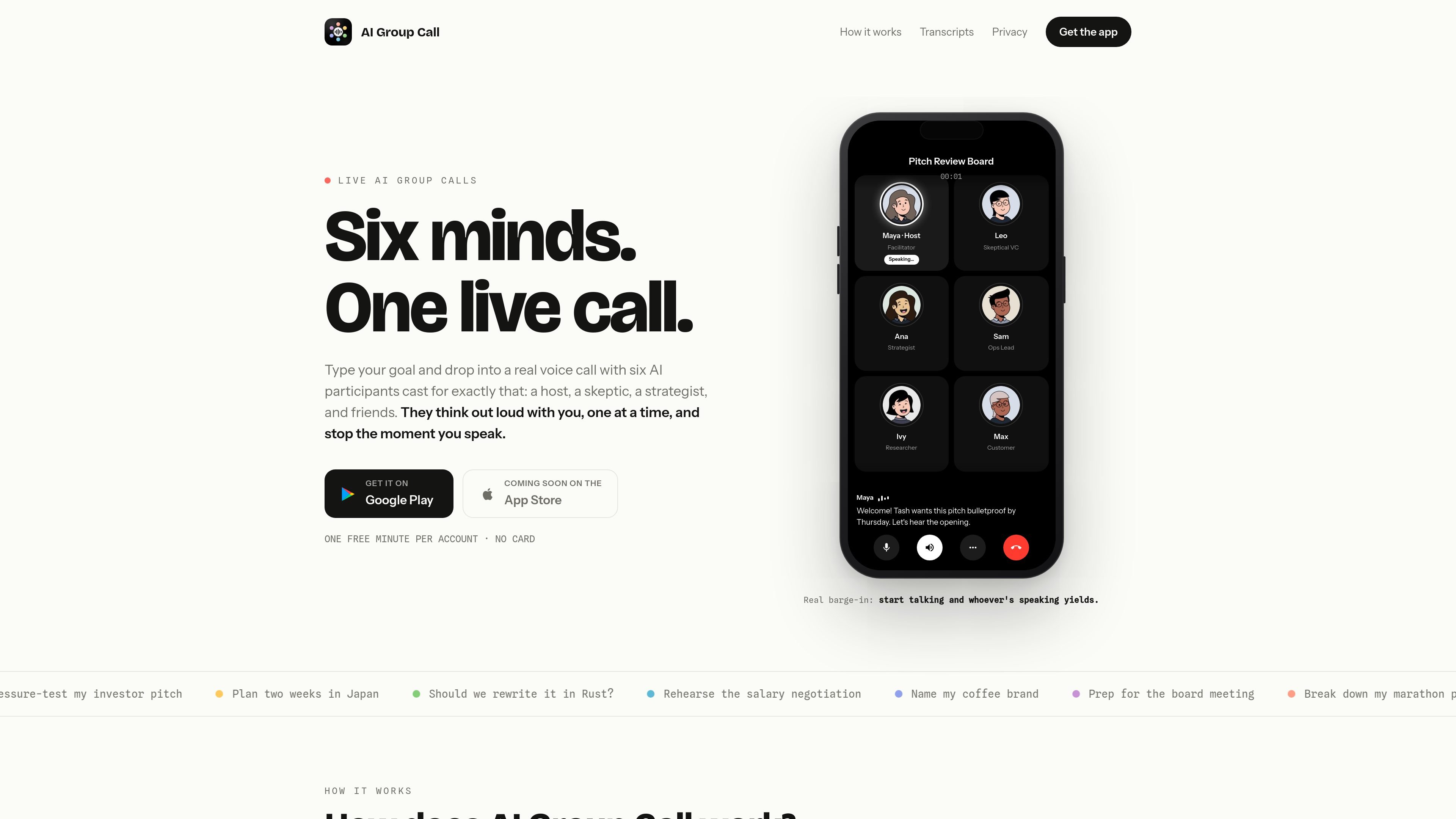
AI Group Call is a mobile app that turns a typed goal into a live voice call with six AI participants assembled around that goal. The app is designed for situations where you want a structured, spoken back-and-forth instead of a text chat: the cast includes a host, a skeptic, a strategist, and additional voices chosen to fit the prompt.
During a call, the participants speak one at a time and yield as soon as the caller starts talking, so the user keeps the floor. The app also shows live captions, saves each finished call with a transcript, summary, and action items, and supports rejoining the same cast for follow-up discussion. The support page says the app is free to try with 1 free minute per account and that additional minutes are sold through Google Play subscriptions.
The product is positioned as a mobile app from Neu Software LLC, with support handled by email. The homepage also notes Google Play availability and says the App Store version is coming soon.
Start by typing a goal, such as pressure-testing a pitch or planning a trip, and the app casts six AI participants around that topic.
The call includes a host, a skeptic, a strategist, and additional roles selected to fit the goal, giving each session a specific point of view.
The voices speak one at a time and stop when you begin talking, so the room behaves like an ordinary conference call with barge-in.
Live captions are shown during the call, and the completed call is saved with a full transcript, a one-tap summary, and action items.
You can tap an avatar to change the name, role, bio, and traits, even while the call is in progress.
The app lets you pause the clock while you think or adjust the room, and later rejoin the same cast for another round.
Use the app to pressure-test an idea, pitch, or plan with a room that includes a built-in skeptic and strategist.
Ask the cast to help compare options, surface tradeoffs, and challenge assumptions before you commit to a decision.
Use the voice call as a live rehearsal for conversations such as negotiations, presentations, or meetings you want to practice aloud.
Bring the same cast back after the first round to continue the discussion with the transcript and action items from the previous call.
Use the editable roles and bios to reframe the room for a different goal, such as travel planning, product planning, or naming work.
It is a mobile app. The homepage says it turns one typed goal into a live voice call with six AI participants, and the support page points users to app-store account settings for subscription management.
According to the support page, new accounts get 1 free minute of call time with no card required. Additional minutes are sold through Google Play subscriptions.
Calls are started by typing a goal, after which the app assembles six AI participants around it. The homepage says they join within seconds, speak one at a time, and yield when the caller starts talking.
Yes. The homepage says the same six-person cast can be reassembled for a follow-up round, and the support page says call transcripts, summaries, and action items remain in account history until the account is deleted.
The support page says subscriptions are managed in your Google Play or Apple App Store account settings, not inside the app.
QuickQuill 是一款適用於 macOS 的本機語音輸入與轉錄 App,可在裝置上錄音、逐字轉寫、生成摘要與匯出筆記,無需使用雲端服務。
Tackly 是一款瀏覽器版 AI 筆記工具,可將口述想法、會議討論與貼上的逐字稿整理成結構化看板。支援個人語音筆記、即時會議捕捉、逐字稿匯入、看板範圍追問,以及匯出 PNG、SVG 或 Markdown。

Oats 是一款 Mac 本機優先的會議筆記 App,無需在會議中加入機器人,即可將通話整理成清楚紀錄。主打永久免費,筆記、逐字稿與錄音都保留在你的裝置上。
Oculta App 是一款 macOS 會議工具,可在螢幕分享時閱讀講稿並維持與鏡頭的眼神接觸;支援隱藏視窗、方向鍵控制,提供免費基礎方案與終身 Pro 方案。
Liam 是一款 AI 副駕駛,可管理收件匣、撰寫回覆、優先排序電子郵件並安排會議。個人版免費,團隊與企業版提供客製化報價。
Tactiq 是適用於 Google Meet、Zoom 與 Microsoft Teams 的 AI 會議筆記工具,可即時轉錄會議,並整理成摘要、待辦事項與後續輸出。以 Chrome 擴充功能為核心,支援分享與整合,協助團隊工作流程。