
Notch-based agent overview
See active Claude Code sessions and their sub-agents in a notch panel, with each session grouped by project and worktrees counted as projects.

AgentValley is a free, open-source macOS app that displays Claude Code sessions and sub-agents in a MacBook’s notch. It helps developers monitor activity, identify agents waiting for input, and review project history without switching between terminal windows.
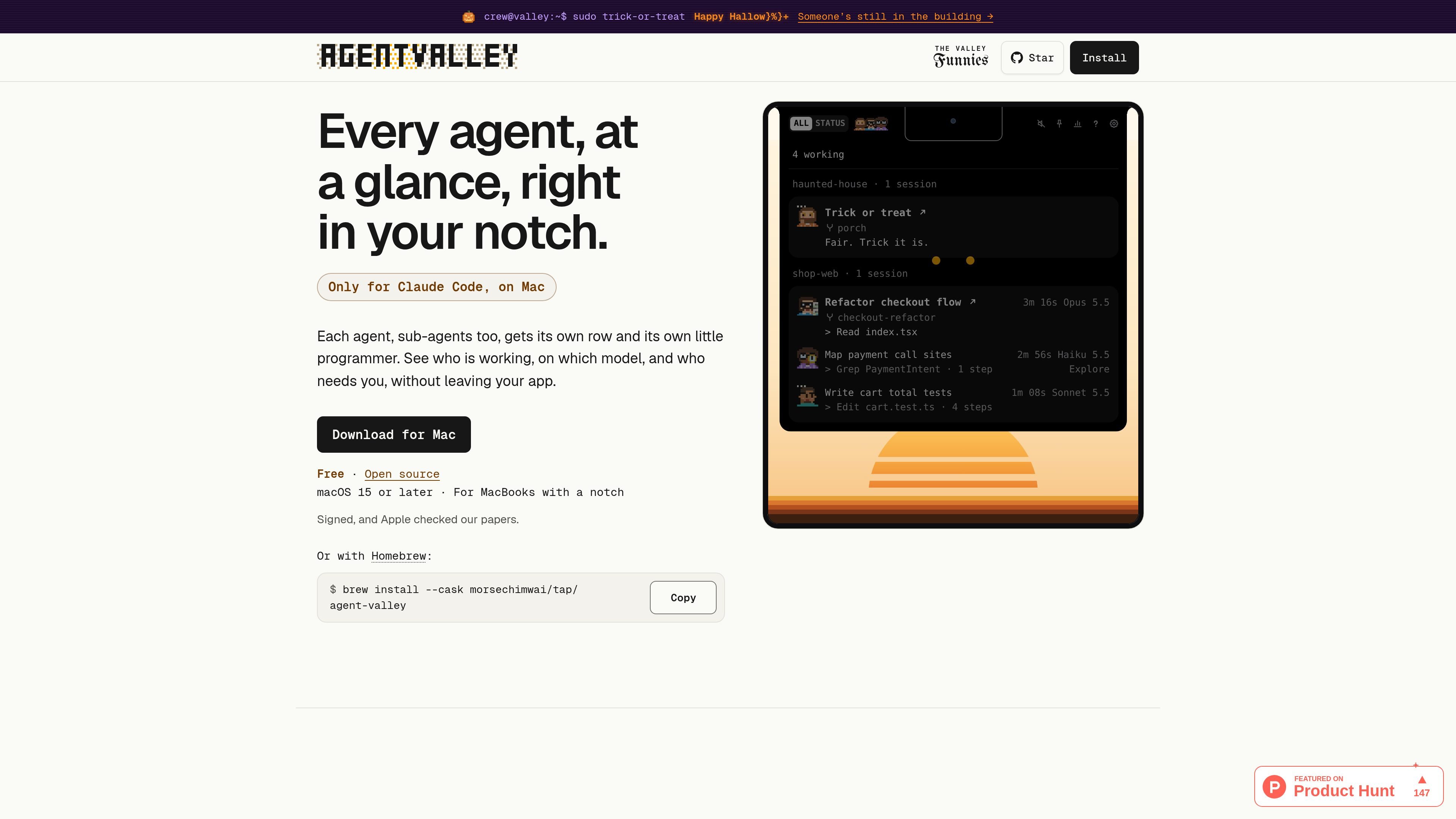
AgentValley is a free, open-source macOS app that places Claude Code activity in a MacBook's notch. It shows active sessions, sub-agents, projects, models, latest steps, and requests that need user attention, so developers can monitor multiple Claude Code terminals without switching between windows.
The app reads the files Claude Code writes while it works, observes its processes, and checks project Git metadata to identify the associated application and branch. It also offers optional controls, history, usage views, sounds, terminal status-line customization, and PDF export. AgentValley is designed specifically for Claude Code on Macs with a notch, rather than as a general-purpose multi-agent dashboard.
See active Claude Code sessions and their sub-agents in a notch panel, with each session grouped by project and worktrees counted as projects.
Review each row's task, model, latest step, and steps completed so far. The app reports when an agent goes quiet instead of inventing progress percentages.
Receive a red notification count when an agent needs an answer or permission, open the request, and optionally jump to the relevant Terminal, iTerm2, or Ghostty tab. Cursor is also listed as a supported terminal environment for the companion font.
Use the optional plugin to bring Allow once and Deny controls to the notch. A second optional hook can wait at the end of a turn while the user is away with a paired phone; approval is always user-selected.
Open day, week, or month views for hours and project sessions, then export a statement-of-work PDF covering all projects or a selected project. The site says this information remains on the Mac.
Optionally show Claude limits and token use, including time until reset and recent usage charts. Plan limits are off until enabled and require the app to read the Claude Code login from Keychain and send it to api.anthropic.com.
Keep several Claude Code sessions visible while working in another application, then inspect the project, model, and latest step from the notch instead of repeatedly changing terminal windows.
Notice when a deployment, shell command, or other agent request is waiting for permission, read the prompt, and jump directly to the relevant terminal tab when more context is needed.
Follow a larger task that delegates work to Explore or other sub-agents by viewing their rows beneath the parent session and checking their individual models and steps.
Review hours and sessions by date or project, then create a PDF statement of work for a project, team, or client based on the recorded activity.
Optionally surface Claude plan limits and token use in the app, while keeping in mind that enabling plan-limit views involves Keychain access and a request to api.anthropic.com.
AgentValley is a free, open-source Mac app for Claude Code. Download the signed macOS app from the website, or install it with Homebrew using `brew install --cask morsechimwai/tap/agent-valley`. It requires macOS 15 or later and a MacBook with a notch.
AgentValley reads the Claude Code files and processes needed to display sessions, sub-agents, projects, branches, models, and latest steps. It can also inspect the project's Git repository to identify the app and branch associated with a session.
The panel shows sessions grouped by project, with sub-agents listed beneath their parent session. Each row can show the task, model, latest step, and steps completed so far; AgentValley does not estimate progress with guessed progress bars.
When Claude Code asks a question or requests permission, a red count appears beside the notch. With the optional plugin installed, users can choose Allow once or Deny from the notch. AgentValley does not answer prompts automatically.
AgentValley offers optional history views for day, week, or month, including hours and project sessions, and can export a statement-of-work PDF for all projects or one project. The site says the usage data is kept on the Mac, even after Claude Code clears its older files.

CreateOS Sandbox is an isolated compute environment for running code and agent workloads inside Firecracker micro-VMs. It is designed for workflows that need machine-level isolation, private networking between sandboxes, and programmatic control through SDK, CLI, or MCP.

GitBot is a local browser-based workspace for creating reusable coding bots powered by Claude Code, Codex, or OpenCode. It helps developers run those agents across repository folders with persistent threads and configurable permissions.

AakarDev AI helps teams manage AI provider access, project-level setups, logs, and analytics from one dashboard. It supports BYOK workflows and lists providers including OpenAI, Google Gemini, Anthropic, Groq, Mistral AI, and Perplexity AI.

Trigger.dev chat agent is a durable AI chat backend for developers building stateful conversations that can survive refreshes, crashes, and long-running turns. It connects with the AI SDK `useChat` flow and runs on managed infrastructure with no timeout on a turn.

ByteAsk is a terminal-first AI coding agent for C and C++ that edits repositories and verifies changes with the real compiler, debugger, sanitizers, and tests before showing a diff. It offers a free tier plus paid plans, with editor connectors and zero-retention handling described in the source.

Epherem is a static security scanner for web apps built with AI coding tools such as Lovable, Bolt, v0, Replit, Cursor, and Claude Code. It checks source files and dependencies for common security mistakes, then provides categorized findings and suggested fixes without running the app.