
URL import and palette-based starting points
Generate a brand kit from a website URL or start from a palette in the playground. The home page shows preset starting points such as Midnight SaaS, Clean Canvas, Forest Calm, and Sunset Bold.

AI Brand Kits generates brand kits from a URL or palette and exports DESIGN.md for AI coding tools such as Cursor and Claude Code. It is aimed at teams that want consistent, token-based brand guidance in code.
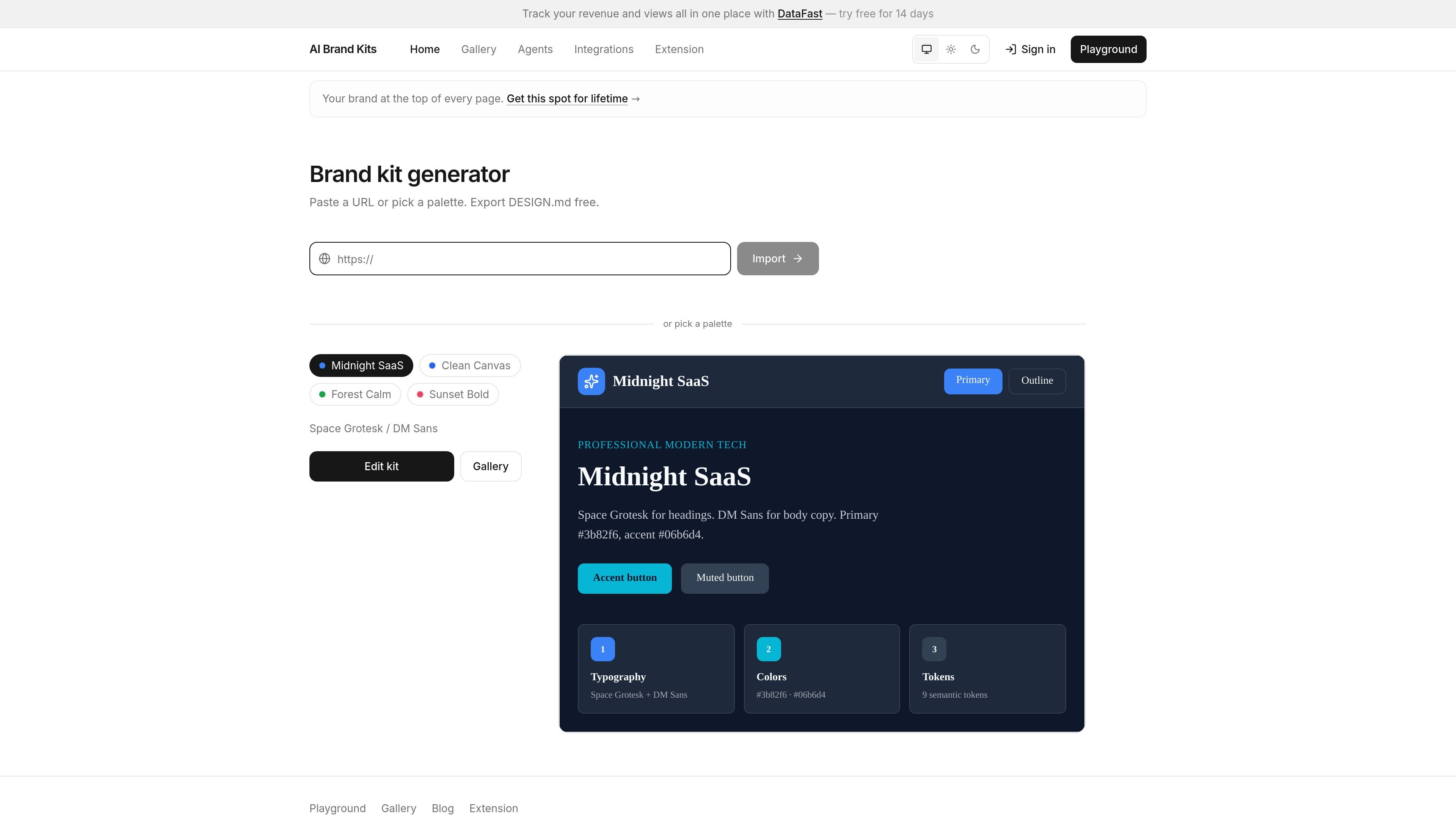
AI Brand Kits is a brand kit generator and export tool for teams that build interfaces with AI coding agents. It lets you start from a website URL or a color palette, extract visual tokens, and turn them into a DESIGN.md file that agents such as Cursor and Claude Code can follow.
The product focuses on making brand decisions machine-readable. Its exports include semantic tokens, font choices, and related agent guidance so the same kit can be used across project files, prompts, and downstream tools like v0 and Lovable.
Generate a brand kit from a website URL or start from a palette in the playground. The home page shows preset starting points such as Midnight SaaS, Clean Canvas, Forest Calm, and Sunset Bold.
Extract semantic tokens such as primary, accent, background, foreground, muted, and border, then refine them in a preview before exporting.
Build exports for AI coding workflows, including DESIGN.md, tokens.json, Tailwind config snippets, CSS variables, and agent rule files.
Create instructions for Cursor and Claude Code so the agent follows named design tokens instead of guessing colors or fonts.
Use the URL importer from any public HTTPS site, or the Chrome extension when you want to extract from an open tab.
Work from the gallery, playground, or catalog JSON to pick kits by industry and feed them into agent prompts or scripts.
Paste a public website URL to extract colors, font families, and a semantic token set, then refine the result before exporting a new kit. This is useful when you want to match an existing brand or study a competitor’s visual system.
Start from one of the preset palettes shown on the home page, adjust typography and color tokens in the playground, and export DESIGN.md for a new product design direction.
Save DESIGN.md in a repo root and point Cursor or Claude Code at it so the agent uses the same fonts, colors, spacing, and component rules during UI work.
Use the gallery, catalog.json, and agent bundles to pull a kit into multiple tools when your workflow spans Cursor, Claude Code, v0, or Lovable.
Use the Chrome extension or open-tab import when you already have a reference page open and want faster extraction than copying a URL by hand.
You can place DESIGN.md in your repository root and reference it in AGENTS.md or your prompt. The product pages say Cursor indexes root-level markdown, and Claude Code indexes project files including markdown in the repository root.
Yes. The site describes DESIGN.md as agent-agnostic, so the same export can be used across Cursor, Claude Code, v0, and Lovable.
The source pages say the free flow includes DESIGN.md download and prompt copy. The full zip export with tokens.json and Tailwind assets is described as part of Pro.
Most public marketing sites work. The URL importer may fail on pages behind login, heavy single-page apps without computed styles, or sites blocked to bots. The site suggests trying the Chrome extension on an open tab in those cases.
You can export and re-export kits as your brand evolves, and the pages note that saved versions can be kept in the dashboard for team access.

ByteAsk is a terminal-first AI coding agent for C and C++ that edits repositories and verifies changes with the real compiler, debugger, sanitizers, and tests before showing a diff. It offers a free tier plus paid plans, with editor connectors and zero-retention handling described in the source.

MeetStream is a meeting bot API for Zoom, Google Meet, Microsoft Teams, and Webex. It helps developers record, stream, and analyze meetings programmatically, with usage-based pricing and a $5 free credit to start.

CreateOS Sandbox is an isolated compute environment for running code and agent workloads inside Firecracker micro-VMs. It is designed for workflows that need machine-level isolation, private networking between sandboxes, and programmatic control through SDK, CLI, or MCP.

GitBot is a local browser-based workspace for creating reusable coding bots powered by Claude Code, Codex, or OpenCode. It helps developers run those agents across repository folders with persistent threads and configurable permissions.

hob is an independent workspace for coding agents that keeps agent sessions, terminals, history, and follow-up work organized around the tools and providers you already use. It is aimed at developers who want local control over routing, history, and workspace structure rather than a bundled model stack.

Grok 4.7 is an xAI model for software development and knowledge work, including extended coding tasks and professional analysis. It is available through Grok Build, Cursor, the Grok API, and other developer platforms, with token pricing starting at $2 per million input tokens and $6 per million output tokens.