
Step-by-step whiteboard tutoring
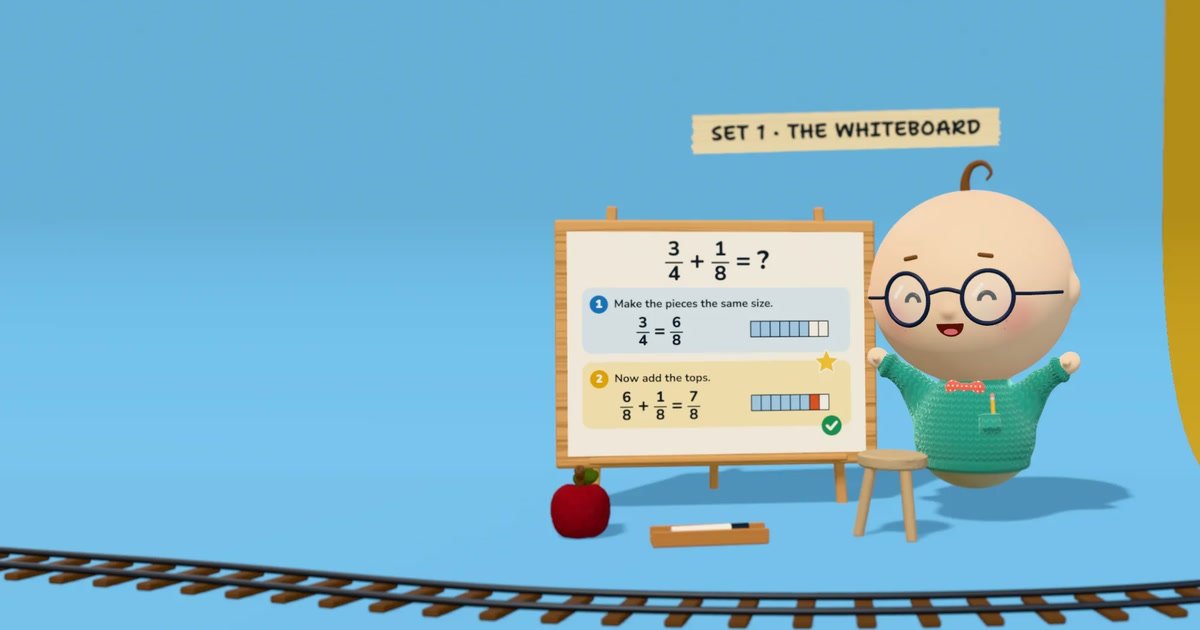
Students and Albie work on the same whiteboard. Albie reads handwritten work, identifies where a step went wrong, and provides a hint instead of completing the problem for the student.

Albie is an AI tutor that works with students on a shared whiteboard, checking each step and offering hints across subjects from early learning through calculus. It supports multimodal lessons, six languages, coding projects, homework, quizzes, and progress views for families and schools.
Albie is an AI tutor for children, teens, and adult learners. It teaches through an interactive shared whiteboard, working through problems one small step at a time rather than only presenting explanations. Students can type, talk, or write; Albie checks their work and uses hints to support independent problem solving.
The product combines tutoring, coursework, assessment, and progress visibility in one workspace. It covers subjects including math, computer science, history, and biology, supports learning from kindergarten through calculus, and lets students request a course on another subject. Families can review lesson activity and assignments, while schools can use teacher and parent views to follow student progress.
Students and Albie work on the same whiteboard. Albie reads handwritten work, identifies where a step went wrong, and provides a hint instead of completing the problem for the student.
Students can type, speak, or write, while Albie responds with speech, board work, quizzes, drawings, graphs, real photos, and short animations when those formats help explain an idea.
Albie teaches computer science, math, history, and biology from kindergarten through calculus. Students can enter another subject for a planned course or ask a standalone question.
Lessons, quizzes, and Albie’s spoken guidance are available in English, Spanish, French, Portuguese, German, and Italian. Students can change language during a lesson.
The built-in coding workspace includes a code editor, files and folders, a terminal, and a browser. Python, JavaScript, SQL, and web pages run in the workspace.
Parents receive a note after each lesson and can see homework, due dates, quizzes, and tests. Teachers can see their students, while parents follow their own children.
A learner can work through math from basic counting to calculus on a shared board, showing each step for Albie to check and explain. Quizzes and tests provide additional practice and assessment.
Students can use the built-in editor, files, terminal, and browser to build and run Python, JavaScript, SQL, or web projects while Albie works alongside them.
Families can use Albie for lessons, homework help, and structured study. Parents receive lesson notes and can review assignments, due dates, quizzes, tests, and progress for their children.
Teachers can monitor enrolled students, while parents follow their own children. Schools and organizations can begin with a pilot class and use shared usage across the school or organization.
A student can switch among six supported languages during a lesson or request a course on a subject outside the listed core areas, allowing the learning path to adapt to their interests.
Albie works through lessons on a shared whiteboard. A student can type, talk, or write with a pen; Albie shows steps, checks the student’s work, and offers hints rather than simply giving the answer.
Albie covers computer science, math, history, and biology, from kindergarten topics through calculus. Students can also enter another subject for Albie to plan a course or ask an individual question.
Albie supports English, Spanish, French, Portuguese, German, and Italian. Students can switch languages during a lesson, while the math remains the same across languages.
Albie includes a real code editor with files, folders, a terminal, and a browser. Python, JavaScript, SQL, and web pages can run in the workspace, with Albie writing and running code alongside the student.
A seven-day free trial is available for the family offering, with billing after the trial and cancellation available at any time. Schools and organizations can start with a pilot class and request a quote for a plan sized to their students.

GameGrad turns PDF study material into quiz questions that appear inside arcade games, so users can practice active recall while they play. It offers a free tier with one PDF and a Pro plan with more uploads, more questions, and answer explanations.

Lingofable is a story-based language learning app that helps learners practice reading at an appropriate level and review new vocabulary in context. It currently supports Spanish, with Android listed as coming soon.

NerdSip is an AI microlearning app that generates custom 7-lesson courses on almost any topic. It supports short, gamified learning sessions on iOS and Android with quizzes, key takeaways, and visual summaries.

BrainBurst is a free quiz platform for IQ practice and UPSC/SSC exam preparation. It offers multiple quiz modes, answer review with explanations, and benchmarked results without requiring registration.

LangPanda is a browser extension for learning languages from streaming video and other supported sites. It combines instant subtitle lookup, flashcard creation, vocabulary tracking, and spaced-repetition review for 36 languages.

recall is an AI flashcard app that turns reading and notes into study cards through Claude, ChatGPT, or another MCP client. It uses one-time lifetime access pricing and spaced repetition review.