
Menu bar weather
The current temperature stays visible in the macOS menu bar, with conditions available from the same compact interface.

Big Weather is a macOS menu bar weather app that shows the current temperature at a glance and presents hourly and multi-day forecasts as an interactive curve. It suits Mac users who want quick weather checks, saved locations, and optional Premium features such as official warnings and on-device AI summaries.
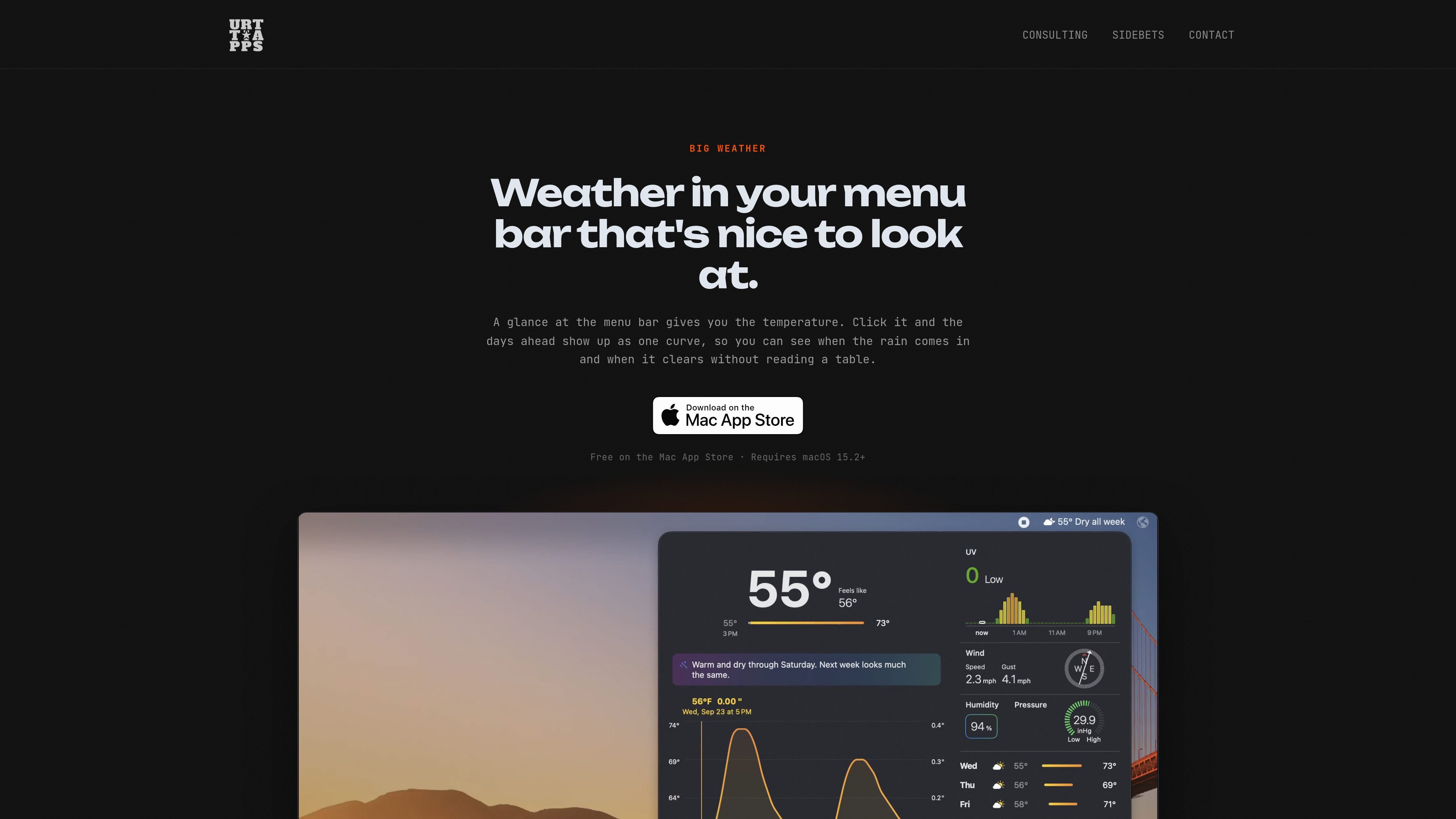
Big Weather is a macOS menu bar weather app from Urtti Apps Oy. It keeps the current temperature in the menu bar and opens a forecast panel with the days ahead represented as a single temperature-and-rain curve, so users can inspect conditions without working through a conventional table.
The app supports current-location forecasts and searches for cities worldwide, with saved places for switching between locations. The free version covers core short-range weather information; Premium expands the forecast horizon and adds features including official warnings, on-device AI summaries on compatible Macs, Apple's weather data, more frequent updates, and Family Sharing.
The current temperature stays visible in the macOS menu bar, with conditions available from the same compact interface.
A curve combines temperature and rain across the next 48 hours in the free version, or up to 10 days with Premium. Move the cursor along it to inspect individual hours.
The panel includes UV, wind, pressure, humidity, and multi-day forecast information; a plain-text layout is available instead of the chart.
Use your current location or search for any city in the world, then save places for quick switching.
Premium can display a short daily forecast statement and a weekly summary. On compatible Macs, Apple Intelligence generates these locally rather than sending the location to an AI service.
Premium displays official warnings word for word for covered locations in the US, Canada, Mexico, and Europe, with markers on affected days.
Keep the current temperature visible while working and open the panel only when you need a more detailed look at the coming hours.
Scrub through the curve to identify when rain or temperature changes occur, without interpreting a dense hourly table.
Save a home location, travel destination, or other frequently checked city and switch between them from the app.
Use the plain-text layout, unit controls, and light or dark appearance to make the forecast easier to read in a preferred format.
With Premium, review official warnings and locally generated AI summaries when deciding how to approach a day or week of weather.
Big Weather is available from the Mac App Store and requires macOS 15.2 or later. It runs in the macOS menu bar and opens its forecast panel when selected.
The app can use your current location or any city in the world. Your location is sent to the weather service to retrieve a forecast; the site says Big Weather does not keep a user profile and has no ads.
The free version shows 48 hours of temperature and rain, a three-day forecast, UV for today and tomorrow, wind, pressure, and humidity. Premium extends the hourly forecast to 10 days and adds AI insights, official weather warnings, Apple's weather data, more frequent updates, and Family Sharing.
AI insights require Premium, macOS 27, and a Mac with Apple Intelligence. Apple Intelligence writes the summaries on the Mac; other Macs receive the regular summary instead.
Premium can be used across your Macs with Family Sharing. The site does not describe team workspaces or business collaboration features.

MacSpoof ist ein MAC-Adressenwechsler für macOS: WLAN-MAC ändern oder randomisieren, um Verbindungen zu erneuern und die Protokollierung auf öffentlichem WLAN zu reduzieren.

DemoTV is an audience-ranked station for discovering and comparing independent product demos. Founders can submit videos, embed approved demos on their websites, collect viewer inquiries and optionally commission demo production or labelled promotion without buying ranking.

Ship It: Idle Dev Tycoon is an iPhone incremental simulation game about building apps, managing a software studio, and selling it for lasting progression benefits. It supports offline play, automated builds, adviser collection, and optional in-app purchases.

NomNak ist eine kostenlose Restaurant-Discovery-App für iPhone, mit der du Orte über Empfehlungen von Freunden statt über anonyme Bewertungen findest.

CAPTA is a mobile GPS waypoint app for quickly saving, organizing, and revisiting locations. It supports offline use, camera-based coordinate capture, optional cross-device synchronization, and GPX export for fishermen, explorers, and field professionals.

Ctrl+Shift+3 is a calm, text-first community platform with a chronological feed, profiles, RSS, and private groups called Clicks. It is built for reading, posting, and joining smaller communities without algorithmic ranking or vanity counts.