
At-a-glance session status
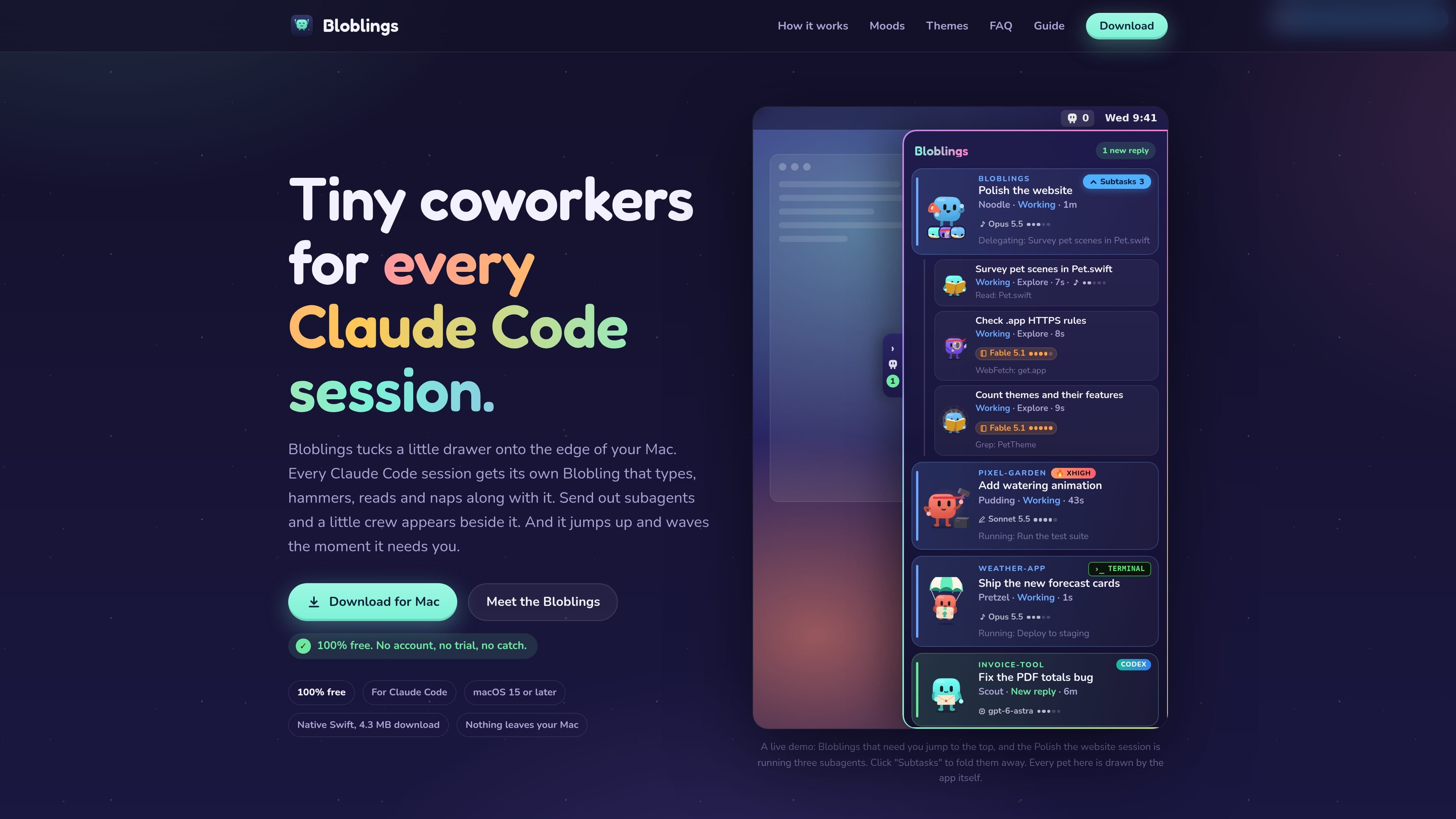
A drawer on the edge of the Mac screen shows each session as a named animated pet and indicates whether it is working, finished, waiting for input, asking a question, or proposing a plan.

Bloblings is a Mac app that gives each Claude Code, Codex, or terminal coding session a visual pet showing its current state. Users can click a pet to reopen the right thread and project, monitor subagents, and pass short notes between sessions locally.
Bloblings is a Mac app that places one small animated pet beside each coding-agent session. It is designed for people who run multiple Claude Code, Codex, or terminal sessions and need a visual way to see which threads are active, finished, or waiting for their attention.
The app helps users return to the correct conversation instead of searching through many project windows or accidentally typing into the wrong thread. Clicking a pet opens its session in the relevant coding app or terminal, while local hooks and status files provide the activity information shown in the drawer.
A drawer on the edge of the Mac screen shows each session as a named animated pet and indicates whether it is working, finished, waiting for input, asking a question, or proposing a plan.
Click a pet to jump to its corresponding Claude, Codex, or terminal thread in the correct project. Option-Command-P points to the session that has waited longest.
Claude Code sessions can expose active helper agents beneath the parent pet, including each helper's task, type, current activity, and model indicator. Helpers can be expanded or collapsed, and their count can be adjusted from a pet's context menu.
Short notes can move between threads as local files. Users can choose automatic delivery, click-to-deliver, or disabled passing; notes are limited in size and automatic delivery is capped between thread pairs.
Team templates can create a group of role-based threads in a selected folder. A leader can call a user-triggered huddle for teammate reports, and long-running threads can be handed over to a fresh archived workflow.
Claude Code activity is represented by animations for tools such as editing, reading, shell work, web access, and subagent handoffs. The app records a short activity hint locally rather than the full command.
When several projects have active Claude Code threads, use the drawer to see which sessions need approval, input, or a plan decision, then click directly into the waiting thread.
Use the session list to distinguish a Claude thread, a Codex chat, and a terminal workflow, then open the matching conversation in its original environment and project folder.
Inspect the parent pet's Subtasks list to see what helper agents are doing, which model they use, and when they finish, without opening each helper separately.
Create role-based teammate threads for a larger task, pass short notes between them, and request a huddle when you want the team leader to summarize progress before continuing.
Bloblings is a Mac app for Claude Code sessions. It connects to Claude Code through the app and can also display other agents when they use Bloblings' local command-line interface and status files.
It supports Claude Code sessions in the Code tab of the Claude desktop app and Claude Code terminal sessions. The site also shows Codex and terminal workflows; iTerm2 is specifically mentioned as working for terminal use. Other agents can connect if they run on the Mac and follow the documented local CLI setup.
For Claude Code, Bloblings adds a small hook. The hook records limited activity information locally, including the tool used and a short hint such as a filename or Claude's description of a command; it does not record the command itself. The site says the hook takes about 10 milliseconds and does not slow Claude down.
Clicking a Blobling opens the corresponding thread in the Claude app, Codex, or terminal, in the relevant project. A keyboard shortcut, Option-Command-P, points to the session that has been waiting longest.
Bloblings passes short notes between threads as local files. Notes can be passed automatically, on the user's click, or not at all. Automatic passing is limited to up to 40 notes per hour between any two threads, after which notes wait for user action.

ByteAsk is a terminal-first AI coding agent for C and C++ that edits repositories and verifies changes with the real compiler, debugger, sanitizers, and tests before showing a diff. It offers a free tier plus paid plans, with editor connectors and zero-retention handling described in the source.

Epherem is a static security scanner for web apps built with AI coding tools such as Lovable, Bolt, v0, Replit, Cursor, and Claude Code. It checks source files and dependencies for common security mistakes, then provides categorized findings and suggested fixes without running the app.

CreateOS Sandbox is an isolated compute environment for running code and agent workloads inside Firecracker micro-VMs. It is designed for workflows that need machine-level isolation, private networking between sandboxes, and programmatic control through SDK, CLI, or MCP.

GitBot is a local browser-based workspace for creating reusable coding bots powered by Claude Code, Codex, or OpenCode. It helps developers run those agents across repository folders with persistent threads and configurable permissions.

hob is an independent workspace for coding agents that keeps agent sessions, terminals, history, and follow-up work organized around the tools and providers you already use. It is aimed at developers who want local control over routing, history, and workspace structure rather than a bundled model stack.

Ably Chat is a chat API platform for building custom realtime chat applications. It supports room-based messaging, typing indicators, presence, reactions, and message updates, with usage-based pricing options for different deployment stages.