
Plain-Markdown agent instructions
Write the agent’s job in Markdown instead of filling out a rigid workflow builder. The product presents this as a way to create specialized agents for sales, support, growth, engineering, and other repeatable work.

Cronloop is a platform for running AI agents on recurring schedules. It lets you define the job in plain Markdown, run agents with Codex or Claude Code, and monitor each run live from the app or via ChatGPT and Claude.
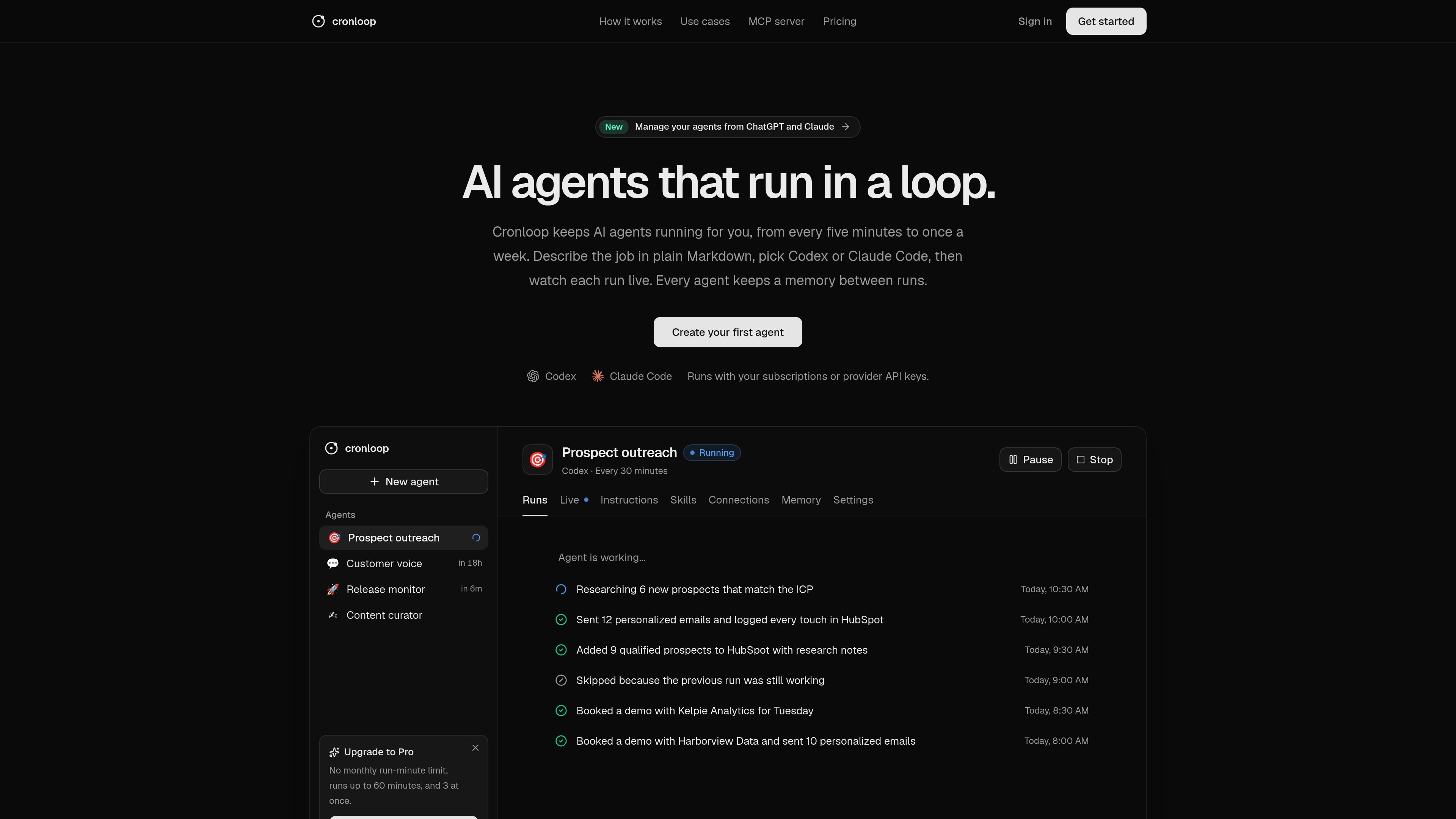
Cronloop is a platform for running AI agents on a schedule. Instead of asking an agent to do a one-off task, you describe a recurring job in plain Markdown, choose Codex or Claude Code, and let it keep running in a loop.
The product is built for work that repeats over time: prospect outreach, support triage, content updates, issue handling, and similar operational tasks. Cronloop shows each run live, keeps a memory between runs, and can be used directly in the Cronloop app or through a hosted MCP server connected to ChatGPT or Claude.
Write the agent’s job in Markdown instead of filling out a rigid workflow builder. The product presents this as a way to create specialized agents for sales, support, growth, engineering, and other repeatable work.
Choose between Codex and Claude Code for the agent runtime. Cronloop says it works with your existing subscriptions or with provider API keys.
Schedule runs from every five minutes to once a week. The site also shows examples such as every 30 minutes, every hour, and every morning.
Each agent keeps a memory between runs, and the MCP tools expose read, write, and delete actions for that durable memory.
Watch each run live and review the recent history afterward. The dashboard examples show in-progress status, skipped runs, completed work, and timestamps for past runs.
Connect agents to common tools through a broad catalog and through a hosted MCP server. The source lists apps and systems such as Gmail, HubSpot, Notion, GitHub, Zendesk, Google Calendar, and many others.
Set an agent to find new prospects on a schedule, enrich them, send outreach, and log results to tools like HubSpot. The home page shows a prospect-outreach agent running every 30 minutes.
Use an agent to read new support tickets, reply from help docs, and escalate sensitive cases to a human. The MCP page gives this as a concrete example for Zendesk and similar support workflows.
Have an agent review fresh performance data, draft content updates, and publish changes to a CMS on a recurring cadence. The home page frames this as a way to grow organic traffic with scheduled updates.
Pick up assigned engineering issues, write fixes and tests, and open pull requests on a schedule. The source positions this as a recurring automation for development work tied to systems like GitHub and issue trackers.
Ask an assistant connected through MCP to create agents, pause runs, review failures, or update memory without opening the dashboard. This fits teams that already work inside ChatGPT or Claude.
Cronloop is designed to run recurring AI agents on a schedule. The source shows schedules from every five minutes up to once a week, with individual examples such as every 30 minutes or every morning.
The product lets you describe the job in plain Markdown, then choose Codex or Claude Code as the agent runtime. Runs execute in a fresh sandbox and can be watched live as they progress.
Cronloop’s MCP server lets you connect Cronloop to ChatGPT, Claude, or any MCP client that supports remote servers. The connection uses OAuth sign-in, so there is no key to copy into the client.
Yes. The source says every agent keeps memory between runs, and the MCP tools include reading, writing, and clearing that durable memory.
The public source does not describe a full pricing page or all plan details. It does show a Free plan and a Pro plan, plus the note that Cronloop works with provider subscriptions or API keys.

CreateOS Sandbox is an isolated compute environment for running code and agent workloads inside Firecracker micro-VMs. It is designed for workflows that need machine-level isolation, private networking between sandboxes, and programmatic control through SDK, CLI, or MCP.

ByteAsk is a terminal-first AI coding agent for C and C++ that edits repositories and verifies changes with the real compiler, debugger, sanitizers, and tests before showing a diff. It offers a free tier plus paid plans, with editor connectors and zero-retention handling described in the source.

Liam is an AI copilot for managing inboxes, writing replies, prioritizing email, and scheduling meetings. It is offered free for individuals, with custom pricing for teams and enterprise.

Codex Plugins bundle reusable skills, app integrations, and MCP servers into workflows you can install in the Codex app or use from Codex CLI. They help extend Codex with connected-service tasks, reusable instructions, and shared team workflows.

hob is an independent workspace for coding agents that keeps agent sessions, terminals, history, and follow-up work organized around the tools and providers you already use. It is aimed at developers who want local control over routing, history, and workspace structure rather than a bundled model stack.

Gemma AI is a phone call reminder app that calls you with scheduled reminders instead of push notifications. It helps people who want a more direct way to stay on schedule, with Google Calendar sync and conversational call interactions.