
Desktop ticker placement
Place the slim ticker at the top or bottom of a display and choose which monitor it uses in a multi-monitor setup. It remains above the Dock or below the menu bar while other windows stay usable.

FeedsBar is a native macOS news ticker that displays curated or user-selected headlines in a slim desktop strip. It suits Mac users who want background awareness of news and specialist sources without pop-up interruptions or a subscription.
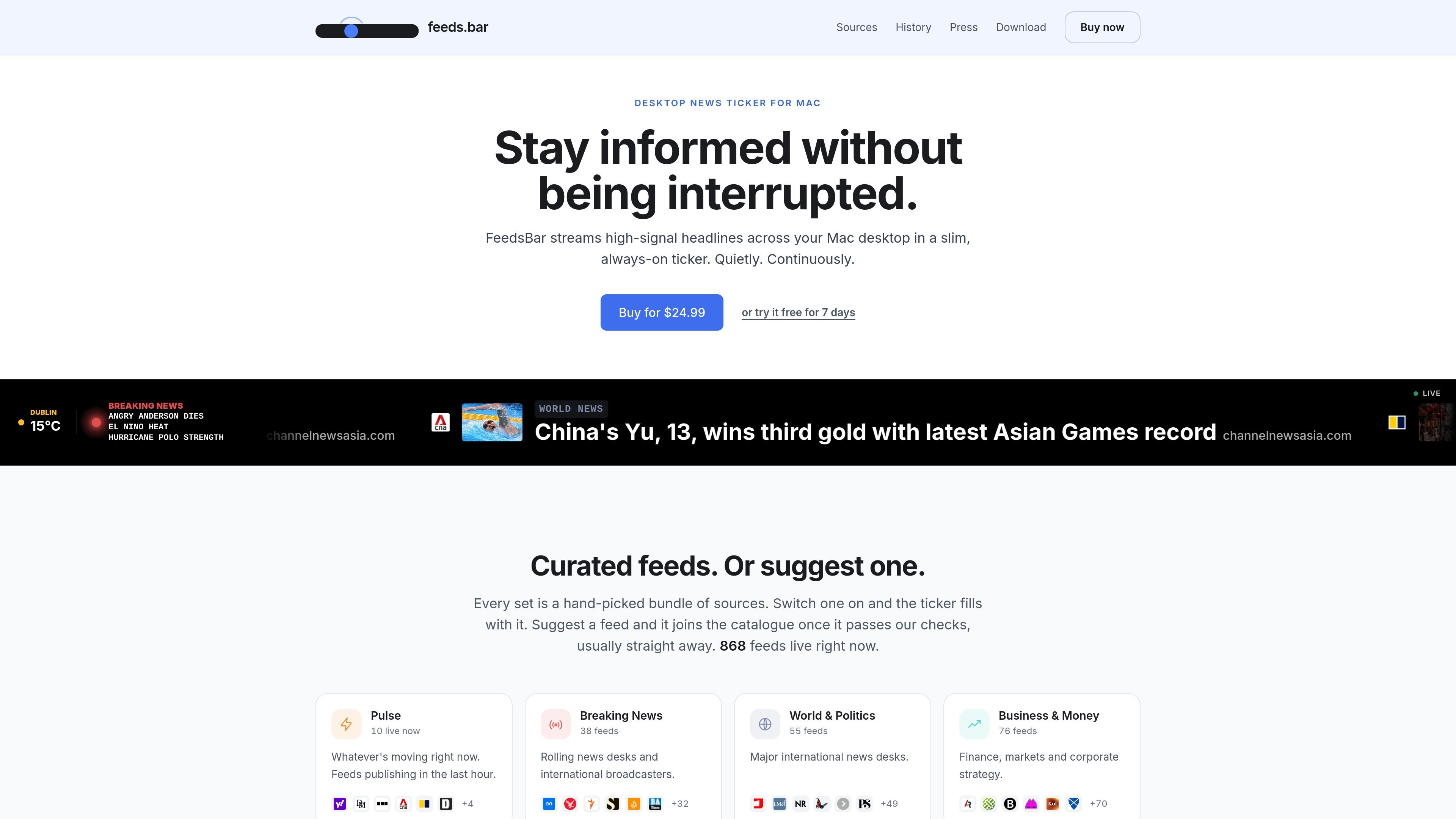
FeedsBar is a native macOS news ticker that continuously presents selected headlines in a narrow strip on the desktop. Users can choose curated topic bundles or add their own RSS feeds, YouTube channels, and subreddits, then glance at the ticker without opening a news site or dealing with pop-up notifications.
The app also offers topic-focused Smart Orbs, a full-screen board for larger displays, and optional music-aware feed changes. It is designed for background use: feeds refresh periodically, the last fetched items remain visible during a connection loss, and users can open a story only when they want more detail.
Place the slim ticker at the top or bottom of a display and choose which monitor it uses in a multi-monitor setup. It remains above the Dock or below the menu bar while other windows stay usable.
Start with curated sets covering areas such as world news, business, technology, science, culture, and sport, or add RSS feeds, YouTube channels, and subreddits by URL.
FeedsBar groups source items into topics and reduces them to short phrases. Selecting a phrase opens the article, while selecting the orb focuses the ticker on that topic’s sources.
Open the same feeds as a full-screen board for a spare monitor, office display, or idle Mac. Cards change one at a time rather than all at once.
The music features can retune the ticker to the artist announced by a music player. An optional room-listening mode uses macOS microphone permission and performs music identification on the Mac.
The app refreshes feeds in the background, keeps the last fetched headlines available offline, and avoids reporting which headlines users read or click. The supplied product copy also states that there is no tracking.
Keep a narrow ticker at the edge of the screen while writing, coding, or working in other apps. Headlines remain available for quick checks without interrupting the active window.
Use curated bundles for world news, business, technology, science, culture, or sport when you want a ready-made starting point instead of assembling sources individually.
Paste URLs for specialist RSS feeds, YouTube channels, or subreddits to build a more personal stream around a niche interest or professional subject.
Run the full-screen board on a spare monitor, office display, or a Mac used as a screensaver so headlines can be read from farther away.
Turn on music-aware behavior to receive related press, videos, gigs, similar artists, or podcasts as the currently playing artist changes.
FeedsBar is a native macOS app for Apple Silicon and Intel Macs. The download page identifies the current release and its minimum macOS requirement; that requirement is not specified in the supplied page text.
Download the app, move it to the Applications folder, and open it. New users can start a seven-day trial from the first screen without a card or account. A purchased licence key arrives by email and is entered once per Mac.
Yes. You can add an RSS feed, YouTube channel, or subreddit by pasting its URL. FeedsBar also provides curated topic feeds and lets users suggest sources for inclusion in the shared catalogue.
The ticker keeps displaying the last headlines it fetched when the connection drops, so the content may become stale until the connection returns. Feed refreshes happen in the background rather than continuously.
No. FeedsBar is sold as a one-time purchase for $24.99, with a seven-day trial and a full refund available within 14 days of purchase. The licence does not expire and there is no recurring charge.

MacSpoof ist ein MAC-Adressenwechsler für macOS: WLAN-MAC ändern oder randomisieren, um Verbindungen zu erneuern und die Protokollierung auf öffentlichem WLAN zu reduzieren.

DemoTV is an audience-ranked station for discovering and comparing independent product demos. Founders can submit videos, embed approved demos on their websites, collect viewer inquiries and optionally commission demo production or labelled promotion without buying ranking.

Ship It: Idle Dev Tycoon is an iPhone incremental simulation game about building apps, managing a software studio, and selling it for lasting progression benefits. It supports offline play, automated builds, adviser collection, and optional in-app purchases.

NomNak ist eine kostenlose Restaurant-Discovery-App für iPhone, mit der du Orte über Empfehlungen von Freunden statt über anonyme Bewertungen findest.

CAPTA is a mobile GPS waypoint app for quickly saving, organizing, and revisiting locations. It supports offline use, camera-based coordinate capture, optional cross-device synchronization, and GPX export for fishermen, explorers, and field professionals.

Ctrl+Shift+3 is a calm, text-first community platform with a chronological feed, profiles, RSS, and private groups called Clicks. It is built for reading, posting, and joining smaller communities without algorithmic ranking or vanity counts.