
Per-type default handling
Make FileRouter the default handler for selected file types such as Markdown or Plain Text, or claim custom types after adding them in Settings.

FileRouter is a macOS menu bar app that acts as a default handler for selected file types and routes them to the right editor or utility. It supports per-type defaults, ordered rules, custom file types, and an x-filerouter URL scheme for scripted launches.
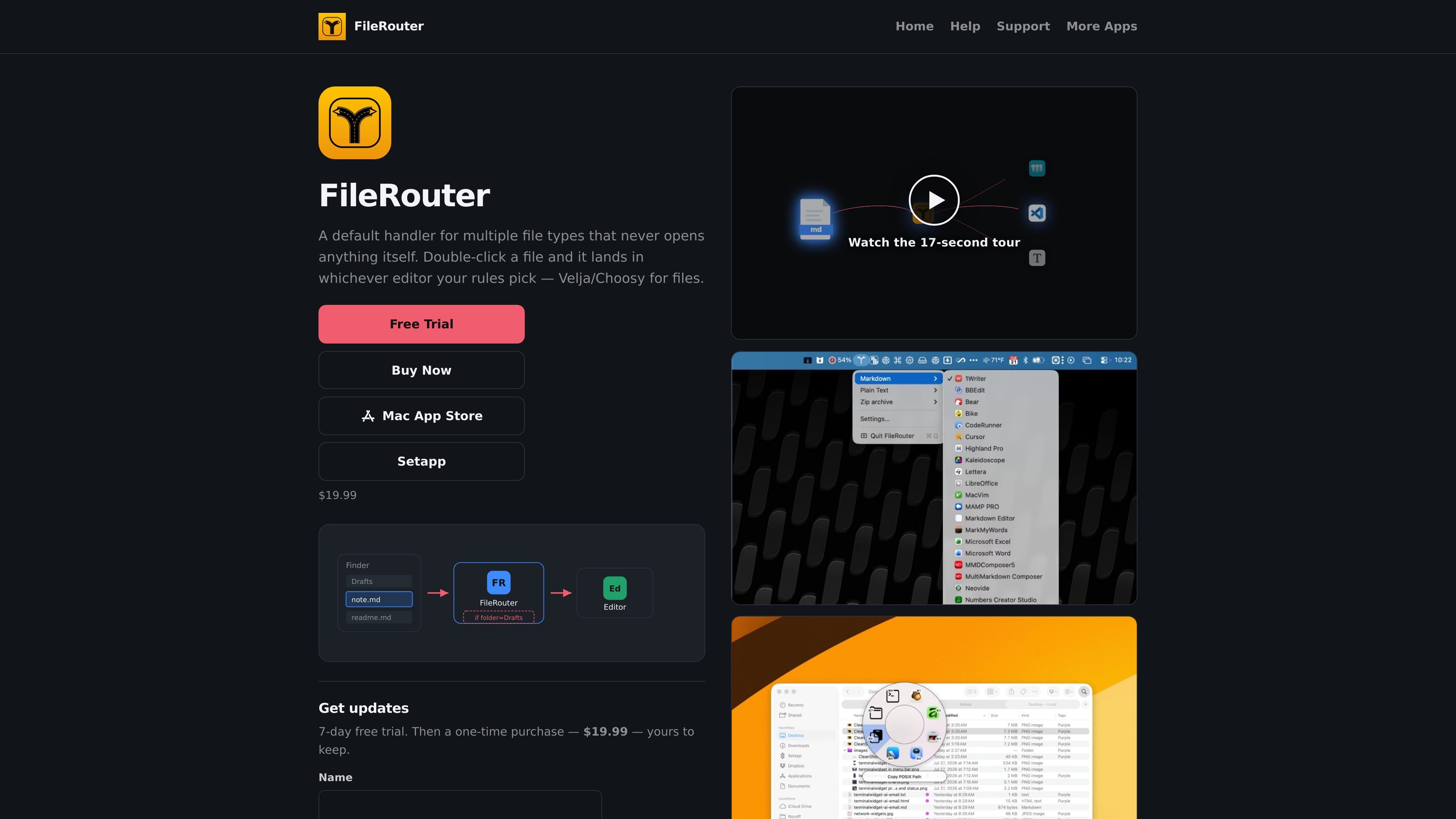
FileRouter is a Mac menu bar app that routes double-clicked files to the right editor instead of opening them directly. It acts as a default handler for selected file types, then applies your rules to decide which editor or utility should handle the file.
The help docs describe support for route-level editor defaults, ordered rules, built-in picker utilities, custom file types, and a custom x-filerouter URL scheme. That combination makes it useful when you want files to land in different apps based on type, folder, filename, or other conditions.
Make FileRouter the default handler for selected file types such as Markdown or Plain Text, or claim custom types after adding them in Settings.
Assign editors per route in Settings → Editors, where discovered apps can be curated, enabled, or added manually with Add App….
Define ordered rules with conditions such as file name, extension, parent folder, creator app metadata, and whether enabled editors are running.
Expose picker actions that do not open an editor, including Copy POSIX Path, Reveal in Finder, Open Parent in Terminal, Shortcuts, Services, and AppleScripts.
Open files through the x-filerouter URL scheme from Terminal, scripts, Shortcuts, or other apps, with support for a named rule parameter.
Add custom file types from unrouted files or drag-and-drop, and merge overlapping types when a route already exists.
Route Markdown, Plain Text, or other assigned file types to a preferred editor automatically when you double-click them in Finder.
Use folder, filename, extension, or creator-app conditions to send specific files to different editors or a fallback default rule.
Trigger FileRouter from Terminal, scripts, Shortcuts, or any app that can open URLs when you want an explicit file handoff.
Use picker utilities to copy a POSIX path, reveal a file in Finder, or open its parent folder in Terminal instead of editing it.
Teach FileRouter a new file type by dropping an unrouted file on it or adding a type in Settings, then assign a route and editor.
FileRouter is configured from its menu bar and Settings. The help docs say you install it into /Applications, then use each route’s submenu to make FileRouter the default handler for that file type.
Yes. FileRouter lets you set a default editor per route, and it also supports a permanent Default Rule. The menu bar and the Rules tab stay linked, so changing one updates the other.
The help docs list built-in utilities for Copy POSIX Path, Reveal in Finder, and Open Parent in Terminal, plus support for Shortcuts, Services, and AppleScripts in the picker or status menu.
FileRouter is a Mac menu bar app. The privacy policy says routing happens locally on your Mac and there is no FileRouter account system or cloud sync for routing rules.
It can. The help docs say FileRouter registers the x-filerouter URL scheme, which you can use from Terminal, scripts, Shortcuts, or any app that can open URLs.

ArtDeck is a visual reference board app for iPhone, iPad, and Mac that lets artists collect mixed reference material on one canvas and study it with ToolBox lenses. It works offline, supports optional iCloud sync, and is sold as a one-time purchase with no account required.

Goldfish is an AI memory app for macOS that helps you reply, write, summarize, and continue using the context already on your Mac. It stores memory locally and writes in your tone.

Biji ist eine vielseitige Plattform, die entwickelt wurde, um die Produktivität durch innovative Werkzeuge und Funktionen zu steigern.

Malyatko is a baby tracker for logging feeding, sleep, growth, teething, and milestones in one app. It works on iPhone, Apple Watch, and widgets, with no sign-up, offline use, and family sharing through iCloud.

Codex Plugins bundle reusable skills, app integrations, and MCP servers into workflows you can install in the Codex app or use from Codex CLI. They help extend Codex with connected-service tasks, reusable instructions, and shared team workflows.

MacSpoof ist ein MAC-Adressenwechsler für macOS: WLAN-MAC ändern oder randomisieren, um Verbindungen zu erneuern und die Protokollierung auf öffentlichem WLAN zu reduzieren.