
Mach RAM treemap
Shows physical memory use as a proportional treemap, helping users see which processes and multi-process application stacks occupy RAM.

MacSentinel is a native Swift macOS system monitor and app cleaner for Apple Silicon M1–M4 and Intel Macs. It helps users inspect CPU, RAM, storage, and network activity, then review application leftovers and caches before cleanup.
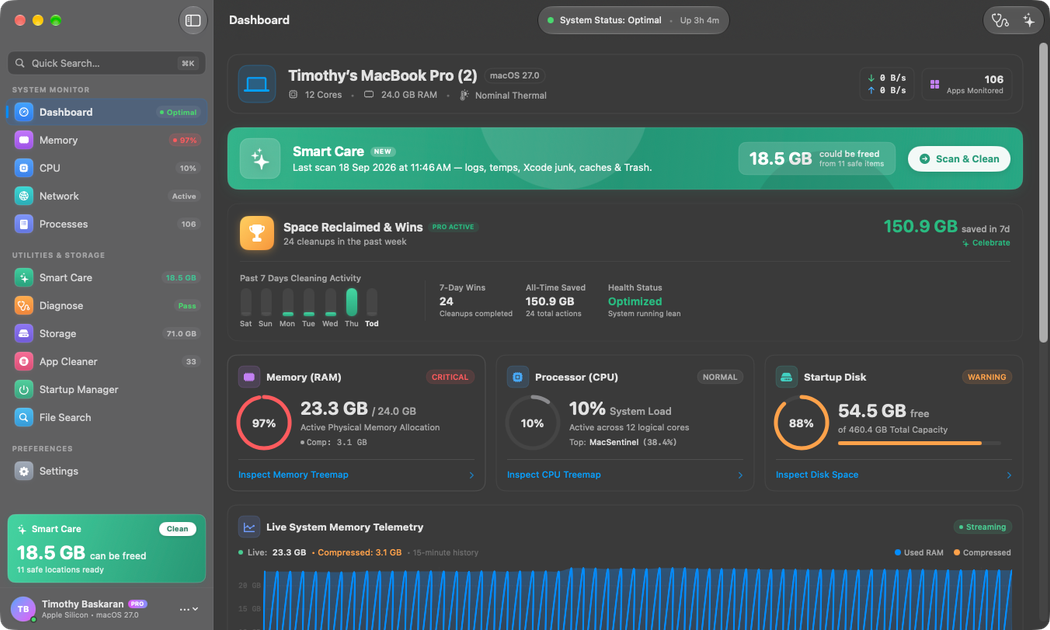
MacSentinel is a native Swift system monitor and app-cleaning utility for macOS. It combines live RAM treemaps, per-core CPU telemetry, storage visualization, and per-application network monitoring in a universal binary for Apple Silicon and Intel Macs.
Its cleanup tools focus on reviewing data that commonly remains after applications are removed or projects are completed, including Application Support files, caches, containers, plists, render scratch, proxy folders, and other recorded app data. Users can inspect paths and sizes before cleanup; the download page also describes a Trash-first workflow for verified cache and scratch data. MacSentinel runs on demand rather than as a background service.
Shows physical memory use as a proportional treemap, helping users see which processes and multi-process application stacks occupy RAM.
Displays per-core CPU telemetry, including separate Apple Silicon Performance and Efficiency core activity and microsecond execution deltas.
Maps directory hierarchies into storage treemaps and helps review leftover Application Support files, caches, containers, and plists in ~/Library.
Reports per-application incoming and outgoing network traffic without requiring background daemons, making active transfer sources easier to inspect.
Scans caches, scratch disks, proxy folders, and other app data across more than 500 apps in 50 categories, with search, paths, and byte counts in the preview.
Runs as a native Swift utility without analytics SDKs, launch agents, telemetry pings, kernel extensions, or extra helper apps.
Inspect physical RAM allocation across demanding applications and multi-process stacks instead of relying only on a flat process list. Per-core telemetry can help investigate short CPU bursts and uneven Performance/Efficiency core activity.
Map internal storage and review orphaned Application Support files, caches, containers, and plists left behind after applications are deleted, while checking each proposed item before cleanup.
Locate render caches, scratch disks, optical-flow data, proxy files, and waveform-related folders from video-editing applications. Smart Care provides searchable matches, paths, and sizes for a more targeted review.
Check which applications or processes are transferring data by viewing incoming and outgoing network throughput per application, without installing a background monitoring daemon.
MacSentinel is a native Swift macOS system monitor and app-cleanup utility. It combines live CPU, memory, storage, and network views with tools for reviewing leftover application data.
The download page lists macOS 14 Sonoma or newer. The same universal binary supports Apple Silicon M1, M2, M3, and M4 Macs as well as Intel 64-bit Macs.
Download the universal DMG, open it, and drag MacSentinel into the Applications folder. Then launch it from Spotlight or Launchpad; macOS verifies its Developer ID signature when the disk image is mounted.
The free workflow provides scans and itemized previews. Pro adds unlimited cleanup, advanced diagnostics, and lifetime updates; the download page lists Pro at $29.
MacSentinel does not use analytics SDKs, launch agents, telemetry pings, background services, kernel extensions, or extra helper apps according to the download page. Cleanup previews items before deletion, and Deep Clean sends verified cache and scratch data to the macOS Trash first.

PromptScout tracks how ChatGPT, Gemini, Google AI Overviews, and Perplexity mention your brand or competitors, then pairs those results with source analysis and website audits. It helps teams decide what to fix in content, positioning, or site readiness next.

Sleek Analytics is a privacy-friendly web analytics tool with real-time visitor tracking, Core Web Vitals, and revenue attribution. It helps site owners understand traffic and conversions without cookie banners or a heavy setup.

MacSpoof ist ein MAC-Adressenwechsler für macOS: WLAN-MAC ändern oder randomisieren, um Verbindungen zu erneuern und die Protokollierung auf öffentlichem WLAN zu reduzieren.

ClawTick is an AI agent automation platform for scheduling jobs from the CLI, dashboard, or REST API. It is aimed at developers and teams running LangChain, CrewAI, webhook, or custom agent workflows that need monitoring, alerts, and logs.

OpenFlags is an open-source, self-hosted feature flag platform for modern JavaScript teams. It supports local evaluation, targeted rollouts, and controlled launches while keeping flag data in your own infrastructure.

SecAIQ Watch is a local, read-only dashboard for monitoring AI assistants, coding agents, local models, and MCP servers on macOS, Linux, and Windows. It shows network activity, permissions, findings, file access, and token usage without sending observations to a cloud service.