
Reading-focused typesetting
Uses a hand-built AppKit typesetting engine with CJK line-height, punctuation compression, and mixed-script spacing adjustments.

MuM is a macOS reading-first Markdown application with native AppKit typesetting, project navigation, multi-format document reading, and PNG/PDF export. Its CLI adds windowless rendering and structured JSON output for automated document workflows.
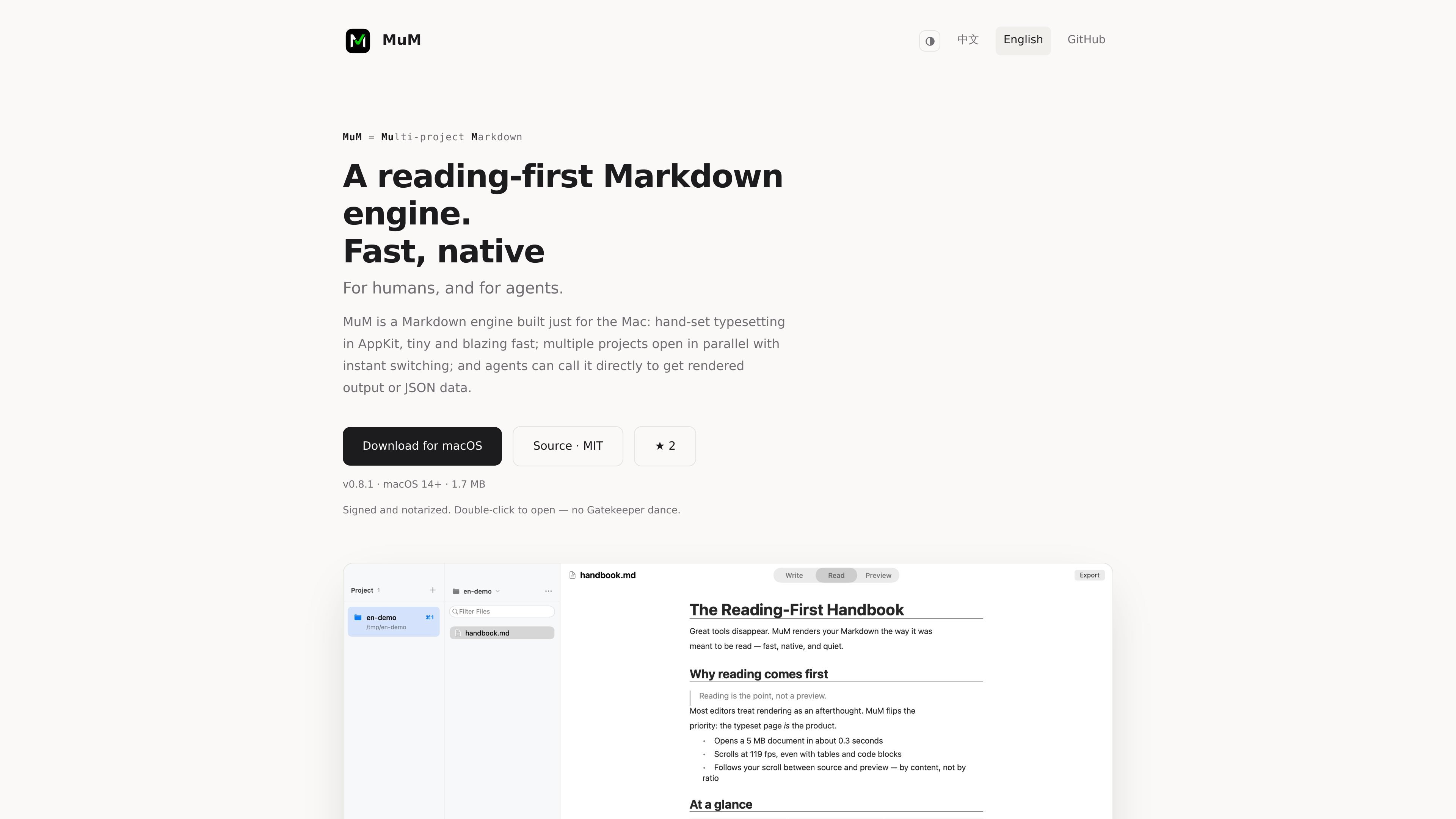
MuM is a macOS reading-first Markdown application built with AppKit. Its main purpose is to present Markdown and related documents in a typeset reading environment rather than a browser-based view, with particular attention to CJK text, code, and mixed-script content.
Alongside the graphical app, MuM includes a command-line workflow for rendering and document analysis. The CLI can produce PNG or PDF output and return structured JSON from outline, search, and check commands, making the same typesetting and inspection capabilities usable in automated workflows.
Uses a hand-built AppKit typesetting engine with CJK line-height, punctuation compression, and mixed-script spacing adjustments.
Keeps multiple projects open for quick switching, remembers reading position, and provides find, outline, and reading-history commands.
Fuzzy-finds files by name and searches names and contents across every project, with streaming search results.
Exports the current document to a tall PNG or paged PDF; document page-break hints become actual page breaks.
Opens Markdown, code, CSV/TSV tables, RTF, images, PDF, and SRT/VTT subtitles; Office files link to the default app instead of rendering them in MuM.
Provides windowless CLI rendering to PNG/PDF plus outline, search, and check commands that return stable JSON and classified exit codes.
Open a Markdown repository as a project, keep several projects available, and use outline, fuzzy file finding, and cross-project search to move through documentation.
Use the native reader for documents containing Chinese, Japanese, Korean, or mixed-script text where line height, punctuation spacing, and script mixing affect readability.
Export a document as a tall PNG for a continuous visual artifact or as a paged PDF when page boundaries and in-document break hints matter.
Run rendering or analysis from scripts and let downstream tools consume PNG/PDF files, JSON results, and exit codes instead of parsing human-oriented prose.
Open a single Markdown file without adding its containing folder to the project list, then use the simplified reading view for focused, file-by-file review.
MuM is a macOS reading-first Markdown application with a hand-built AppKit typesetting engine. It also provides CLI commands for rendering and document analysis.
The graphical app can open Markdown and also reads code, CSV/TSV tables, RTF, images, PDF, and subtitle files in SRT/VTT formats. Office files receive a page directing users to the default application.
Yes. The CLI can render a Markdown document directly to PNG or PDF. The site also documents outline, search, and check commands that emit stable JSON with classified exit codes.
The app can export the current document as a tall PNG or paged PDF. Page-break hints in the document are converted into page breaks in the exported output.
The site describes a no-account, no-telemetry product and does not publish pricing information on the available pricing URL. Platform and system requirements beyond the macOS/AppKit implication are not specified.

MacSpoof ist ein MAC-Adressenwechsler für macOS: WLAN-MAC ändern oder randomisieren, um Verbindungen zu erneuern und die Protokollierung auf öffentlichem WLAN zu reduzieren.

DemoTV is an audience-ranked station for discovering and comparing independent product demos. Founders can submit videos, embed approved demos on their websites, collect viewer inquiries and optionally commission demo production or labelled promotion without buying ranking.

Ship It: Idle Dev Tycoon is an iPhone incremental simulation game about building apps, managing a software studio, and selling it for lasting progression benefits. It supports offline play, automated builds, adviser collection, and optional in-app purchases.

NomNak ist eine kostenlose Restaurant-Discovery-App für iPhone, mit der du Orte über Empfehlungen von Freunden statt über anonyme Bewertungen findest.

CAPTA is a mobile GPS waypoint app for quickly saving, organizing, and revisiting locations. It supports offline use, camera-based coordinate capture, optional cross-device synchronization, and GPX export for fishermen, explorers, and field professionals.

Ctrl+Shift+3 is a calm, text-first community platform with a chronological feed, profiles, RSS, and private groups called Clicks. It is built for reading, posting, and joining smaller communities without algorithmic ranking or vanity counts.