
Notch-based player
The compact player sits in the MacBook notch and expands into a full player on hover or click, keeping playback controls close without taking over the screen.

Notch Radio is a native macOS internet radio player that places live station playback in the MacBook notch or menu bar. It helps Mac users discover, save, and listen to community-listed stations, with live track titles and album artwork when broadcasters provide the relevant metadata.
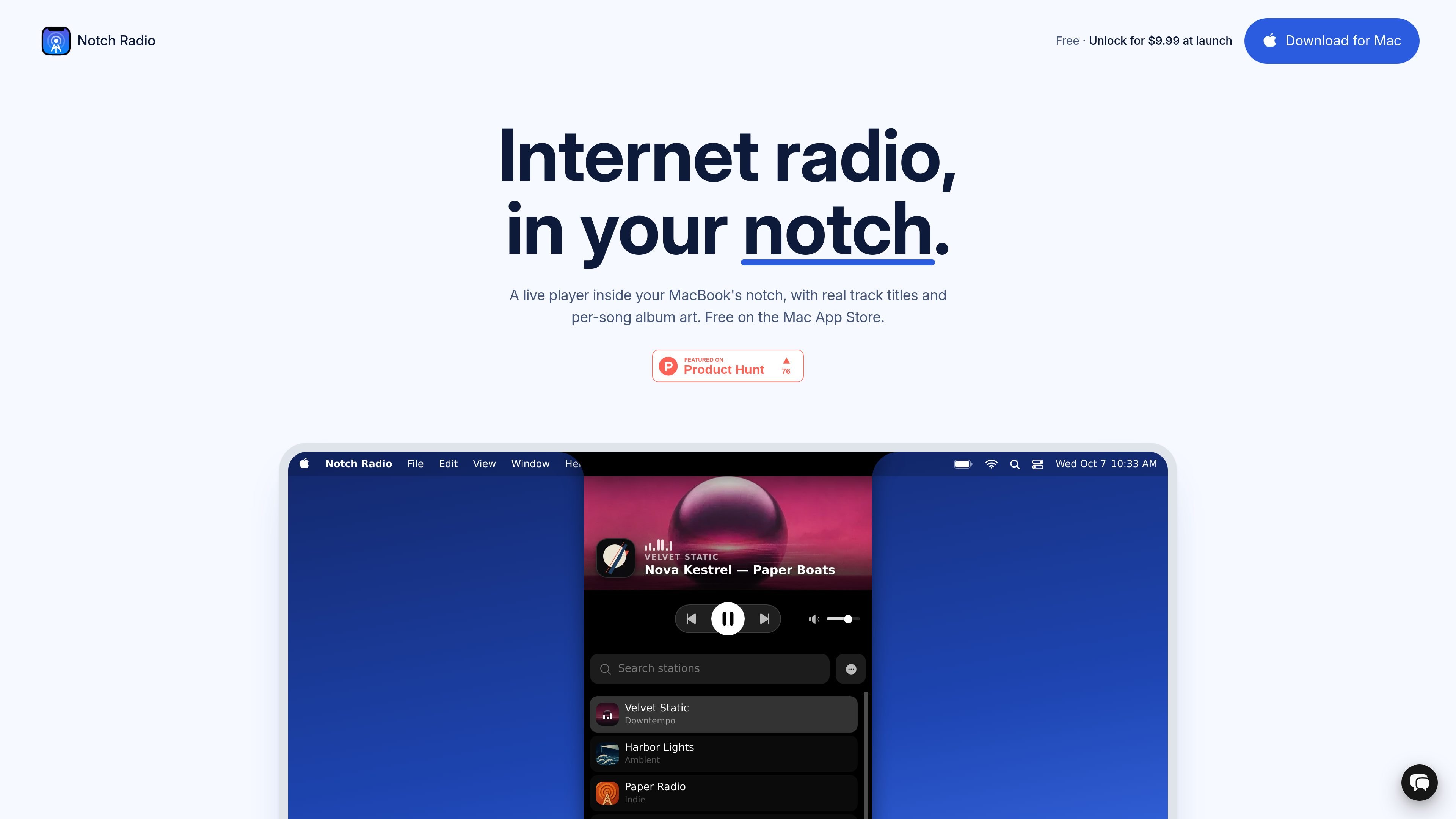
Notch Radio is a native macOS internet radio player designed to live in a MacBook's notch. It connects to live station streams, shows the current station and available track metadata, and provides playback controls in a compact interface rather than a separate traditional player window.
The app uses the Radio Browser community directory for station discovery, while audio plays directly from the broadcaster's stream. Users can search by name, genre, or country, save stations to a personal library, and add an HTTPS stream URL when a station is not listed. It also works on Macs without a physical notch through a drawn notch interface or a menu bar mode.
The compact player sits in the MacBook notch and expands into a full player on hover or click, keeping playback controls close without taking over the screen.
View live track titles and per-song album artwork in the full player when the station supplies usable metadata; artwork is fetched to match the current song.
Search the Radio Browser community directory by station name or genre, including genre-based results, then save stations to a personal library.
Use keyboard media keys and macOS Now Playing controls for playback without returning to the app window.
Move the player to the menu bar, pin it to a selected display, or use a drawn notch on Macs without a physical notch.
Add stations outside the directory with a manually entered HTTPS stream URL and filter directory results by country.
Keep a station playing while working in other Mac apps, using the notch or menu bar for quick access and keyboard media keys for basic playback control.
Search by genre or country to find ambient, focus, jazz, electronic, and other internet radio stations, then keep selected stations in a personal library.
Use the compact player on a MacBook with a physical notch, or switch to the drawn-notch and menu bar modes on another Mac or an external display.
Add a preferred broadcaster directly when it is not indexed in Radio Browser, provided the station exposes an HTTPS stream URL.
Notch Radio requires macOS 14 Sonoma or later and runs on any Mac, including both Macs with and without a physical notch. On Macs without a notch, it can draw its own notch-shaped player or use the menu bar.
By default, the player sits in the Mac's notch and expands when hovered or clicked. You can switch it to a menu bar icon in Settings → Appearance, and on multi-display setups pin it to a specific display.
Search the Radio Browser community directory in Settings → Stations, or add a station manually with an HTTPS stream URL. Plain HTTP stream URLs are not supported.
Station availability and metadata depend on the broadcaster. Stations may go offline, move, or change URLs, and track titles are missing when a station does not broadcast them. In that case, Notch Radio shows the station name.
The free tier has no time limit or account requirement. It keeps up to five stations and allows directory playback while there is room to save. A 14-day in-app trial enables the paid features; after it ends, saved stations continue to play, while live track titles, per-song artwork, and some player options are disabled until unlocking.

MacSpoof ist ein MAC-Adressenwechsler für macOS: WLAN-MAC ändern oder randomisieren, um Verbindungen zu erneuern und die Protokollierung auf öffentlichem WLAN zu reduzieren.

DemoTV is an audience-ranked station for discovering and comparing independent product demos. Founders can submit videos, embed approved demos on their websites, collect viewer inquiries and optionally commission demo production or labelled promotion without buying ranking.

Ship It: Idle Dev Tycoon is an iPhone incremental simulation game about building apps, managing a software studio, and selling it for lasting progression benefits. It supports offline play, automated builds, adviser collection, and optional in-app purchases.

NomNak ist eine kostenlose Restaurant-Discovery-App für iPhone, mit der du Orte über Empfehlungen von Freunden statt über anonyme Bewertungen findest.

CAPTA is a mobile GPS waypoint app for quickly saving, organizing, and revisiting locations. It supports offline use, camera-based coordinate capture, optional cross-device synchronization, and GPX export for fishermen, explorers, and field professionals.

Ctrl+Shift+3 is a calm, text-first community platform with a chronological feed, profiles, RSS, and private groups called Clicks. It is built for reading, posting, and joining smaller communities without algorithmic ranking or vanity counts.