
Connect to live API responses
Paste an endpoint URL, add headers or auth when needed, and preview the JSON response directly in the plugin before binding anything to the canvas.

Paint By JSON is a Figma plugin that binds layers to live REST or JSON endpoints, helping designers test layouts with real data instead of placeholder text. It supports reusable palettes, import-time transforms, and export formats for handoff.
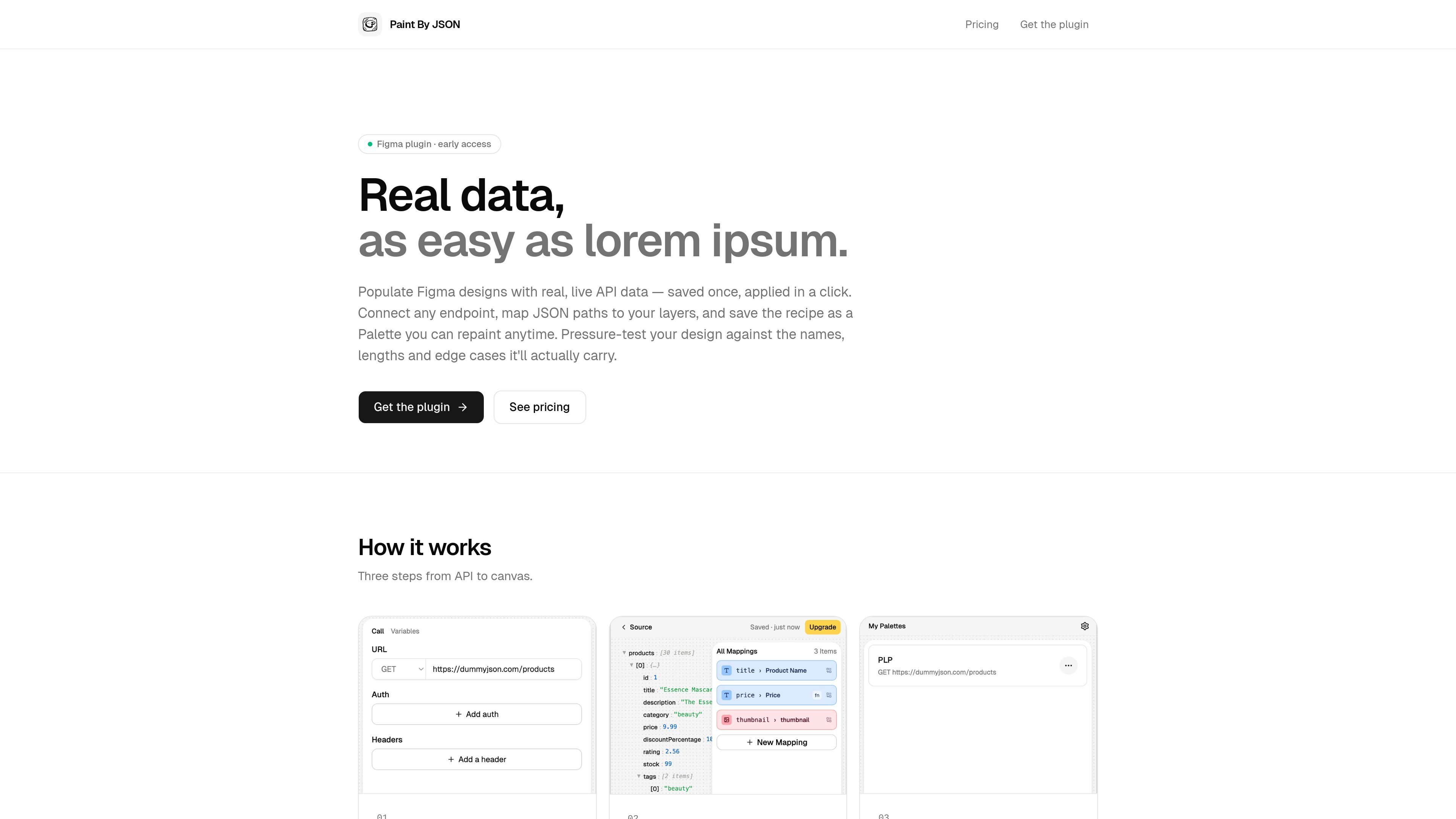
Paint By JSON is a Figma plugin for binding design layers to real API data instead of placeholder text. It lets you connect an endpoint, map JSON paths to layer names, save that mapping as a Palette, and apply it to a frame when you want to populate a design with live or mocked response data.
The product is aimed at designers who need to test layouts against the data their product actually returns. The site emphasizes using live REST endpoints or other GET-able JSON sources, previewing the response in-plugin, and reusing the same Palette across files and devices through cloud sync on paid plans.
Paste an endpoint URL, add headers or auth when needed, and preview the JSON response directly in the plugin before binding anything to the canvas.
Bind JSON paths to layer names so the same palette can be applied to different frames without rewiring each layer by hand.
Store the endpoint, headers, and mappings as a Palette, then reuse it on other frames or share it across files.
Apply text and value transforms such as truncation, currency formatting, date parsing, and if/then/else branching before data lands in Figma.
Fill a single frame from one response or iterate an array into repeated component instances for collection-style layouts.
Export populated content as JSON, Markdown, or a Spec Frame to support handoff between design and engineering.
Designers can populate mockups with live response data to see whether labels, dates, and long values still fit in the layout.
Teams can keep a reusable Palette for a common endpoint and apply it to multiple frames without rebuilding the mapping each time.
When a design needs repeated cards or list items, the plugin can map an array onto repeated component instances instead of filling only one frame.
During handoff, designers can export the populated state as JSON, Markdown, or a Spec Frame so engineering gets the data context alongside the design.
If raw API values need cleanup, users can truncate text, format currency, parse dates, or branch values before they reach the canvas.
Paint By JSON is a Figma plugin that connects a frame to a REST endpoint, maps JSON paths to layer names, and saves the setup as a reusable Palette.
It supports any endpoint you can GET, including live API responses and mocked JSON. The source also says you can add headers or auth when needed, but it does not provide a full list of authentication methods.
Export options listed on the site are JSON, Markdown, and a Spec Frame on the canvas for handoff.
The pricing page shows a Free plan for personal use and a Pro plan for designers shipping against real data daily. The site says Pro adds larger palette limits, all transforms, exports for handoff, and priority support.
The site says palettes can be reused on any frame and shared across files, and that palettes stay portable across team libraries and refactors when layers are targeted by name.

imgcook is a design-to-code tool that converts design drafts into front-end code. It supports plugin-based and developer workflows for Sketch, Photoshop, VS Code, and CLI usage.

ByteAsk is a terminal-first AI coding agent for C and C++ that edits repositories and verifies changes with the real compiler, debugger, sanitizers, and tests before showing a diff. It offers a free tier plus paid plans, with editor connectors and zero-retention handling described in the source.

CreateOS Sandbox is an isolated compute environment for running code and agent workloads inside Firecracker micro-VMs. It is designed for workflows that need machine-level isolation, private networking between sandboxes, and programmatic control through SDK, CLI, or MCP.

hob is an independent workspace for coding agents that keeps agent sessions, terminals, history, and follow-up work organized around the tools and providers you already use. It is aimed at developers who want local control over routing, history, and workspace structure rather than a bundled model stack.

Ably Chat is a chat API platform for building custom realtime chat applications. It supports room-based messaging, typing indicators, presence, reactions, and message updates, with usage-based pricing options for different deployment stages.

Manta AI is an autonomous web app testing tool for teams that want to map application behavior, catch regressions, and generate tests without writing scripts or maintaining selectors. It works from a URL and supports plain-English test flows, run results with screenshots, and scheduled or deployment-triggered checks.