
Real-time network path view
See the path from your Mac through the router and ISP with real-time telemetry for connection points, bandwidth, latency, and status.

PeakHour 6 is a macOS network bandwidth and connection monitor that visualizes the path from your Mac through the router and ISP. It helps users investigate intermittent connectivity, track bandwidth and latency over time, and monitor multiple network targets from the menu bar.
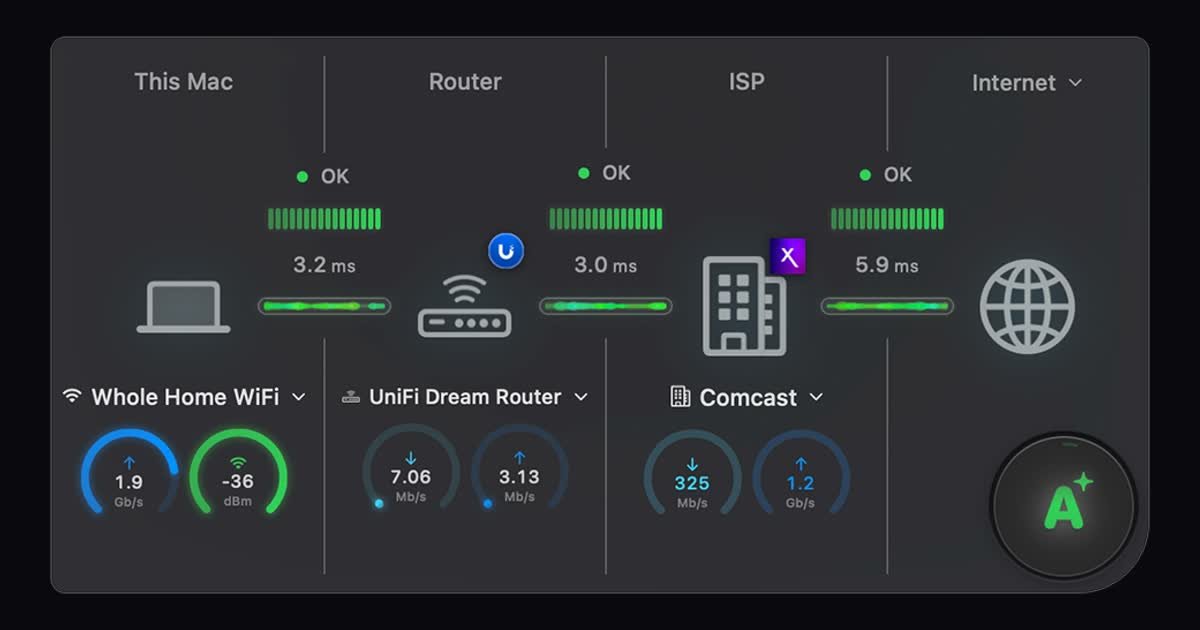
PeakHour 6 is a network bandwidth and connection monitor for macOS. It provides a real-time view of the network path from a Mac to its router, ISP, and beyond, combining bandwidth, latency, connection status, and local Wi-Fi information in one desktop app.
The app is designed for diagnosing intermittent connectivity, observing local and internet-facing network behavior, and tracking changes over time. It runs in the menu bar, supports multiple monitoring targets, and uses lightweight probes and periodic SNMP or UPnP queries rather than routing network traffic through the app.
See the path from your Mac through the router and ISP with real-time telemetry for connection points, bandwidth, latency, and status.
An on-device advisor assigns a letter grade to the connection and explains detected issues in plain language.
View Wi-Fi signal strength, transmit rate, channel information, Ethernet link speed, and other local network details.
Run speed tests with traditional measurements and RPM Responsiveness scores, then review longer-term bandwidth and latency history charts.
Keep current bandwidth, latency, and connection status in the macOS menu bar, with alerts when the connection drops and recovers.
Monitor routers, remote servers, ISP gateways, and other supported targets through SNMP, UPnP, or the Mac's network interface, with configurable polling and alert settings.
Use the network-path view, latency telemetry, and outage notifications to identify whether an intermittent problem appears between the Mac, router, ISP, or a more distant connection point.
Watch multiple devices or gateways at once to compare local and remote conditions when checking a router, firewall, remote server, or more than one ISP connection.
Review bandwidth and latency history, speed-test results, and RPM Responsiveness scores to understand recurring congestion or changes that a one-time speed test may miss.
Keep a compact status view in the menu bar and receive alerts when a connection drops or returns, without opening a full monitoring window for every check.
Use Wi-Fi signal, channel, transmit-rate, and local link information alongside the AI-generated connection explanation when narrowing down a wireless or local-network issue.
PeakHour 6 can monitor bandwidth through SNMP on most routers, UPnP on compatible routers, or by reading the Mac’s network interface directly. Its setup wizard recommends the appropriate option for the configuration.
No. The app uses lightweight ICMP pings and periodic SNMP or UPnP queries. The site states that this typically consumes less than 1 KB/s of bandwidth.
Yes. You can monitor multiple targets at the same time, including a router, a remote server, and multiple ISP gateways.
PeakHour 6 requires macOS 14.6 Sonoma or later and runs natively on both Apple Silicon and Intel Macs as a Universal Binary.
Download PeakHour 6 from the Mac App Store and open it; the trial starts automatically without signup. After the trial ends, the app displays its purchase screen. Purchases are billed through Apple, and existing purchases can be restored with the same Apple ID.

PromptScout tracks how ChatGPT, Gemini, Google AI Overviews, and Perplexity mention your brand or competitors, then pairs those results with source analysis and website audits. It helps teams decide what to fix in content, positioning, or site readiness next.

Sleek Analytics is a privacy-friendly web analytics tool with real-time visitor tracking, Core Web Vitals, and revenue attribution. It helps site owners understand traffic and conversions without cookie banners or a heavy setup.

MacSpoof ist ein MAC-Adressenwechsler für macOS: WLAN-MAC ändern oder randomisieren, um Verbindungen zu erneuern und die Protokollierung auf öffentlichem WLAN zu reduzieren.

ClawTick is an AI agent automation platform for scheduling jobs from the CLI, dashboard, or REST API. It is aimed at developers and teams running LangChain, CrewAI, webhook, or custom agent workflows that need monitoring, alerts, and logs.

OpenFlags is an open-source, self-hosted feature flag platform for modern JavaScript teams. It supports local evaluation, targeted rollouts, and controlled launches while keeping flag data in your own infrastructure.

SecAIQ Watch is a local, read-only dashboard for monitoring AI assistants, coding agents, local models, and MCP servers on macOS, Linux, and Windows. It shows network activity, permissions, findings, file access, and token usage without sending observations to a cloud service.