
Six-dimension compliance scan
Runs a single crawl across accessibility, security, privacy, deceptive design, technical quality, and SEO, producing one composite score and a shared remediation queue.

Sitejar scans public websites across accessibility, security, privacy, deceptive design, technical quality, and SEO. It gives website owners and developers cited findings, reviewable source-level fix proposals, compliance exports, and API access for engineering workflows.
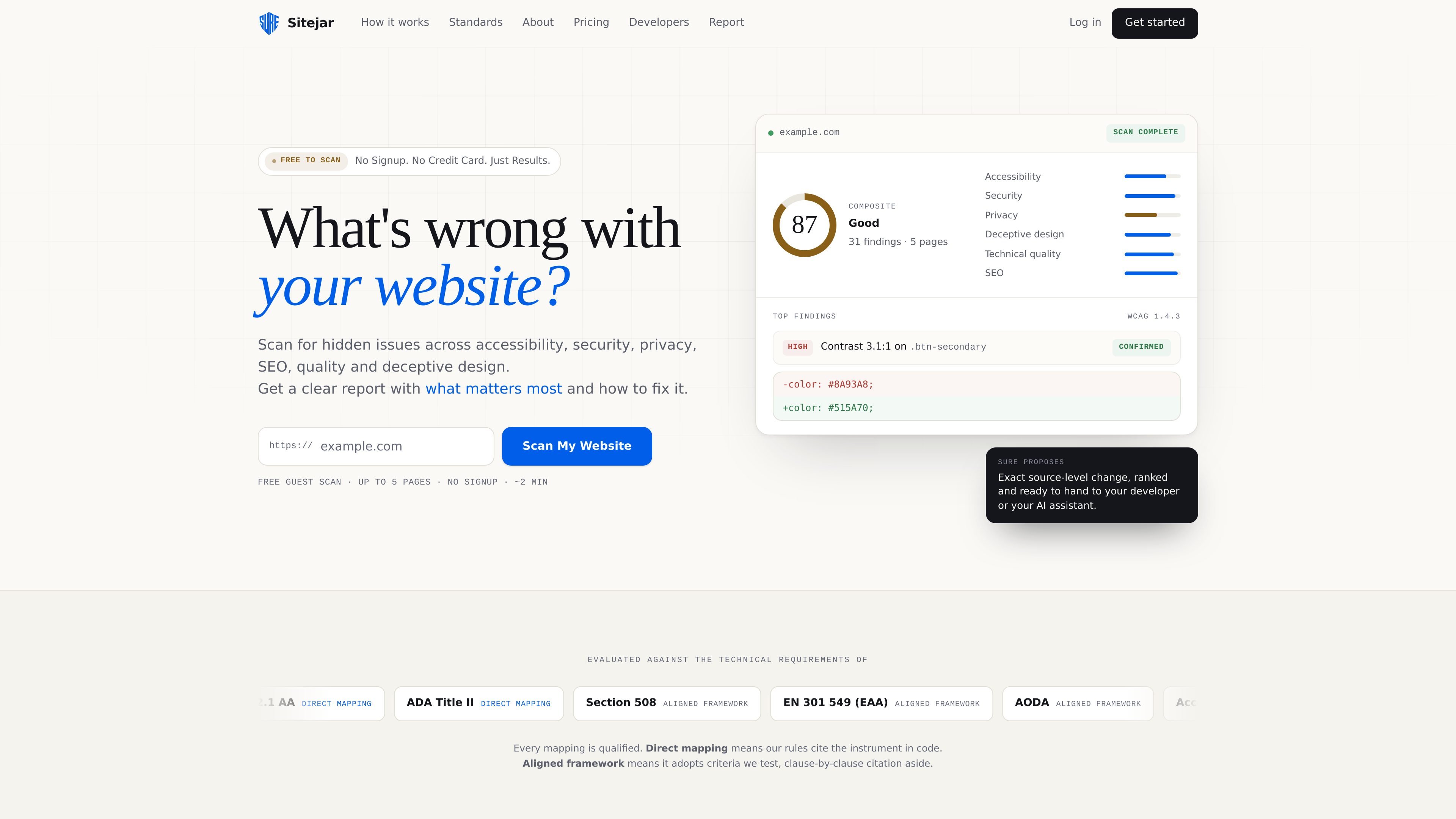
Sitejar is a website compliance scanning platform for finding issues across accessibility, security, privacy, deceptive design, technical quality, and SEO. It crawls public pages in a real browser so its checks use the rendered experience rather than only the source HTML, then combines the results into one report and composite score.
The product is designed to turn findings into work that can be reviewed and assigned. Each finding identifies the affected element, cites the rule or framework basis, and includes a confidence label. Its SURE remediation engine proposes source-level changes that can be copied to a developer or passed to an AI assistant; Sitejar does not deploy those changes itself.
Runs a single crawl across accessibility, security, privacy, deceptive design, technical quality, and SEO, producing one composite score and a shared remediation queue.
Renders pages in a real browser and identifies the affected element in plain language. Findings include a confidence label—Confirmed, Likely, or Needs review—and cite the relevant rule or criterion.
SURE uses the page's surrounding markup and semantic relationships to propose a specific source-level change rather than a generic checklist suggestion. Proposed changes remain subject to human review.
Creates an HTML accessibility statement, a PDF executive report, a DOCX VPAT draft, and a TXT remediation prompt from scan results. Availability and branding options depend on the plan.
Provides an API with API-key authentication for starting compliance scans and gating CI pipelines on accessibility, security, and privacy scores. Public API rate limits vary by plan.
SitejarBot identifies itself, checks robots.txt, and limits its crawl behavior. It reads pages but does not submit forms, access logins or paywalls, or apply changes to a site.
Run a pre-launch or periodic review to identify issues that affect users, security posture, privacy signals, search structure, and deceptive-design risk before publishing changes.
Use the cited findings and SURE proposals as a handoff package: developers can inspect the affected element, review the proposed source change, and commit an approved fix in their normal workflow.
Generate an executive PDF for non-technical stakeholders and structured accessibility or procurement documents from the same scan instead of translating raw findings manually.
Start scans and gate CI decisions through the API, using accessibility, security, and privacy scores as part of an engineering pipeline.
Connect an AI agent through MCP server access or use the exported remediation prompt while keeping detection deterministic and changes under team review.
Enter a public URL and Sitejar crawls the site in a real browser rather than evaluating only raw HTML. A scan produces findings across six dimensions, with each finding naming the relevant element and providing a confidence label such as Confirmed, Likely, or Needs review.
A guest scan can cover up to five pages without an account. Guest results include full accessibility findings and summary counts for the other five dimensions, and the scan is deleted 24 hours after it finishes. A free account provides full findings across all six dimensions and retains scan history until you delete it.
Sitejar evaluates accessibility, security, privacy, deceptive design, technical quality, and SEO in one crawl. Its accessibility checks are evaluated against WCAG 2.1 AA, while the site also describes mappings or alignments with frameworks and requirements including ADA Title II, Section 508, EN 301 549, AODA, the Accessible Canada Act, the UK Equality Act, and the Australian DDA.
SURE proposes a context-aware source-level change for a finding. You can review and copy the change, give it to a developer, or use a generated prompt with an AI assistant. Sitejar does not apply the proposed changes to your site automatically.
SitejarBot fetches public pages, identifies itself as SitejarBot/1.0, checks robots.txt, and never submits forms, clicks through paywalls or logins, or attempts to access pages that are not linked from a normal crawl. It fetches at most two pages concurrently and does not currently honor Crawl-delay.

PromptScout tracks how ChatGPT, Gemini, Google AI Overviews, and Perplexity mention your brand or competitors, then pairs those results with source analysis and website audits. It helps teams decide what to fix in content, positioning, or site readiness next.

ClayHog ist eine KI-Sichtbarkeitsplattform für die Suche, die zeigt, wie Marken in ChatGPT, Gemini, Perplexity, Claude und Google AI Overviews erscheinen.

beehiiv is a newsletter platform for creators, publishers, and brands that want to build, grow, and monetize email newsletters and websites from one place. It offers a free Launch plan, plus paid tiers for more advanced growth, monetization, and support features.

Scribeist is an AI-powered writing platform with dedicated workspaces for novels, blogs, essays, and notes. It combines project-aware AI, fiction continuity tools, SEO-focused blog tools, and publishing integrations.

findloc.ai publishes public AI reports for local markets and checks individual business websites for AI visibility signals. It helps owners, marketers, and agencies see which businesses AI assistants recommend and what their own site may be missing.

LoupeKit is a browser panel that inspects live web pages for stack details, layout, SEO, accessibility, and AI-generated code smells. It works as an over-the-page extension with a free tier and Pro options for exports, reports, advisories, and server-side readings.