
Visual canvas editing
Arrange and resize freeform shapes on a canvas, with fine-grained controls for colors, spacing, layout, borders, effects, and typography.

Timeful is a local visual editor for Vue and Tailwind web applications that keeps canvas-based UI editing synchronized with standard code. It is intended for designers and developers who want to collaborate through local files and Git without a separate export workflow.
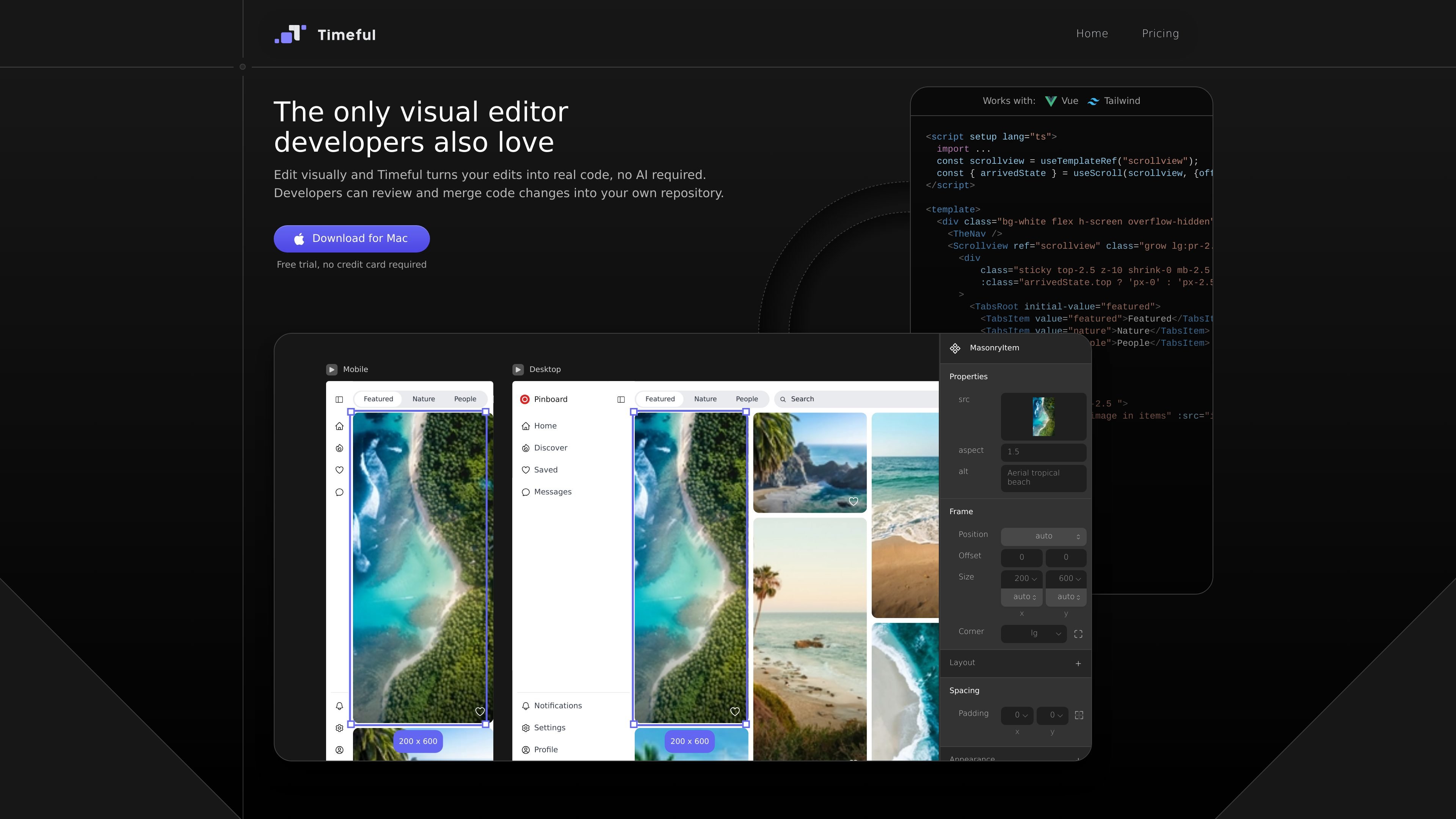
Timeful is a local visual editor for web applications built with Vue and Tailwind CSS. It lets developers and designers edit Vue interfaces on a canvas while saving the result directly as standard code, rather than creating a separate design file that must later be exported.
The product is designed around two-way synchronization: canvas changes update local Vue files, and code changes can update the design view. Projects remain in a local folder and regular Git repository, allowing teams to combine visual UI work with normal coding, review, and deployment workflows.
Arrange and resize freeform shapes on a canvas, with fine-grained controls for colors, spacing, layout, borders, effects, and typography.
Use Tailwind design tokens or choose arbitrary styles, allowing token-based consistency alongside detailed visual adjustments.
Build auto-layout frames with control over alignment and spacing, and edit breakpoints and states separately in side-by-side views.
Changes made on the canvas are written to local Vue files, while changes made in code update the visual design, keeping both representations aligned.
The output is standard Vue and Tailwind code stored in a local project folder, with no export step or proprietary file format required for publishing.
Projects use a regular Git repository, so teams can review, merge, pull, push, and revert changes through their existing version-control workflow.
A designer can lay out Vue interface components visually, tune styles and spacing on the canvas, and leave the resulting implementation in the project files for the development team.
Designers and developers can work on the same Vue files: visual changes handle layout and styling, while developers continue building application logic in their usual tools.
A team can pull updated code from its repository, inspect the corresponding design, make a visual adjustment, and commit the result through its established Git process.
An AI coding agent can work against the local Vue and Tailwind project, while Timeful reflects code changes in the visual editor for further layout editing.
Timeful currently supports Vue 3 Single-File Components using the Composition API and Tailwind CSS version 3. It does not currently support React.
Yes. Timeful works with Vite setups and plugins, and it also works with Nuxt.
Timeful writes changes directly to local Vue files. Canvas edits update the files, while code changes can update the visual design; Git remains the team's existing workflow for committing, pushing, pulling, and reverting changes.
Timeful generates formatted Vue code with Tailwind utility classes. It modifies the template block while leaving the script block and application logic untouched, and it preserves existing formatting where possible.
Only people who use the visual canvas to edit files need a Timeful license. Other team members can view or edit the standard code with their preferred IDE and Git workflow without a Timeful license.

ByteAsk is a terminal-first AI coding agent for C and C++ that edits repositories and verifies changes with the real compiler, debugger, sanitizers, and tests before showing a diff. It offers a free tier plus paid plans, with editor connectors and zero-retention handling described in the source.

CreateOS Sandbox is an isolated compute environment for running code and agent workloads inside Firecracker micro-VMs. It is designed for workflows that need machine-level isolation, private networking between sandboxes, and programmatic control through SDK, CLI, or MCP.

GitBot is a local browser-based workspace for creating reusable coding bots powered by Claude Code, Codex, or OpenCode. It helps developers run those agents across repository folders with persistent threads and configurable permissions.

hob is an independent workspace for coding agents that keeps agent sessions, terminals, history, and follow-up work organized around the tools and providers you already use. It is aimed at developers who want local control over routing, history, and workspace structure rather than a bundled model stack.

Ably Chat is a chat API platform for building custom realtime chat applications. It supports room-based messaging, typing indicators, presence, reactions, and message updates, with usage-based pricing options for different deployment stages.

Manta AI is an autonomous web app testing tool for teams that want to map application behavior, catch regressions, and generate tests without writing scripts or maintaining selectors. It works from a URL and supports plain-English test flows, run results with screenshots, and scheduled or deployment-triggered checks.