
Four script formats
Typerino formats writing for four document types: screenplay, one-hour drama, half-hour TV, and stage play. Each format comes with its own page rules and templates so the document starts in the right structure.

Typerino is screenwriting and playwriting software for Mac and Windows. It supports industry-standard formatting for screenplays and stage plays, with live preview, local file storage, and import/export for common script formats.
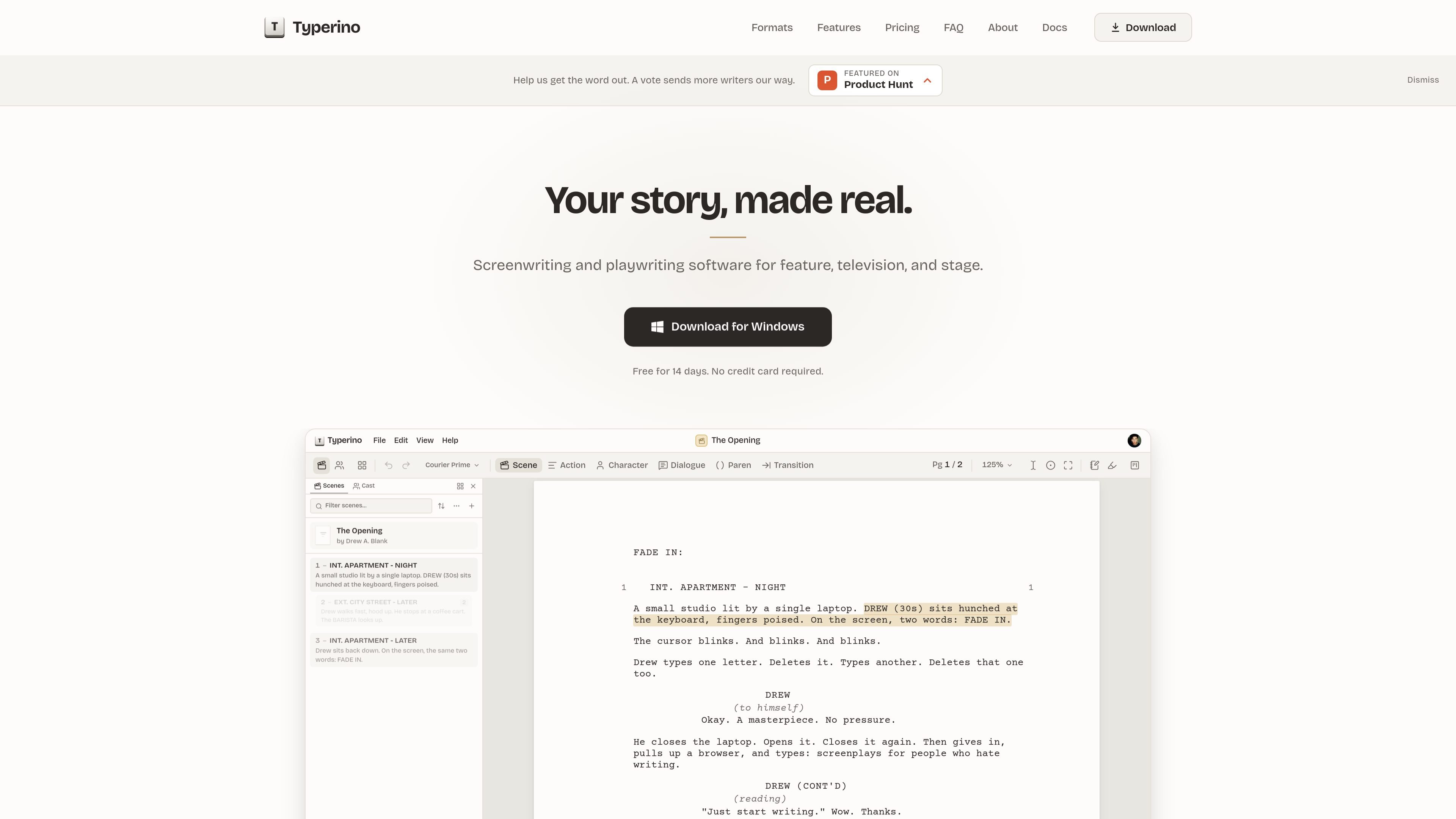
Typerino is screenwriting and playwriting software for Mac and Windows. It is built for writers who want industry-standard formatting for screenplays, television scripts, and stage plays without using Markdown or memorizing syntax.
The app runs on your desktop and keeps documents as local files on your computer. It combines format-aware writing, live page preview, import and export tools, and snapshot history so writers can draft, revise, and hand off scripts in common industry file formats.
Typerino formats writing for four document types: screenplay, one-hour drama, half-hour TV, and stage play. Each format comes with its own page rules and templates so the document starts in the right structure.
The editor updates the page as you write, so what you see on screen matches the exported result. The site highlights page breaks, spacing, margins, and screenplay conventions like transitions and parentheticals.
Typerino changes element behavior as you type, such as turning a slug line into formatted screenplay structure or moving from a character name into dialogue. It also offers autocomplete for characters and locations.
Documents save continuously to a local .type file and keep a quiet version history. If something goes wrong, you can roll back to an earlier point in the script.
Typerino can import Final Draft, Fountain, Fade In, and Celtx files. It preserves structure from Final Draft, Fountain, and Fade In, and it can export to PDF, .fdx, and Fountain.
Stage-play documents include first-class front matter for a cast page and a setting/time page, and the stage format uses manuscript-style layout suited to submission and publication.
Draft feature-length scripts with screenplay formatting, page counts, and the standard scene-heading, action, dialogue, and transition structure readers expect.
Build one-hour drama pilots and episodes with the act structures used for broadcast, premium, streaming, or limited-series formats.
Write half-hour comedies or dramedies, including single-cam and multi-cam variants with the corresponding act and tag structure.
Format stage plays from ten-minute pieces through full-length manuscripts, including cast and setting pages ahead of the script body.
Import existing drafts from Final Draft, Fountain, Fade In, or Celtx, then continue editing in Typerino while preserving as much structure as the source format allows.
Yes. Typerino is a desktop app for Mac and Windows, and the site says you can download it for either platform.
Typerino opens four import formats: Final Draft (.fdx), Fountain (.fountain), Fade In (.fadein), and Celtx (.celtx). Export options include PDF, .fdx, and Fountain.
Typerino supports screenplays and stage plays. The docs describe four formats: screenplay, one-hour drama, half-hour, and stage play.
The site says Typerino auto-saves continuously and keeps a snapshot history inside each document, so you can roll back to earlier versions.
Typerino uses local files on your computer rather than storing work on Typerino’s servers. The docs say documents are single .type files that you control on disk.

Goldfish is an AI memory app for macOS that helps you reply, write, summarize, and continue using the context already on your Mac. It stores memory locally and writes in your tone.

ProWritingAid is a writing assistant for storytellers that offers grammar checking, style editing, paraphrasing, and story analysis inside popular writing apps. It includes a free plan, paid tiers, and tools for chapter critique, manuscript review, and collaborative editing.

SpeakoFlow is a free, open-source desktop voice-to-text app for Windows, macOS, and Linux. It supports dictation into any app, voice-driven writing with Flow, cleanup, translation, and a screen-aware assistant.

Paperpal 是一款面向学术写作的 AI 工具,提供文献阅读、语言润色、引用、查重、AI 检测和投稿前检查。它适合需要在英文论文和学术材料上进行写作、修改与合规自检的学生、研究人员和教师。

Sanota is an app that turns spoken memories, reflections, and interviews into clear written stories. It supports personal storytelling, family history, and shared memories, with guided prompts and subscription pricing.

Dirac is an AI email assistant that prepares a morning brief, prioritizes important threads, and drafts replies in your voice. It is positioned for founders and other busy professionals who use Gmail and want to reduce morning inbox triage.