
Multi-source feedback collection
Bring reviews and responses from listed platforms, files, feeds, Stripe, Smart Forms, and a feedback widget into one workspace instead of handling each source separately.

Usereviews is customer feedback software that combines reviews, forms, widgets, and usage signals in one workspace. It helps product, customer, and growth teams use AI to classify feedback, prioritize themes, coordinate follow-ups, and identify activation or churn risks.
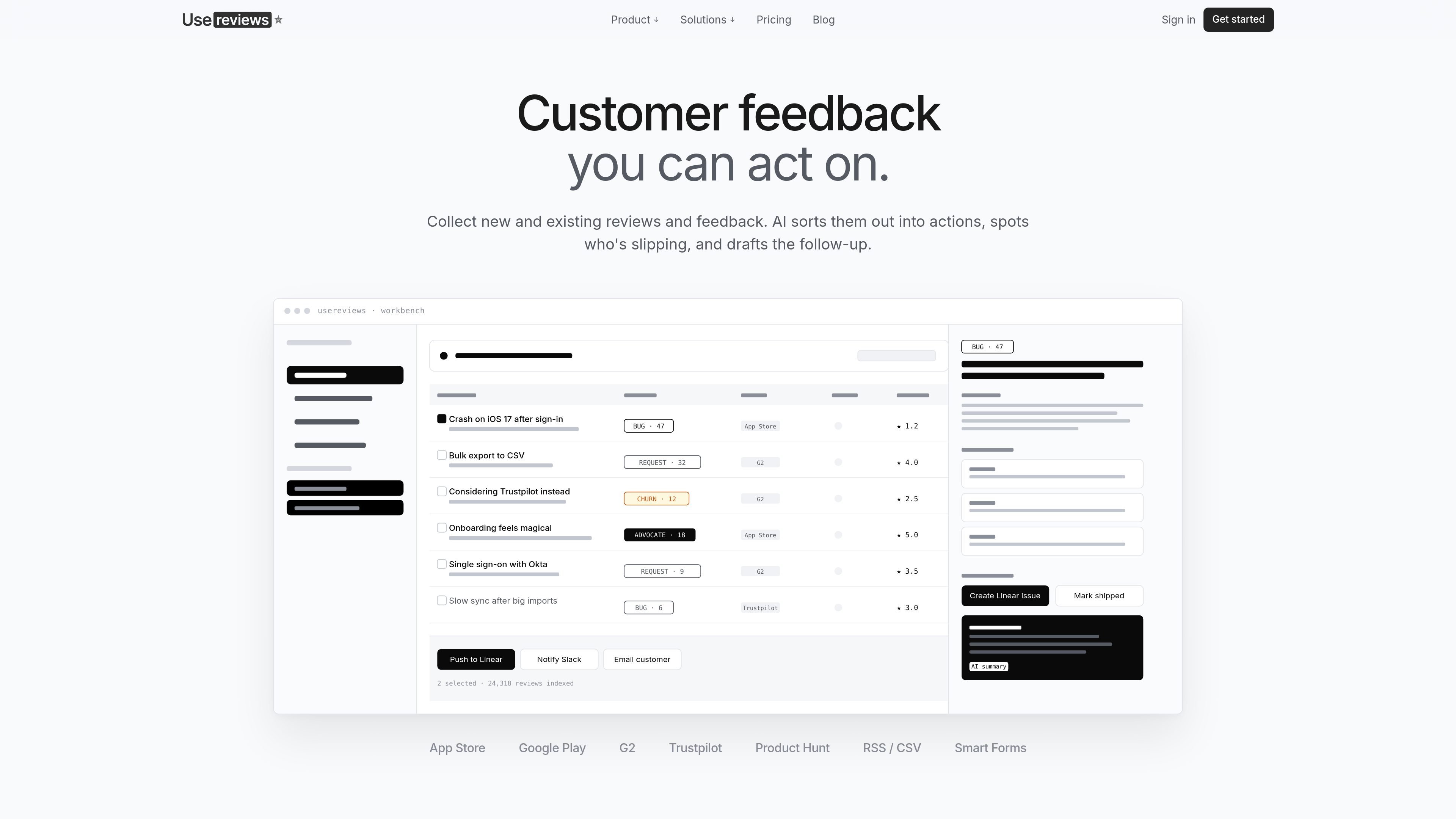
Usereviews is customer feedback software for collecting reviews and first-party responses, analyzing them with AI, and turning recurring signals into team workflows. It brings feedback from review platforms, files, feeds, forms, widgets, and Stripe into a shared workbench.
The product is designed to help teams move from raw customer comments to prioritized action. AI identifies themes such as bugs, feature requests, churn signals, competitor mentions, and advocacy; teams can then manage those themes, send them to delivery or communication tools, and use Pulse to examine activation and usage patterns for tracked people. Plans are usage-based, with capacity measured across seats, reviews, platforms, AI credits, and tracked people.
Bring reviews and responses from listed platforms, files, feeds, Stripe, Smart Forms, and a feedback widget into one workspace instead of handling each source separately.
AI classifies feedback into bugs, requests, churn signals, competitor mentions, and advocates, then groups related items into themes with summaries and impact scores.
Review themes in a kanban workflow or sortable table, filter by status, assignee, priority, area, date, and platform, and save views for recurring team workflows.
Send structured insights to Linear, Slack, email, or a webhook with summaries, customer quotes, and links back to the source feedback.
Build multi-step forms and embedded widgets in a block editor. AI generates follow-up questions from each answer, while responses are routed into the workbench.
Pulse segments tracked people by product usage and activation behavior, including slipping, not activated, one-and-done, sticky, power user, and unpaid value; teams can email segments with AI-drafted copy.
Aggregate low-rated reviews and recurring complaints, then let AI group related reports and rank themes by impact. Product teams can move a selected insight through New, Acknowledged, In Progress, and Shipped while retaining the underlying customer quotes.
Use Smart Forms, an embedded widget, or triggered email requests to collect structured feedback. AI follows up on an answer in context, helping teams gather a more specific explanation instead of relying on a fixed questionnaire alone.
Track competitor names and variants across existing reviews, then review mention frequency, sentiment, and source quotes for battlecards, sales material, or positioning work.
Connect usage data to Pulse to find people who are slipping below their baseline, have not activated, or are showing strong product engagement. Teams can save segments and send AI-drafted win-back, review-request, or advocate outreach.
Usereviews combines imported reviews with first-party feedback. Sources listed on the product site include the App Store, Google Play, G2, Trustpilot, Product Hunt, RSS, CSV, Stripe, Smart Forms, and a feedback widget. Connected sources poll automatically where supported, and form responses feed into the same workbench.
AI tags feedback as bugs, feature requests, churn signals, competitor mentions, or social proof. Related items are grouped into themes with summaries and impact scores, which can then be reviewed in a kanban board or sortable table.
Teams can send an insight to Linear, Slack, email, or a webhook. The output can include an AI-written summary, customer quotes, and a link back to the relevant feedback. Usereviews also supports drafting follow-ups to reviewers and sending campaigns or sequences to selected segments.
Smart Forms use a block-based editor and can ask AI-generated follow-up questions based on each response. Forms or widgets can be embedded, triggered after an event such as purchase, or sent by email; an optional contact step can collect a name and email address.
Plans scale by seats, stored reviews, connected platforms, AI credits, and tracked people. The Free plan is listed at $0 per month for one person, with paid Starter, Pro, and Teams plans available; add-ons can increase capacity on paid plans. Usage limits generate warnings, and reviews over a limit queue until capacity is added or the plan is upgraded.

PromptScout tracks how ChatGPT, Gemini, Google AI Overviews, and Perplexity mention your brand or competitors, then pairs those results with source analysis and website audits. It helps teams decide what to fix in content, positioning, or site readiness next.

SaveMRR is a Stripe retention tool for SaaS teams that scans billing data for churn and MRR leaks, then automates recovery through dunning, cancel-save offers, win-back emails, and onboarding nudges. It is built for founders and bootstrapped teams using Stripe.

Hype is a web tool for finding trending YouTube topics by category, time range, and scoring mode. It helps creators spot emerging ideas, inspect source videos, and decide what to cover next.

Sleek Analytics is a privacy-friendly web analytics tool with real-time visitor tracking, Core Web Vitals, and revenue attribution. It helps site owners understand traffic and conversions without cookie banners or a heavy setup.

Struere is an AI-native platform for turning spreadsheet data into structured operational software with dashboards, alerts, and automations. It is aimed at teams that want to replace manual spreadsheet workflows without building custom tools from scratch.

ClayHog ist eine KI-Sichtbarkeitsplattform für die Suche, die zeigt, wie Marken in ChatGPT, Gemini, Perplexity, Claude und Google AI Overviews erscheinen.