
Relationship-aware writing
Generate context-aware replies, messages, and posts from the dashboard or within LinkedIn and X, then review the wording before using it.

Zextri is a relationship-intelligence and AI writing tool for professionals working on LinkedIn and X. It uses interaction context, contact memory, and Relationship Pulse to help draft replies, messages, posts, and follow-ups while leaving review and publishing to the user.
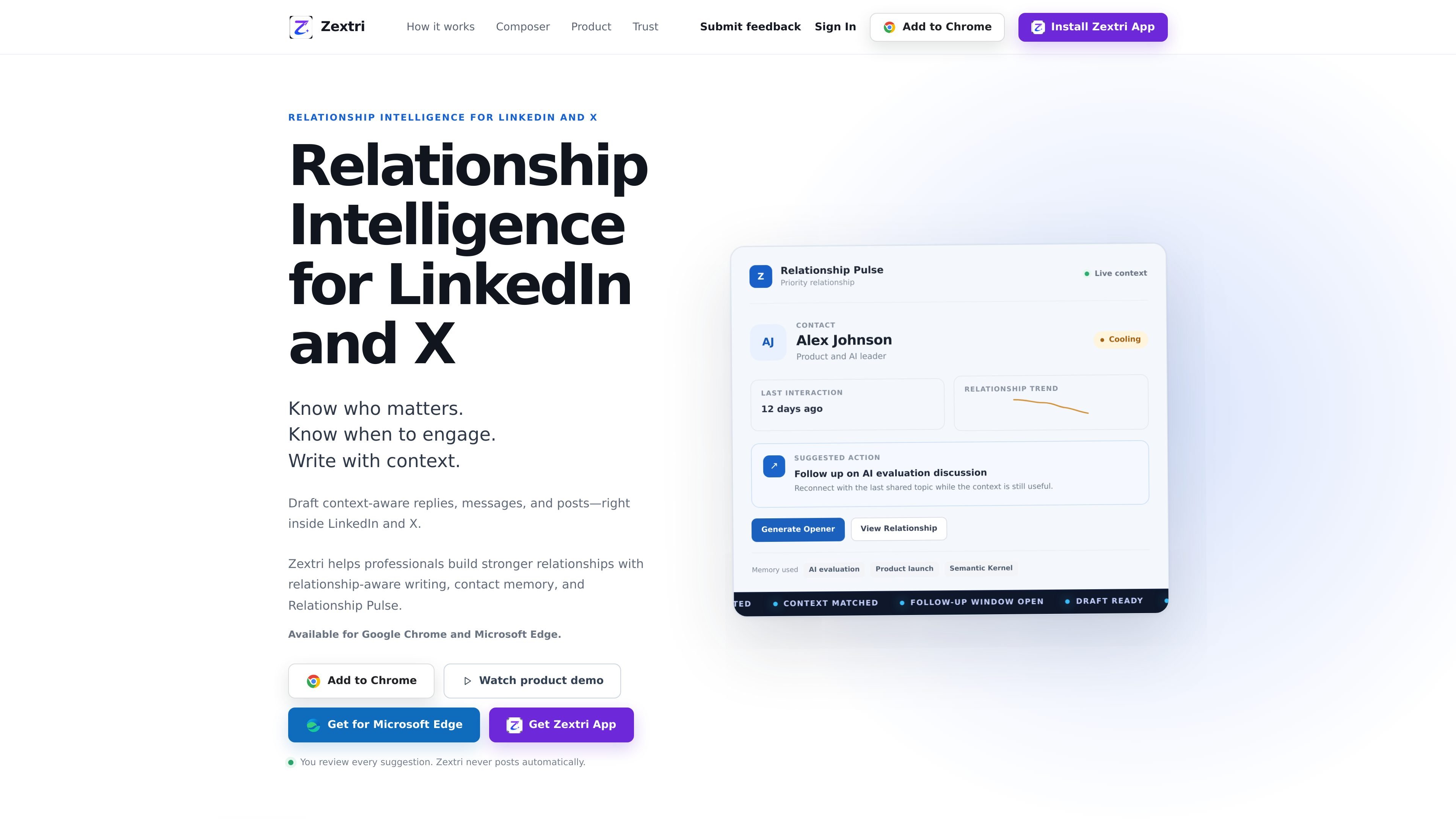
Zextri is a relationship-intelligence tool for professionals who communicate and build connections on LinkedIn and X. It combines AI-assisted writing with contact memory and Relationship Pulse, helping users draft replies, messages, and posts with more awareness of previous interactions.
The product can be used from inside LinkedIn and X or through a dashboard composer. It also supports a workflow for sharing or pasting a public post link from Android, reviewing the available context, generating a response, and copying the result. Zextri remains assistive: users review and edit suggestions, and the product does not publish content automatically.
Generate context-aware replies, messages, and posts from the dashboard or within LinkedIn and X, then review the wording before using it.
Keeps professional interaction context and topics—such as an AI evaluation, product launch, or Semantic Kernel discussion—available for future relationship work.
Highlights contacts that may need attention, shows relationship states such as hot, warming, or cooling, and surfaces a suggested next action.
Use a public LinkedIn or X post as input by sharing or pasting its link, reviewing the fetched context, and drafting a response.
Start with an idea or draft, choose LinkedIn or X as the destination, and create a platform-aware post that can be edited before publishing yourself.
The product explicitly keeps the final decision with the user: suggestions are reviewed, edited, copied, and sent or posted manually.
Use Relationship Pulse to identify contacts marked as cooling or otherwise needing attention, then review the suggested next action and draft a follow-up based on the last meaningful topic.
When responding to a public post, share or paste the LinkedIn or X link, inspect the fetched context, and generate a reply that can be shortened, refined, or made more conversational before copying.
Turn a rough idea or draft into a platform-aware LinkedIn or X post, while keeping editing and the final publishing decision in the user's hands.
Use remembered interaction topics to reconnect with professional contacts after a gap, such as following up on an earlier AI evaluation or product discussion.
Zextri is available for Google Chrome and Microsoft Edge. The site also offers a Zextri desktop app and describes a dashboard workflow for sharing a public LinkedIn or X post from Android.
Zextri drafts replies, messages, and posts using context from LinkedIn and X. You review, edit, copy, and decide what to send or publish; Zextri does not post automatically.
You can work from the dashboard or inside LinkedIn and X. For a public post, share or paste its link, review the fetched public context, generate a reply, refine it, and copy the final text when ready.
Zextri's Relationship Memory keeps context and interaction history from professional interactions available for later writing and relationship monitoring. The source does not specify retention periods or detailed data-handling policies.
The site presents Zextri for professionals who manage LinkedIn and X relationships, follow-ups, replies, messages, and posts. The available source does not describe team collaboration features or administrator controls.

Goldfish is an AI memory app for macOS that helps you reply, write, summarize, and continue using the context already on your Mac. It stores memory locally and writes in your tone.

Topple.lol is a public pay-to-rank leaderboard where listings start at $1 and their bid balance decays over time and with clicks. It helps makers and marketers buy short-term visibility for product sites or X profiles while tracking live board stats.

ProWritingAid is a writing assistant for storytellers that offers grammar checking, style editing, paraphrasing, and story analysis inside popular writing apps. It includes a free plan, paid tiers, and tools for chapter critique, manuscript review, and collaborative editing.

SpeakoFlow is a free, open-source desktop voice-to-text app for Windows, macOS, and Linux. It supports dictation into any app, voice-driven writing with Flow, cleanup, translation, and a screen-aware assistant.

Paperpal 是一款面向学术写作的 AI 工具,提供文献阅读、语言润色、引用、查重、AI 检测和投稿前检查。它适合需要在英文论文和学术材料上进行写作、修改与合规自检的学生、研究人员和教师。

Sanota is an app that turns spoken memories, reflections, and interviews into clear written stories. It supports personal storytelling, family history, and shared memories, with guided prompts and subscription pricing.