

Afterpage
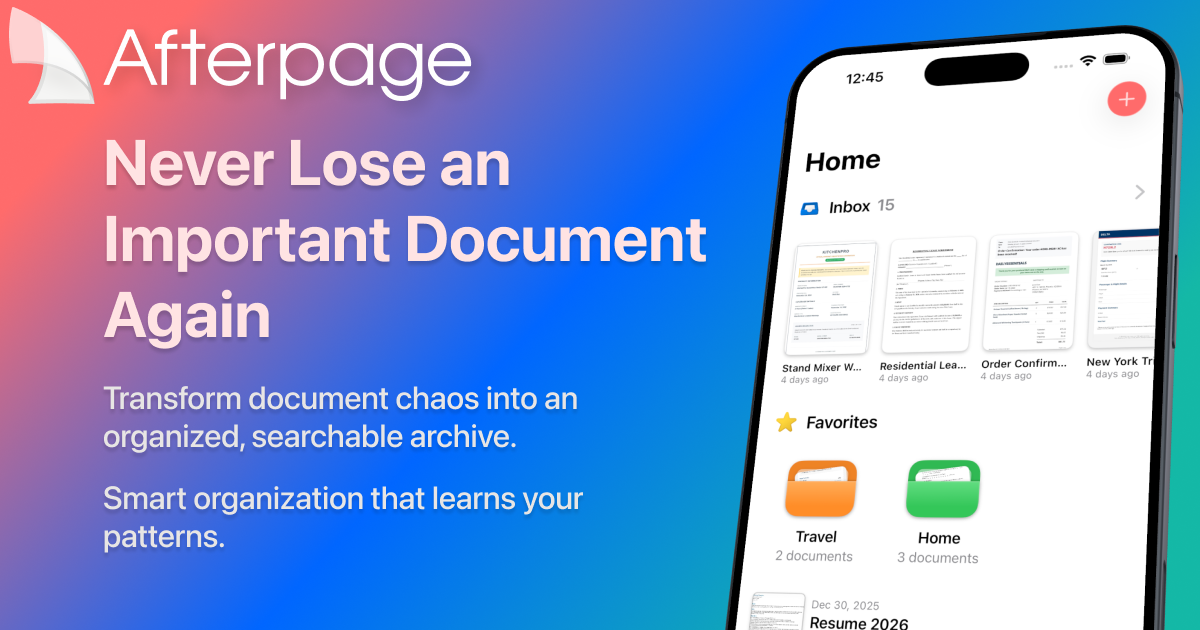
Afterpage is an intelligent document organizer for iPhone and iPad that learns your filing patterns to ensure you can instantly find any receipt, contract, or important file.
What is Afterpage?
What is Afterpage?
Afterpage is the intelligent document archive designed specifically for the Apple ecosystem, transforming document chaos into instant clarity. It moves beyond simple storage by actively learning how you manage your files, receipts, contracts, and tax forms. By leveraging on-device intelligence, Afterpage ensures that your most critical documents are not just stored securely, but are instantly searchable and retrievable exactly when you need them, eliminating the panic associated with lost paperwork.
This application is built on a foundation of privacy and efficiency. Unlike cloud-heavy solutions, Afterpage processes everything locally on your iPhone or iPad using Apple's Vision framework. This means your sensitive data remains yours, synced securely via your personal iCloud Drive, offering unparalleled control and peace of mind while delivering cutting-edge organization capabilities.
Key Features
- Smart Organization (AI-Powered): Learns your historical filing patterns to automatically suggest relevant tags, document types, and associated contacts. The system improves its suggestions with every document processed.
- Instant Full-Text Search: Utilizes on-device Optical Character Recognition (OCR) powered by Apple Vision to make the text inside every imported document searchable within seconds.
- Effortless Capture: Seamlessly import documents via camera scanning, direct import from Photos or Files apps, or by sharing directly from Mail.
- Inbox Workflow: Provides a dedicated Inbox for quick triage, allowing you to scan documents immediately and organize them later when you have dedicated time.
- Privacy by Default: All processing, including OCR and AI learning, occurs entirely on your device. No data is uploaded to third-party servers or external clouds.
- iCloud Sync & Ecosystem Integration: Documents are stored in your personal iCloud Drive, ensuring seamless, secure synchronization across all your iPhone and iPad devices.
- Searchable Export: Easily export documents as fully searchable PDFs, ready to be shared via AirDrop, email, or saved back into Files.
How to Use Afterpage
Getting started with Afterpage is designed to be a simple, three-step process that quickly integrates into your existing workflow:
- Import: Bring your documents into the system. Use the built-in camera scanner for physical papers, import existing images/PDFs from your Photos or Files libraries, or share attachments directly from your Mail application. Afterpage handles multi-page documents efficiently.
- Organize: New imports land in your dedicated Inbox. Here, you can quickly apply tags, assign document types (e.g., Receipt, Contract, Invoice), and link them to specific contacts. This is where Smart Organization begins suggesting optimal placements based on your habits.
- Find: Once organized, finding anything is instantaneous. Search using keywords that appear anywhere within the document text, or refine your search using filters based on the tags, types, or contacts you assigned. You can then export the file as needed.
Use Cases
- Managing Personal Finances and Receipts: Quickly scan and archive all retail receipts, warranties, and bank statements. When tax season arrives, you can instantly search for 'Amazon' and '2023' to pull up every relevant purchase record.
- Professional Contract Management: For freelancers or small business owners, scan signed client agreements or vendor contracts. Tag them by client name and expiration date, allowing you to search for "Service Agreement expiring next month" instantly.
- Handling Important Personal Documents: Securely archive medical records, insurance policies, or property deeds. Because the OCR works locally, you can search for a specific doctor's name or policy number without worrying about sensitive data leaving your device.
- Academic Research and Notes: Import lecture handouts or research papers. Tag them by course or topic, and use the full-text search to recall specific quotes or data points from documents you reviewed months ago.
FAQ
Q: Where are my documents physically stored, and is my data secure? A: Your documents are stored either locally on your device or within your personal iCloud Drive, based on your setup choice. Crucially, all processing, including OCR and AI pattern learning, happens entirely on-device, ensuring maximum privacy and control.
Q: What is the difference between the Free tier and the Plus subscription? A: The Free tier allows you to archive up to 20 documents and includes core features like scanning, manual organization, and full-text search. The Plus subscription unlocks unlimited document archiving, the powerful Smart Organization AI suggestions, and batch processing capabilities.
Q: Does Afterpage work on the iPad, and does it sync? A: Yes, Afterpage is fully optimized for both iPhone and iPad. It utilizes iCloud Sync to ensure that your entire organized archive is consistent and available across all your Apple devices.
Q: How does the Smart Organization feature actually learn my patterns? A: Smart Organization uses on-device machine learning to analyze how you tag and categorize documents over time. The more you use the app to organize files, the more accurate and helpful its automated suggestions for tags, types, and contacts become.
Q: Can I try the advanced features before committing to a subscription? A: Yes, you can try Afterpage for free with the 20-document limit. To experience the full power of unlimited storage and the AI-driven Smart Organization, you can upgrade to the Plus plan, currently offered at a special launch price.
Alternatives
司马阅
司马阅 is a leading domestic enterprise-level AI document intelligence platform, focused on activating dormant data in enterprises and helping them create serious scenario-based AI employees.

PDF Toolbox
PDF Toolbox is a comprehensive offline tool for creating, organizing, and securing PDF documents without compromising your privacy.

Falconer
Falconer is a self-updating knowledge platform designed to serve as the single source of truth for teams, ensuring documentation and tribal knowledge remain accurate and easily accessible.

Nolain OCR
Nolain OCR is an advanced Optical Character Recognition solution designed to accurately extract text and data from various document formats, streamlining document processing workflows.

BookAI.chat
BookAI allows you to chat with your books using AI by simply providing the title and author.

BeFreed
BeFreed is a personalized audio learning platform that transforms knowledge into engaging audio content tailored for individual learning preferences.