

VVTerm
VVTerm is a powerful and secure SSH terminal application designed for both iOS and macOS. It offers seamless synchronization across devices and robust security features for managing your servers from anywhere.
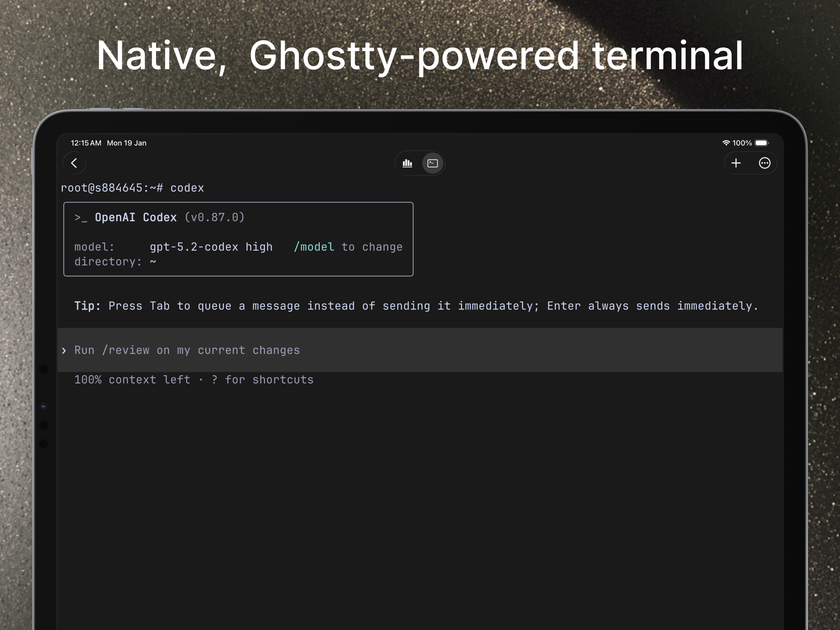
What is VVTerm?
What is VVTerm?
VVTerm is a sophisticated SSH terminal client meticulously crafted for Apple's ecosystem, spanning iOS and macOS. It empowers users to connect to and manage their servers securely and efficiently, no matter where they are. Built with a focus on performance, security, and user experience, VVTerm aims to be the go-to solution for developers, system administrators, and anyone who needs reliable remote server access on their Apple devices.
The application distinguishes itself through its seamless iCloud synchronization, ensuring that your connection profiles, settings, and even session states are consistent across all your logged-in Apple devices. This means you can start a session on your Mac and seamlessly pick it up on your iPhone or iPad without missing a beat. Coupled with industry-standard security practices like Keychain integration for storing credentials, VVTerm provides peace of mind while handling sensitive server access.
Key Features
- iCloud Sync: Automatically syncs your connection profiles, settings, and session history across all your iOS and macOS devices signed in with the same Apple ID.
- Keychain Security: Securely stores your SSH keys and passwords using Apple's Keychain, ensuring your credentials are protected.
- GPU-Accelerated Terminal: Leverages the power of your device's GPU for a remarkably fast and responsive terminal experience, even with demanding tasks.
- Modern UI/UX: Features a clean, intuitive, and customizable interface designed for ease of use on both mobile and desktop platforms.
- MFA Support: Supports One-Time Password (OTP) for Multi-Factor Authentication, adding an extra layer of security to your connections.
- SSH Key Management: Easily import, manage, and use SSH keys for passwordless authentication.
- Customizable Appearance: Offers a wide range of themes, fonts, and color schemes to personalize your terminal environment.
- Session Management: Efficiently manage multiple SSH sessions simultaneously with tabs and organized profiles.
- Universal App: A single purchase grants access to VVTerm on both iPhone, iPad, and Mac.
How to Use VVTerm
Getting started with VVTerm is straightforward:
- Installation: Download VVTerm from the App Store on your iOS device or Mac.
- Add a New Connection: Tap the '+' button or navigate to 'New Connection'. Enter the necessary details: Host address (IP or domain name), Port (usually 22), Username, and optionally, Password or SSH Key.
- SSH Key Management: If using SSH keys, navigate to the 'Keys' section to import your private key. You can then associate this key with specific connections.
- Connect: Select your saved connection profile and tap 'Connect'. If prompted, enter your password or passphrase for the SSH key.
- iCloud Sync: Ensure iCloud Drive is enabled for VVTerm in your device's settings to automatically sync your configurations across devices.
- Customization: Explore the 'Settings' menu to customize themes, fonts, key bindings, and other preferences to tailor the terminal to your workflow.
Use Cases
- Remote Server Administration: System administrators can manage servers, deploy applications, and troubleshoot issues on the go using their iPhone or iPad.
- Software Development: Developers can connect to development, staging, or production servers to run commands, manage code repositories, and monitor application performance from their Mac or mobile device.
- DevOps & Cloud Management: Cloud engineers and DevOps professionals can easily access and manage cloud instances (AWS, Azure, GCP), containers, and CI/CD pipelines.
- Network Troubleshooting: Network engineers can perform diagnostics, check configurations, and access network devices remotely.
- Secure Access for Remote Work: Provides a secure and reliable way for employees to access company resources and servers from any location.
FAQ
Q1: What platforms is VVTerm available on?
A1: VVTerm is available for iOS (iPhone and iPad) and macOS.
Q2: Does VVTerm support SSH key authentication?
A2: Yes, VVTerm fully supports SSH key authentication. You can easily import and manage your SSH private keys within the app.
Q3: How does the iCloud sync feature work?
A3: VVTerm uses iCloud to sync your connection profiles, settings, and session history across all your devices. Ensure you are logged into iCloud on each device and that iCloud Drive is enabled for VVTerm.
Q4: Is my data secure with VVTerm?
A4: Yes, VVTerm prioritizes security. It utilizes Apple's Keychain for secure storage of credentials and supports standard SSH security protocols. Connections are encrypted via SSH.
Q5: Is VVTerm a free application?
A5: VVTerm is a paid application, offering a universal purchase for both iOS and macOS versions. Please check the App Store for current pricing details.
Alternatives

Biji
Biji is a versatile platform designed to enhance productivity through innovative tools and features.

Prompty Town
Prompty Town is an innovative platform that allows users to transform their links into virtual buildings, creating a unique and engaging way to share and interact with content.

AakarDev AI
AakarDev AI is a powerful platform that simplifies the development of AI applications with seamless vector database integration, enabling rapid deployment and scalability.

Planndu: Daily Task Planner
Planndu is an intuitive productivity application designed to help users organize tasks, manage projects, build routines, and enhance focus using tools like AI generation and a built-in Pomodoro timer.

Devin
Devin is an AI coding agent and software engineer that helps developers build better software faster.

imgcook
imgcook is an intelligent tool that converts design mockups into high-quality, production-ready code with a single click.