

Live AI Design Benchmark
Compare live design outputs from leading AI models like Anthropic, OpenAI, and Google side-by-side based on a single text prompt.
What is Live AI Design Benchmark?
What is Live AI Design Benchmark?
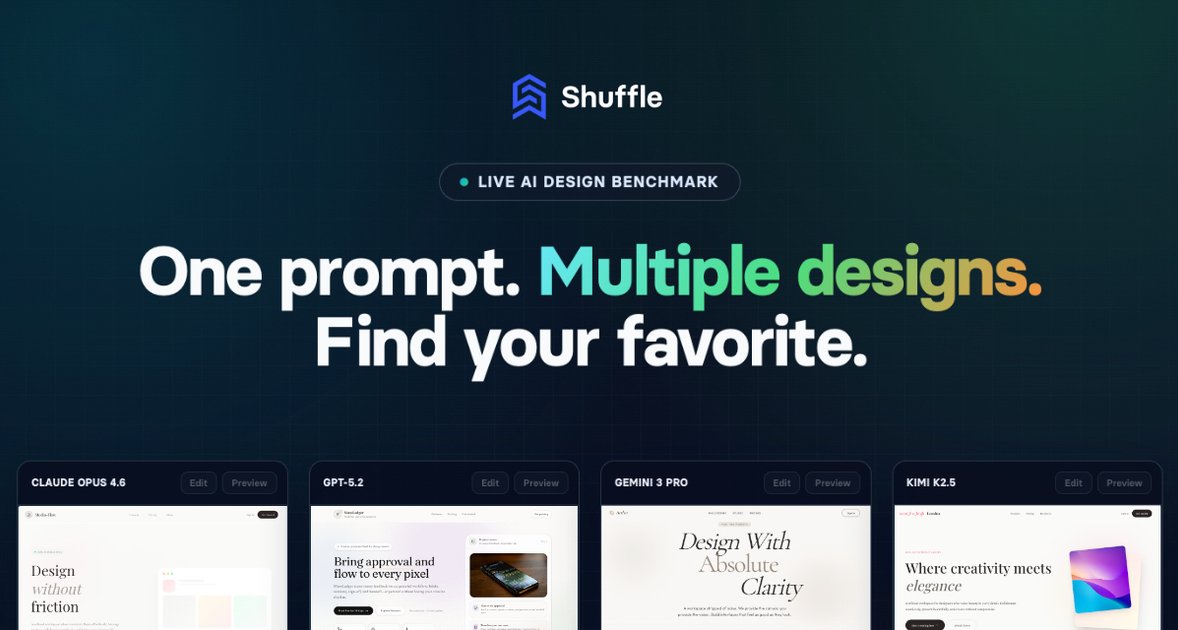
The Live AI Design Benchmark by Shuffle is a cutting-edge tool designed to revolutionize how developers and designers approach initial website ideation. It allows users to input a single descriptive prompt and instantly generate multiple, independent website layout variations simultaneously from several top-tier AI models, including Claude Opus, GPT-5.2, Gemini 3 Pro, and Kimi K2.5. This parallel generation capability eliminates the need to run separate tests on different platforms, providing a comprehensive, real-time comparison of design approaches.
This benchmark serves as an essential validation layer for AI-assisted design workflows. Instead of guessing which model produces the best starting point for a specific aesthetic or functional requirement, users can visually assess the strengths and weaknesses of each engine side-by-side. Once a preferred design emerges, it can be seamlessly taken into the Shuffle Editor for visual fine-tuning, ensuring a rapid transition from concept to production-ready code.
Key Features
- Parallel AI Generation: Run prompts across multiple leading AI models (Anthropic, OpenAI, Google, Moonshot) concurrently to see diverse layout results instantly.
- Side-by-Side Comparison: Easily compare the generated desktop and mobile views from different engines on a single screen for efficient decision-making.
- Model Transparency: Clearly see which model generated which output, aiding in understanding model performance characteristics for specific design tasks.
- Prompt Exploration: Access a gallery of community-generated prompts and their results, offering inspiration and best practices for prompt engineering.
- Seamless Integration: Designs selected from the benchmark can be immediately remixed and edited within the powerful Shuffle visual editors (Tailwind, Bootstrap, Material-UI, etc.).
- Design Refinement: The ability to 'Remix' a chosen design allows users to jump directly into the visual editor to apply precise stylistic changes, typography adjustments, or layout tweaks.
How to Use Live AI Design Benchmark
Using the Live AI Design Benchmark is straightforward, designed to get you from idea to visual concept in minutes:
- Enter Your Prompt: Navigate to the input field and describe the website or component you need. Be specific about the section (e.g., "hero section, features, pricing"), target audience, visual style (e.g., "elegant, pastel color scheme"), and required elements.
- Select Models & Generate: Choose which AI models you wish to test (or use the default selection). Click the "Generate designs" button.
- Analyze Results: Wait briefly as all selected models run in parallel. The resulting layouts will appear side-by-side, categorized by the generating model.
- Compare and Select: Review the desktop and mobile previews for each design. Identify the layout that best matches your vision.
- Refine or Remix: If you find a promising result, click the corresponding "Remix this design" link. This action transfers the generated structure and style directly into the Shuffle Editor, where you can use drag-and-drop functionality and property panels to finalize every detail before exporting clean code.
Use Cases
- Rapid Prototyping for Agencies: Agencies needing to quickly present multiple distinct visual directions to a client for a new project can use the Benchmark to generate 3-4 completely different starting points in minutes, significantly accelerating the initial pitch phase.
- Testing Design System Compatibility: Developers using a specific framework (like Tailwind CSS) can test how different AI models interpret their design constraints, ensuring the generated output is structurally sound and easily integrated into their existing component library.
- Overcoming Creative Blocks: When facing a blank canvas, designers can input abstract concepts or vague requirements and use the diverse outputs from models like Claude (often known for elegance) versus Gemini (often known for structured layouts) to spark new creative avenues.
- Benchmarking AI Performance: Product teams evaluating which foundational AI model offers the best ROI for their internal design tool development can use this benchmark as a standardized, objective testing ground for visual output quality.
- Generating Niche Components: Users requiring highly specific sections—like a complex pricing table or a unique testimonial slider—can prompt the system to generate several variations, picking the most functional layout to refine.
FAQ
Q: How many free generations do I get before needing an account? A: The Live AI Design Benchmark typically offers a limited number of free demo calls or generations. To continue building sites with AI and unlock full export options, users are encouraged to create an account or subscribe to a plan.
Q: Can I export the code directly from the Benchmark tool? A: No. The Benchmark's primary function is comparison and selection. Once you select a winning design, you must click "Remix this design" to move it into the full Shuffle Editor, where you can then export the code in formats like JSX or TSX.
Q: Which AI models are currently supported in the comparison? A: The tool actively supports leading models such as Anthropic's Claude Opus, OpenAI's GPT series, Google's Gemini Pro, and Moonshot models, with support frequently updated to include the latest releases.
Q: What happens if the generated design isn't quite right? A: If the initial output is close but needs refinement, you can use the integrated visual editor. The "Remix" feature takes the AI-generated structure and allows you to visually adjust colors, spacing, typography, and content without writing code from scratch.
Q: Is this tool only for website layouts, or can it generate smaller components?
A: While excellent for full-page layouts, the tool is versatile. By adjusting your prompt, you can focus the generation on specific components, such as a navigation bar, a feature grid, or a call-to-action block, and then integrate those components into your existing projects.
Alternatives

Pixso
Pixso is a next-generation AI-native UI design tool that allows users to generate design drafts and code with a single click, serving as a domestic alternative to Figma.

Make Real
Draw a UI and make it real using the tldraw SDK.

Napkin AI
Napkin AI transforms your text into insightful visuals, making communication more effective and engaging.

PromptLayer
PromptLayer is a platform for prompt management, evaluations, and LLM observability, designed to enhance AI engineering workflows.

TapNow
TapNow is a next-generation AI visual creation engine that empowers businesses and creators to produce professional-grade visuals for various applications.

Snack Prompt
A platform to share and discover amazing AI prompts and resources.