

AI Director Mode
AI Director Mode is a feature that allows users to direct AI video creation through an initial, controllable AI storyboard, ensuring visual consistency and brand alignment before generating final video clips.
What is AI Director Mode?
What is AI Director Mode?
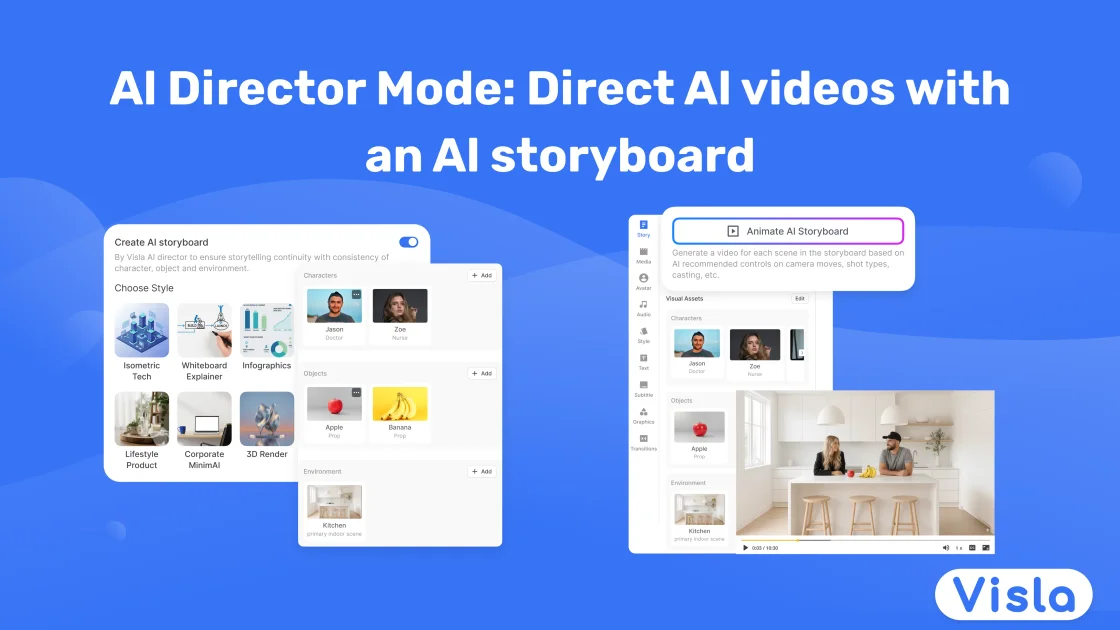
AI Director Mode is Visla’s innovative approach to building professional, on-brand videos using artificial intelligence. It fundamentally changes the chaotic nature of direct AI video generation by introducing a structured, directorial layer first. Instead of jumping straight into rendering motion, users begin by providing initial input—such as a script, PDF, or rough idea—which Visla transforms into a scene-by-scene AI storyboard. This storyboard acts as the blueprint, allowing for granular control over every visual element before any expensive rendering occurs.
This mode solves the common pitfalls of generative video, such as visual drift, inconsistent characters, and misplaced branding. By locking down the visual plan—including characters, objects, environments, style, and pacing—users ensure that the final AI video clips maintain strong continuity and adhere strictly to brand guidelines. It merges the speed of AI with the intentionality of professional pre-production, making complex video creation predictable and efficient.
Key Features
- AI Storyboard Foundation: Transforms any input (script, image, idea) into a clear, structured, scene-by-scene AI storyboard for pre-visualization.
- Granular Scene Direction: Users explicitly choose and lock down key visual elements for every scene, including specific characters, required objects (logos, products), and environments.
- Visual Consistency Engine: Maintains steady characters, objects, and environments across all scenes, eliminating the common issue of visual drift or "changing actors" mid-video.
- Brand Asset Integration: Seamlessly incorporates brand logos, product images, and mascots into the storyboard in a thoughtful, integrated manner, ensuring natural brand presence.
- Dual Output Flexibility: Scenes can be kept as high-quality storyboard images or rendered into full, high-fidelity AI video clips, allowing users to approve the plan before committing credits to motion.
- Style and Pacing Control: Direct the overall aesthetic (e.g., photorealistic, cinematic, vector) and the narrative pace, along with voiceover style, to match the desired tone.
How to Use AI Director Mode
AI Director Mode streamlines video production into a deliberate, multi-step process designed for maximum control and minimal waste:
- Initiate Project & Input: Start a new video project and provide your source material (script, document, idea). Visla immediately structures this into a foundational project plan.
- Define Visual Rules: Select a comprehensive visual style (e.g., Cinematic, 3D Render) that dictates lighting and composition. Set directional parameters like video pace and desired voiceover tone.
- Cast and Prop Definition: Generate or upload specific characters (team members, mascots) and essential objects (product shots, logos). These assets are then cataloged for consistent reuse.
- Set the Scene: Choose or generate the environments (offices, abstract spaces) that will serve as the backdrop for your narrative.
- Review the Storyboard: Visla renders the scene-by-scene AI storyboard based on all your inputs. This is the critical review stage where you can tweak compositions and ensure the narrative flows correctly.
- Generate Motion Selectively: By default, scenes are static images. You decide which scenes to upgrade into full AI-generated video clips, saving rendering time and credits on static shots.
- Final Polish: Refine the resulting video clips using Visla’s integrated editing tools to finalize your directed masterpiece.
Use Cases
- Corporate Training & Onboarding: Create highly consistent explainer videos where trainers or company mascots must appear identically across dozens of instructional modules, ensuring brand and character fidelity.
- Product Marketing & Demos: Showcase new products or software features by locking down precise product shots and packaging visuals within various branded environments, guaranteeing the product is always shown correctly.
- Internal Communications: Develop leadership updates or company announcements where key executives (uploaded as consistent characters) deliver messages against approved, professional backdrops.
- Advertising Campaigns: Rapidly prototype and iterate on ad concepts by directing the storyboard first. This allows marketing teams to approve the core message and visual flow before committing budget to high-fidelity video rendering.
- Educational Content Creation: Build engaging, story-driven educational series where abstract concepts are visualized using consistent graphical elements, icons, and specific visual metaphors throughout the entire lesson.
FAQ
Q: How is AI Director Mode different from standard AI video generation? A: Standard generation often results in unpredictable visuals that drift scene-to-scene. AI Director Mode forces structure via an editable storyboard first, allowing you to dictate characters, objects, and environments precisely before motion is generated, ensuring high continuity.
Q: Can I use my existing brand assets in the storyboard? A: Absolutely. You can upload logos, product photos, packaging shots, and brand mascots. Visla integrates these assets directly into the scene generation process, treating them as directed props.
Q: Do I have to pay for video generation for every scene? A: No. By default, scenes start as storyboard images. You only spend credits to convert a scene into a full AI-generated video clip after you have approved its visual composition in the storyboard stage.
Q: What happens if I need to change a character's appearance mid-video? A: If you need a change, you edit the specific scene in the storyboard. Because characters are locked assets, Visla maintains their core identity while adapting the pose or action required for that specific shot, ensuring continuity remains strong.
Q: Can I start with raw footage instead of a script? A: Yes. AI Director Mode accepts various inputs, including raw footage. Visla will analyze the footage and structure it into a coherent storyboard plan, allowing you to direct the surrounding AI-generated scenes consistently.
Alternatives

艺映AI
艺映AI is a free AI video generation platform focused on transforming text and images into high-quality dynamic videos.

AI Training Video Generator
The AI Training Video Generator by Coursebox allows users to create engaging training videos quickly and efficiently using artificial intelligence.

Video Ocean
Video Ocean is an AI-driven creative studio that helps creators generate, edit, and mix stunning videos using intelligent video agents and intuitive tools.

Sora 2 AI Video Generator
Generate stunning Sora 2 videos with our free AI video generator, offering no watermark and no subscription fees.

DeepMotion
DeepMotion offers AI-powered motion capture and real-time body tracking to generate 3D animations from video in seconds.

必应图像创建器
A free AI-powered Bing Image Creator that transforms text into stunning visuals and engaging videos.