

AiDesignDev
AiDesignDev is a visual code designer that empowers designers, developers, and product managers to build websites and apps. It offers an AI-powered visual editor, generates production-ready code, and enables one-click deployment.
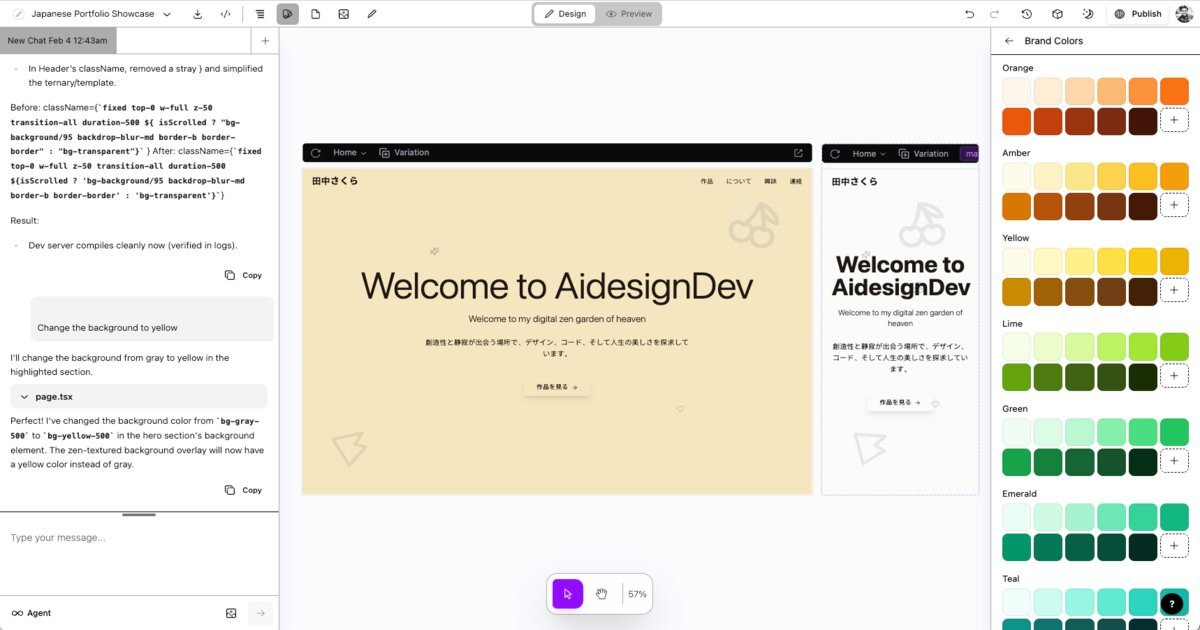
What is AiDesignDev?
What is AiDesignDev?
AiDesignDev revolutionizes the way websites and applications are built by bridging the gap between visual design and code. It's a powerful platform designed for designers, developers, and product managers who want to create stunning digital products with unprecedented speed and efficiency. By offering a visual canvas integrated directly into the development workflow, AiDesignDev allows users to design intuitively while ensuring that the output is always production-ready code.
This innovative tool eliminates the traditional friction between design and development teams. Designers can work with a familiar Figma-like interface, complete with a canvas, layers, and brand controls, to create responsive layouts and test them across multiple devices in real-time. Simultaneously, developers benefit from clean, automatically generated React code that directly reflects every visual change. This ensures that the design is not just a mockup but a functional part of the codebase, ready for immediate deployment.
Key Features
- Visual Editor: Design with a Figma-like interface featuring an infinite canvas, layers panel for component management, and brand controls for consistent styling (colors, typography).
- AI Code Generation: Leverage natural language prompts to generate entire sections or refine specific elements. The AI is context-aware, understanding your design and components to provide relevant code suggestions.
- Real-time Preview: See every design change reflected instantly, allowing for rapid iteration and immediate feedback.
- One-Click Deployment: Deploy your creations directly to a custom domain in seconds. Share your designs easily with a shareable link.
- Production-Ready React Code: Generates clean, maintainable React code that is directly written to your project files, eliminating code generation gaps.
- IDE Integration: Design and code seamlessly within your IDE, keeping code and design in one place.
- Supabase Integration: Connect with Supabase to build full-stack web applications, including user authentication, database management, and secure API connections, with no coding required for backend setup.
- Design System Management: Manage brand colors and typography in a centralized panel, ensuring consistency across your project.
How to Use AiDesignDev
Getting started with AiDesignDev is straightforward:
- Sign Up: Create an account on the AiDesignDev platform.
- Design Visually: Utilize the intuitive visual editor. Use the canvas to lay out your components, manage them using the layers panel, and apply brand styles via the brand controls.
- Generate Code with AI: Describe the components or sections you need in natural language, or refine existing elements through conversation with the AI assistant.
- Preview and Iterate: Observe real-time previews of your design and code changes. Make adjustments as needed.
- Connect to Supabase (Optional): For full-stack applications, connect your Supabase account to manage databases, authentication, and APIs.
- Deploy: Once satisfied, deploy your website or application to a custom domain with a single click.
Use Cases
- Rapid Prototyping: Quickly visualize and iterate on website or app ideas, generating functional code prototypes in minutes.
- Frontend Development: Streamline the process of building user interfaces for web applications, especially for React-based projects.
- Design System Implementation: Ensure brand consistency by managing design tokens and applying them visually across the entire project.
- Product Management: Product managers can collaborate more effectively by visually designing features and seeing instant code outputs, facilitating clearer communication with development teams.
- Full-Stack Web Apps: Build complete web applications by integrating visual design with backend services like Supabase, enabling faster shipping of data-driven products.
FAQ
What kinds of things can I design with AiDesignDev? You can prototype, ideate, and create websites and web applications from scratch with AiDesignDev. Its flexibility allows for designing anything visual, including presentations and mockups, with code as the source of truth.
Why would I use AiDesignDev over other design tools? AiDesignDev integrates design directly with the codebase. Unlike tools that generate mockups, AiDesignDev uses your actual product code as the source of truth, ensuring that designs translate instantly and accurately into production-ready code. It's the only tool that lets you design with the existing product and translate designs to code instantly.
Who owns the code that I write with AiDesignDev? The code you create with AiDesignDev is entirely yours. The code is written locally directly to your project files, and it is not hosted off your device. You have full ownership and control over your codebase.
What is the difference between AiDesignDev and traditional design tools like Figma or Sketch? AiDesignDev is a visual editor for code. While it offers a visual interface similar to Figma, its core principle is using code as the source of truth. This means designs are directly translated into functional code, whereas traditional tools primarily output static designs or require separate code conversion steps. AiDesignDev allows for unconstrained design possibilities because the underlying code is the ultimate arbiter.
Can I integrate AiDesignDev with my existing codebase? Yes, AiDesignDev is designed to work with your existing codebase. Code is written directly to your local files, allowing seamless integration with your current development workflow and projects.
Alternatives

Prompty Town
Prompty Town is an innovative platform that allows users to transform their links into virtual buildings, creating a unique and engaging way to share and interact with content.

Make Real
Draw a UI and make it real using the tldraw SDK.

AakarDev AI
AakarDev AI is a powerful platform that simplifies the development of AI applications with seamless vector database integration, enabling rapid deployment and scalability.

beehiiv
beehiiv is an all-in-one newsletter platform providing integrated tools for email publishing, no-code website building, audience growth, and monetization for creators and brands.

Devin
Devin is an AI coding agent and software engineer that helps developers build better software faster.

imgcook
imgcook is an intelligent tool that converts design mockups into high-quality, production-ready code with a single click.