

CanopyAI
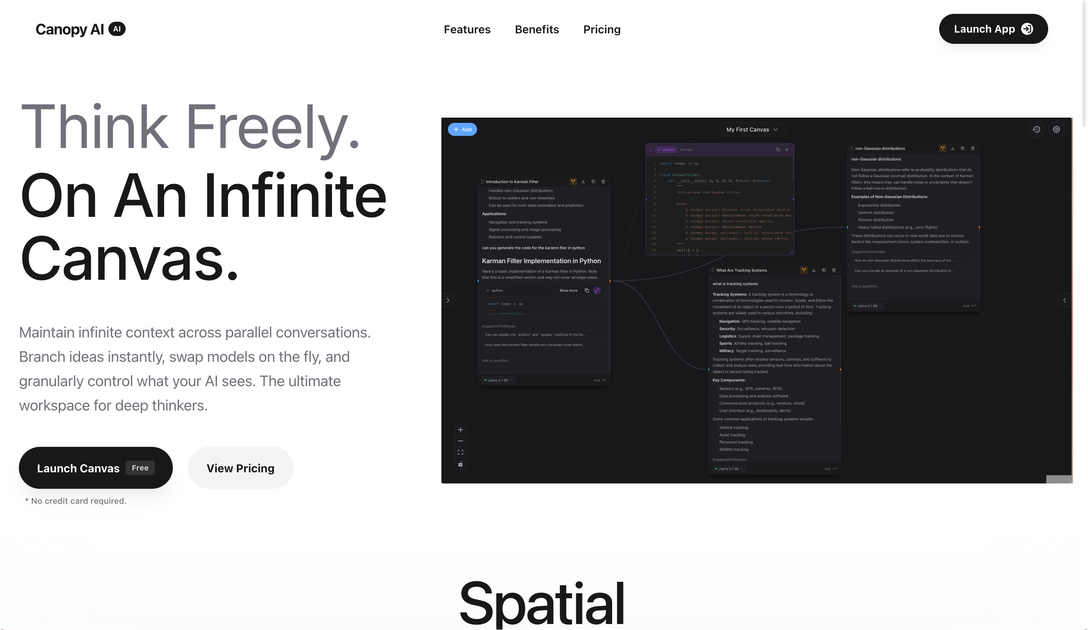
CanopyAI is an infinite canvas workspace designed for deep thinkers to manage complex AI conversations, allowing users to branch ideas, swap models, and maintain full context across parallel discussions.
What is CanopyAI?
What is CanopyAI?
CanopyAI redefines the landscape of AI interaction by moving beyond the limitations of linear, isolated chat windows. It introduces the concept of an Infinite Canvas—a spatial environment where your thoughts and AI conversations can expand organically and interconnectedly. This platform is specifically engineered for power users, researchers, developers, and deep thinkers who require robust context management and the flexibility to explore multiple lines of reasoning simultaneously without losing track of the core objective.
Unlike standard chatbot interfaces, CanopyAI transforms a series of prompts and responses into interconnected nodes on a visual map. This spatial intelligence allows users to instantly fork conversations (branching), explore tangential ideas, and then seamlessly merge back or continue down parallel paths. The core value proposition lies in maintaining infinite context across these parallel explorations, ensuring that every AI model interaction builds upon a complete, shared understanding of the project or problem space.
Key Features
CanopyAI is built around advanced workflow management and model flexibility:
- Infinite Branching: Instantly fork any message or conversation node to pursue new ideas or test hypotheses without derailing the original, primary thread. This allows for comprehensive exploration of every possibility.
- Spatial Intelligence: Visualize complex thought processes on a non-linear canvas, breaking free from the constraints of traditional, sequential chat logs. Organize and see relationships between different lines of inquiry.
- Multi-Model Switching: Effortlessly switch between different Large Language Models (LLMs) like GPT-4, Claude 3.5, Perplexity, or Grok on a per-node or per-branch basis. This enables direct comparison of reasoning engines while maintaining identical context.
- Advanced Parameter Control: Fine-tune generation parameters such as Temperature and Max Tokens granularly for each specific node, allowing for precise control over the AI's output style and length.
- Bring Your Own API Key (BYOK): Users can integrate their existing API keys from various providers, offering usage flexibility without imposed platform usage limits.
- Searchable, Permanent Memory: All work, annotations, and conversations are saved, indexed, and searchable, acting as a permanent, organized knowledge base for future reference.
- Context Preservation: Tangents and branches never compromise the main thread's context, ensuring that even deep explorations remain tethered to the original problem statement.
How to Use CanopyAI
Getting started with CanopyAI focuses on establishing your initial canvas and leveraging its branching capabilities for complex tasks:
- Launch the Canvas: Begin by launching the workspace. Since there is no credit card required for the initial tier, users can immediately start exploring.
- Establish the Core Thread: Start your primary conversation or problem statement on the canvas. This forms the root node of your thought process.
- Branch for Exploration: When you encounter a point where multiple directions seem viable (e.g., testing different assumptions or asking follow-up questions using different models), right-click or select the option to Fork that specific message.
- Model Comparison: In the newly created branch, switch the active AI model (e.g., switch from GPT-4 to Claude 3.5) to see how the reasoning changes for the same input, all while the branch inherits the context from the parent node.
- Organize and Refine: Continue developing parallel threads. Use the visual canvas to group related nodes, annotate key findings, and ensure that tangential explorations are clearly separated but still accessible.
- Save and Return: CanopyAI automatically saves your entire canvas state, allowing you to close the session and return later to the exact point where you left off, with all context intact.
Use Cases
CanopyAI is optimized for workflows that demand high cognitive load and rigorous context management:
- Scientific Research & Hypothesis Testing: Researchers can map out complex theories (like the Fermi Paradox example shown), instantly branching to test counter-arguments or explore different supporting evidence using specialized models for data analysis or literature review.
- Software Development & Debugging: Developers can maintain a main thread for feature implementation while branching off to debug specific errors, test alternative architectural designs, or compare code generation outputs from different LLMs side-by-side.
- Strategic Business Planning: Entrepreneurs and strategists can map out market entry plans. One branch might explore a high-risk, high-reward strategy, while another explores a conservative approach, allowing leadership to compare outcomes based on the same initial market data.
- Complex Content Creation & Outlining: Writers or educators can outline large documents, branching out to develop specific chapters or arguments in isolation, ensuring that the core narrative structure remains consistent across all developed sections.
- Comparative AI Auditing: Teams needing to select the best foundational model for a specific task can run the exact same complex prompt sequence across three different models simultaneously on separate branches to objectively evaluate performance metrics.
FAQ
Q: Is CanopyAI free to use? A: CanopyAI offers a free tier, noting that no credit card is required to start. Full access to advanced features, higher usage limits, and BYOK integration are typically available on paid subscription plans.
Q: How does CanopyAI handle context when I switch models? A: This is a core strength. When you switch models within a branch or node, the new model inherits the entire context history leading up to that point on the canvas, ensuring continuity and preventing the model from starting fresh.
Q: Can I use my own OpenAI or Anthropic API keys? A: Yes, CanopyAI supports the Bring Your Own API Key (BYOK) feature, allowing you to connect your preferred providers and use the platform without incurring usage fees through CanopyAI itself (though standard API charges from your provider will apply).
Q: What happens if I delete a branch? A: Deleting a branch removes that specific line of exploration from the canvas view and its associated history. However, the original parent node and the main thread remain completely unaffected, preserving your core work.
Q: Is my data stored permanently? A: Yes, CanopyAI emphasizes that your work is saved with a searchable, permanent memory. This means you can close the application and return later to find your entire workspace exactly as you left it, fully indexed for easy retrieval.
Alternatives

BookAI.chat
BookAI allows you to chat with your books using AI by simply providing the title and author.

OrgaNice
OrgaNice is a smart tab manager that helps users save, organize, and quickly restore browser tabs using clean collections and workspaces, enhancing productivity and reducing tab chaos.

Biji
Biji is a versatile platform designed to enhance productivity through innovative tools and features.

Prompty Town
Prompty Town is an innovative platform that allows users to transform their links into virtual buildings, creating a unique and engaging way to share and interact with content.

Falconer
Falconer is a self-updating knowledge platform designed to serve as the single source of truth for teams, ensuring documentation and tribal knowledge remain accurate and easily accessible.

AakarDev AI
AakarDev AI is a powerful platform that simplifies the development of AI applications with seamless vector database integration, enabling rapid deployment and scalability.