

DatoCMS Visual Editing
DatoCMS introduces Visual Editing, enabling content editors to click directly on website elements for in-context editing, bridging the gap between headless CMS and WYSIWYG experience.
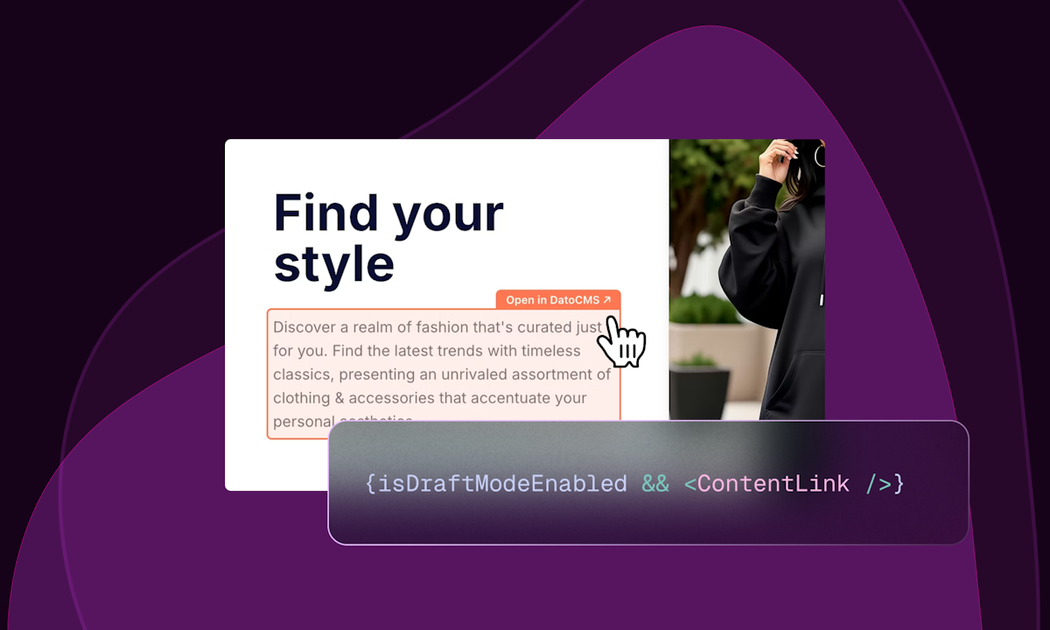
What is DatoCMS Visual Editing?
Introducing DatoCMS Visual Editing
What is DatoCMS Visual Editing?
DatoCMS Visual Editing is a revolutionary feature designed to eliminate the disconnect between content creation and content presentation inherent in traditional headless CMS workflows. Instead of forcing content editors to navigate complex backend forms and guess which field corresponds to which on-page element, Visual Editing allows them to interact directly with the live website preview. This feature brings the intuitive, 'what you see is what you get' (WYSIWYG) experience directly to the headless environment, ensuring content changes are fast, accurate, and context-aware. It fundamentally shifts the editor's mindset from managing data models to managing pages and posts.
This powerful capability is supported by two distinct, yet complementary, workflows: Click-to-edit (Content Link) and Side-by-side editing (Visual Mode). Crucially, this functionality is available across all DatoCMS plans, including the Free tier, and is supported by dedicated SDKs for modern frontend frameworks like Next.js, Astro, Svelte, and Vue, making adoption seamless for existing and new projects.
Key Features
- Click-to-Edit (Content Link): Editors visit the live site in draft mode, hover over editable content, and click to instantly open the corresponding field in DatoCMS in a new tab. This works entirely on the frontend, regardless of hosting (Vercel, Netlify, Cloudflare).
- Side-by-Side Visual Mode: An enhanced version of the Web Previews plugin that displays the website preview on one side and the editing panel directly beside it. Clicking content instantly opens the relevant editor panel without context switching.
- Steganography Backend: The system uses invisible Unicode characters appended to GraphQL API responses to encode the origin metadata (record ID, field path, locale) of every piece of content, allowing the frontend to automatically map clicks to the correct data source without manual developer wiring.
- Bidirectional Context Sync: In Side-by-Side mode, scrolling in the preview panel keeps the edit panel synchronized, and vice-versa, maintaining perfect context during complex edits.
- Universal Compatibility: Works out-of-the-box with complex content structures including links to records, modular blocks, Structured Text, and localized fields.
- Framework SDK Support: Dedicated SDKs for major frameworks (React/Next.js, Astro, Svelte/SvelteKit, Vue/Nuxt) simplify implementation, built upon the framework-agnostic
@datocms/content-linklibrary.
How to Use DatoCMS Visual Editing
Getting started with Visual Editing is designed to be minimal, requiring just three primary steps for developers to enable the experience for their content teams:
- Enable Stega Encoding: When fetching draft content via GraphQL, add two specific headers to your requests:
X-Visual-Editing: v1andX-Base-Editing-Url: https://<YOUR-PROJECT-NAME>.admin.datocms.com. - Integrate the ContentLink Component: Add the framework-specific
<ContentLink />component to your main layout file. This component automatically scans the rendered DOM for the embedded steganographic metadata and renders the necessary edit overlays. - Unlock Side-by-Side Editing (Optional but Recommended): Install and configure the Web Previews plugin within your DatoCMS project settings to enable the highly efficient side-by-side editing interface directly within the CMS sidebar.
Once configured, editors simply navigate to the site in draft mode (or open the CMS interface) and begin clicking on the content they wish to modify, instantly seeing their changes reflected or ready for editing.
Use Cases
- High-Velocity Marketing Teams: Teams launching frequent campaigns or landing pages can rapidly iterate on copy and imagery directly on the page preview, drastically reducing the time spent coordinating between design, development, and content teams.
- Complex E-commerce Product Pages: Editors managing pages with deeply nested modular content (e.g., product descriptions, feature blocks, specifications) can click directly on the specific section they need to update without manually searching through dozens of content records.
- Multilingual Content Management: For sites supporting multiple locales, Visual Editing ensures editors are editing the correct localized version of the content, as the metadata includes locale information, preventing accidental overwrites of translated strings.
- Agency Development & Client Handoff: Agencies can deploy projects with Visual Editing enabled, providing clients with an immediately intuitive editing experience, minimizing training time and reducing support requests related to content location.
- Iterative Design & Content Pairing: Developers and designers can work alongside content editors in real-time. As new components are built, editors can immediately populate them with production-ready content using the visual interface.
FAQ
Q: Is Visual Editing only available on paid plans? A: No. DatoCMS has made Visual Editing available on every plan, including the Free plan, ensuring that all users can benefit from this enhanced editing experience without needing to upgrade.
Q: What happens if I use a framework not explicitly listed (e.g., Remix)?
A: All official SDKs are built on top of the framework-agnostic library, @datocms/content-link. You can integrate this core library directly into any frontend setup to achieve the same functionality.
Q: Do I need to manually map every single piece of content to its field?
A: Absolutely not. The core innovation is the steganography technique, which automatically appends origin metadata to your GraphQL responses. The <ContentLink /> component scans this metadata and wires up the edit overlays automatically, eliminating tedious manual configuration.
Q: Can I use Visual Editing with my existing Web Previews setup? A: Yes. The Side-by-Side Visual Mode is an upgrade to the existing Web Previews plugin. If you are already using Web Previews, enabling the new functionality requires minimal configuration changes.
Q: What kind of content structures does this support? A: It supports the full spectrum of DatoCMS content modeling, including standard fields, links to other records, complex Structured Text blocks, and deeply nested modular content structures.
Alternatives

Prompty Town
Prompty Town is an innovative platform that allows users to transform their links into virtual buildings, creating a unique and engaging way to share and interact with content.

Biji
Biji is a versatile platform designed to enhance productivity through innovative tools and features.

Make Real
Draw a UI and make it real using the tldraw SDK.

beehiiv
beehiiv is an all-in-one newsletter platform providing integrated tools for email publishing, no-code website building, audience growth, and monetization for creators and brands.

Planndu: Daily Task Planner
Planndu is an intuitive productivity application designed to help users organize tasks, manage projects, build routines, and enhance focus using tools like AI generation and a built-in Pomodoro timer.

Nolain OCR
Nolain OCR is an advanced Optical Character Recognition solution designed to accurately extract text and data from various document formats, streamlining document processing workflows.