

Insta Posts AI
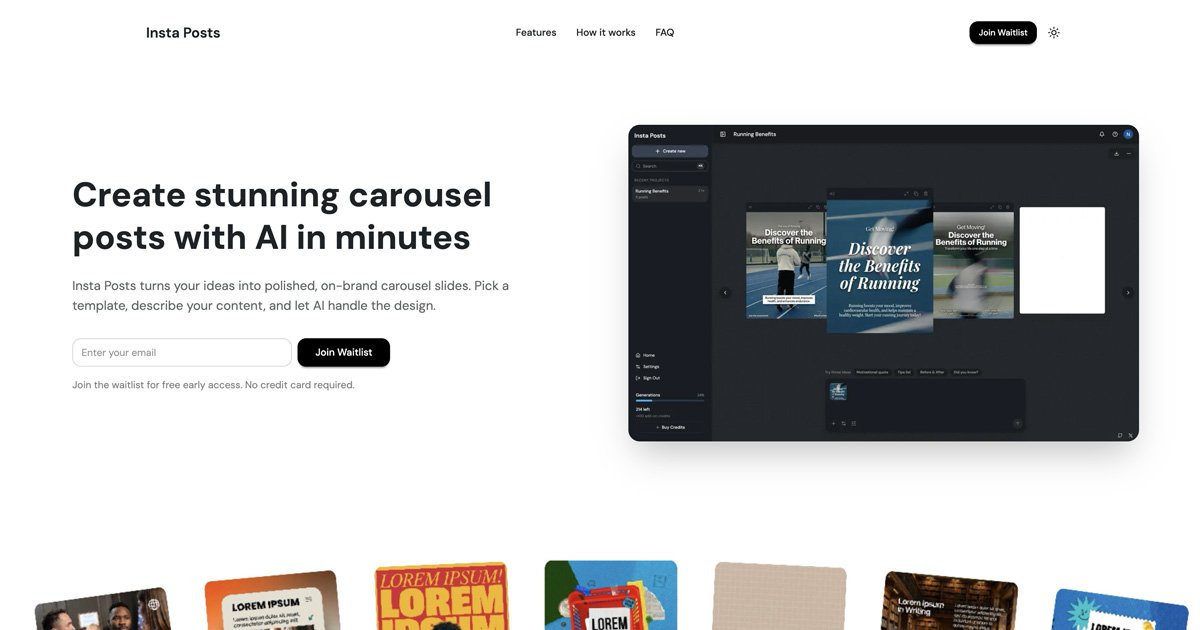
Insta Posts AI is an AI-powered tool designed to rapidly generate professional, multi-slide carousel posts optimized for social media platforms like Instagram and LinkedIn.
What is Insta Posts AI?
What is Insta Posts AI?
Insta Posts AI is a cutting-edge content creation platform that leverages artificial intelligence to streamline the design and production of engaging social media carousels. Traditional carousel creation is time-consuming, requiring meticulous attention to design consistency across multiple slides. Insta Posts AI solves this by allowing users to describe their content idea in plain language—a simple prompt—and instantly receive a polished, multi-slide sequence ready for review. This tool is essential for marketers, social media managers, and small business owners who need to maintain a high volume of visually cohesive content without sacrificing quality or spending hours in complex design software.
The core value proposition of Insta Posts AI lies in its efficiency and brand adherence. By integrating prompt-based generation with a robust template library, it ensures that every piece of content aligns perfectly with established brand guidelines. Furthermore, its versioned editing system provides a safety net, allowing for iterative refinement without the fear of losing previous creative directions. It transforms the tedious process of sequential slide design into a fast, intuitive, and intelligent workflow.
Key Features
- AI-Powered Generation: Describe your content concept in natural language, and the AI engine instantly generates a complete, multi-slide carousel draft, drastically reducing initial design time.
- Curated Template Library: Access a wide array of professionally designed templates that serve as a starting point, ensuring visual consistency and adherence to modern design standards across all your posts.
- Iterative Prompt Refinement: Easily edit and adjust generated slides or the entire sequence by providing follow-up prompts, allowing for precise tuning of text, layout, or visual elements.
- Versioned Editing History: Every modification and iteration is automatically saved. Users can revert to any previous version of their carousel, ensuring creative flexibility and eliminating the risk of accidental data loss.
- Seamless Multi-Slide Construction: Build sequences slide-by-slide or generate the entire flow at once. The system maintains context and consistency throughout the entire carousel sequence.
- Brand Consistency Engine: Once a style or layout is chosen, the AI enforces these parameters across all subsequent slides, guaranteeing a cohesive and professional brand presentation.
- Direct Export & Sharing: Finished carousels can be downloaded in high resolution, ready for immediate deployment across major platforms including Instagram, LinkedIn, and Facebook.
How to Use Insta Posts AI
Getting started with Insta Posts AI is designed to be straightforward, focusing on speed and simplicity:
- Define Your Concept: Begin by entering a detailed prompt describing the topic, key takeaways, and desired tone for your carousel (e.g., "Create a 5-slide carousel explaining the top 3 benefits of remote work for HR managers.").
- Select a Base Template (Optional): Browse the Template Library and select a visual style that best matches your current brand aesthetic or campaign goal. This sets the foundational layout.
- Generate Initial Draft: Submit your prompt. The AI will process the request and output the first draft of your multi-slide carousel, adhering to the chosen template.
- Review and Iterate: Examine the generated slides. If adjustments are needed, use the refinement prompt feature. For example, you might prompt: "Make slide 3 more visually engaging with an icon" or "Shorten the text on slide 5."
- Finalize and Export: Once satisfied with the flow and design of all slides, use the built-in editor for final minor tweaks. When complete, click the Export button to download the finished sequence as high-quality image files, ready for scheduling or direct posting.
Use Cases
Insta Posts AI is versatile and beneficial across numerous professional contexts:
- Educational Content Creators: Quickly transform complex tutorials, step-by-step guides, or research findings into visually digestible, swipeable lessons that maximize audience engagement on Instagram.
- B2B Marketing Teams: Generate lead magnets or product feature breakdowns in carousel format for LinkedIn. The tool ensures professional branding is maintained across all promotional materials.
- E-commerce Brands: Create visually rich "How-to-Use" guides for new products or showcase before-and-after results in a compelling, sequential narrative format.
- Social Media Agencies: Rapidly prototype and deliver multiple carousel options for various clients simultaneously, significantly boosting agency output capacity while maintaining client-specific brand guidelines.
- Personal Branding & Thought Leadership: Establish authority by consistently publishing insightful, well-designed content on trending topics without needing a dedicated graphic designer on staff.
FAQ
Q: What file formats does Insta Posts AI export the carousels in? A: The tool primarily exports carousels as high-resolution JPG or PNG files, formatted correctly for optimal display on Instagram and LinkedIn feeds. You can typically download them as individual sequential images ready to be uploaded as a multi-image post.
Q: Can I upload my own brand assets or logos? A: Yes, most advanced content creation tools like Insta Posts AI allow for the integration of custom brand kits, including logos, specific color palettes, and font preferences, ensuring the AI-generated content aligns perfectly with your established visual identity.
Q: How does the versioned editing feature work if I decide to go back to an older design? A: The versioned editing system saves snapshots of your carousel at key modification points. If you dislike the latest changes, you can easily access the history panel and select a previous state, instantly restoring the carousel to that exact look and content layout.
Q: Is there a limit to the number of slides I can create in one carousel? A: While the exact limit depends on the specific subscription tier, the platform is designed to handle standard social media carousel limits (often up to 10 slides) and allows for the effortless addition of slides as needed during the generation process.
Q: Does this tool replace the need for graphic design software entirely? A: Insta Posts AI significantly reduces the need for heavy design software like Photoshop or Illustrator for standard social media content. It handles layout, consistency, and initial design, but users requiring highly specialized, pixel-perfect manual adjustments might still use external tools for final touches on exported assets.
Alternatives

PXZ AI
An All-In-One AI Platform that combines tools for image, video, voice, writing, and chat to enhance creativity and collaboration.

Make Real
Draw a UI and make it real using the tldraw SDK.

Grok AI Assistant
Grok is a free AI assistant developed by xAI, engineered to prioritize truth and objectivity while offering advanced capabilities like real-time information access and image generation.

AI Song Maker
Create royalty-free songs effortlessly with our AI Song Maker and Music Generator.

DeepMotion
DeepMotion offers AI-powered motion capture and real-time body tracking to generate 3D animations from video in seconds.

ManyLinks
ManyLinks is a highly visual, customizable 'link in bio' tool designed for creators, allowing them to build a personal landing page that dynamically displays their latest content and links.