
MealTime
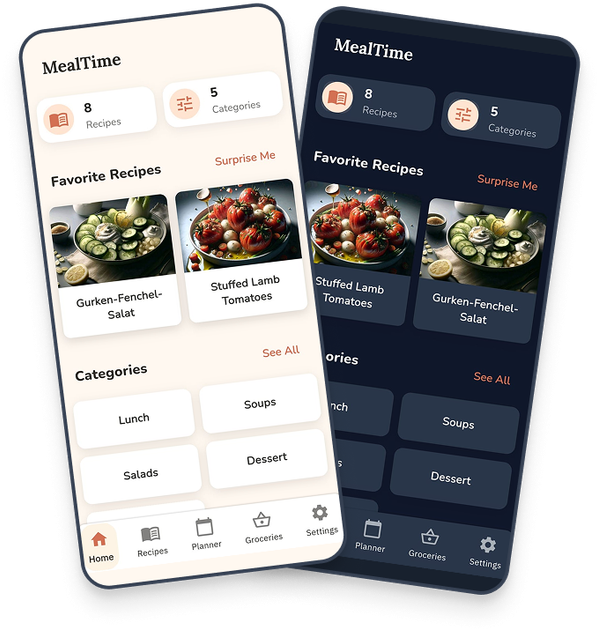
MealTime is your personal, offline-first recipe companion designed to help you save, organize, plan meals, and generate smart grocery lists, all while keeping your data private.
What is MealTime?
What is MealTime?
MealTime is a sophisticated, privacy-focused application designed to be your ultimate personal recipe companion. It centralizes all your culinary knowledge, allowing you to save, organize, and manage every recipe you own in one secure location. Unlike cloud-dependent services, MealTime prioritizes user control with an offline-first architecture, ensuring your data remains on your device unless you explicitly choose to back it up. It transforms the chaotic process of recipe management and meal planning into a streamlined, enjoyable experience, offering powerful tools from import functionality to AI-assisted cooking guidance.
Beyond simple storage, MealTime actively supports your cooking journey. It provides clear, structured views for ingredients and steps, offers cooking analytics to track your culinary trends, and even integrates optional, powerful AI features (BYOK - Bring Your Own Key) for advanced recipe generation and allergen detection. Whether you are a novice cook or a seasoned chef, MealTime ensures you stay focused, prepared, and confident in the kitchen, making mealtime less about logistics and more about enjoyment.
Key Features
MealTime stands out by blending robust organization with modern convenience:
- Comprehensive Recipe Management: Save and organize all your recipes. Easily share them via text, files, or PDFs. Import recipes effortlessly from web links, images, or the MealDB database.
- AI-Powered Assistance (Optional): Utilize integrated AI capabilities (supporting OpenAI, DeepSeek, and Google APIs via user keys) for advanced features like generating new recipes or detecting potential allergens within existing instructions.
- Distraction-Free Cooking Mode: Stay focused while cooking with a dedicated, clean view that displays step-by-step instructions, built-in timers, and essential information without clutter.
- Integrated Meal Planning & Groceries: Plan your weekly meals directly within the app. Automatically generate smart grocery lists from planned meals or add items manually, and share these lists with family members in real-time.
- Data Privacy & Portability: All core data resides locally on your device, ensuring maximum privacy. Manual backup options include Google Drive and iCloud integration, allowing for seamless device migration.
- Advanced Tracking: Log meals prepared from recipes or eaten out, and review cooking analytics to understand your eating habits and trends over time.
- Smart Pairing Suggestions: Receive AI-driven suggestions for complementary dishes or wine pairings to elevate your meals.
How to Use MealTime
Getting started with MealTime is designed to be intuitive and quick:
- Import & Organize: Begin by importing your existing collection. Use the link importer for online recipes, upload images of handwritten notes, or manually input new creations. Categorize and tag recipes immediately for easy searching.
- Plan Your Week: Navigate to the Meal Planner section. Drag and drop saved recipes onto specific days or mealtimes. The app will automatically compile all necessary ingredients into your Grocery List.
- Shop Smart: Review the generated Grocery List. Add non-recipe items (like toiletries or household goods) manually. Share the finalized list with family members who can check off items in real-time while shopping.
- Cook with Confidence: When it's time to prepare a meal, activate the Cooking Mode. This locks the screen into a clean interface, allowing you to follow instructions sequentially and utilize the integrated timers without worrying about screen dimming or accidental navigation.
- Track & Analyze: After eating, log the meal in your tracker. Over time, review the analytics dashboard to see which cuisines you cook most often, your average preparation times, and adherence to your meal plan.
Use Cases
MealTime is perfectly suited for a variety of users and scenarios:
- The Busy Family Manager: Quickly plan weeknight dinners based on existing family favorites, automatically generate a consolidated grocery list, and share it instantly with a partner running errands.
- The Health-Conscious Cook: Import recipes and use the optional AI feature to scan ingredients for common allergens, ensuring meals meet specific dietary restrictions while tracking nutritional intake via meal logging.
- The Digital Recipe Collector: Consolidate decades of recipes scattered across cookbooks, screenshots, and bookmarks into one secure, searchable, offline database that is always accessible, even without Wi-Fi.
- The Experimental Chef: Leverage the AI Assistant (BYOK) to generate entirely new recipe variations based on ingredients you currently have on hand, complete with precise measurements and cooking times.
- The Traveler/Remote Worker: Since the app is offline-first, users can access their entire recipe library and meal plan while camping, traveling internationally, or working in locations with unreliable internet access.
FAQ
Q: Is MealTime free to use, and what is the cost of the AI features? A: The core functionality of MealTime—saving, organizing, planning, and offline use—is available without subscription. The advanced AI features (like recipe generation or allergen detection) are optional and require the user to provide their own API key from supported providers (OpenAI, DeepSeek, Google), meaning you only pay the provider directly for the usage you consume.
Q: How secure is my recipe data if it's stored offline? A: Your primary recipe data is stored locally on your device, offering maximum security against external breaches. For backup, you must manually initiate synchronization with your preferred cloud service (Google Drive/iCloud), giving you full control over when and where your data resides.
Q: Can I import recipes from any website? A: MealTime offers a robust importer that works well with many standard recipe websites via link import. Additionally, you can import recipes by pasting text or uploading images of recipes, making it highly versatile for capturing content from various sources.
Q: What happens if I get a new phone? How do I transfer my recipes? A: Since you control the backups, transferring is straightforward. Ensure you have manually backed up your data to your linked Google Drive or iCloud account. Once you install MealTime on the new device, you can use the restore function to pull your latest backup from the cloud, ensuring a seamless transition.
Q: Does the Cooking Mode require an internet connection? A: No. The Cooking Mode is designed to be fully functional offline. Once the recipe is loaded, the distraction-free view, step-by-step navigation, and built-in timers operate entirely locally on your device.
Alternatives

dumppp
The fastest way to capture thoughts to Notion with a 0.5s launch time, eliminating friction and enhancing productivity.

Biji
Biji is a versatile platform designed to enhance productivity through innovative tools and features.

Gemma AI
Gemma AI is a smart application that calls you directly with personalized, intelligent voice reminders to ensure you never miss important tasks, appointments, or deadlines.

Prompty Town
Prompty Town is an innovative platform that allows users to transform their links into virtual buildings, creating a unique and engaging way to share and interact with content.

Tavus
Tavus introduces PALs: AI humans that remember, empathize, and grow with you, bridging the human-machine divide.

Planndu: Daily Task Planner
Planndu is an intuitive productivity application designed to help users organize tasks, manage projects, build routines, and enhance focus using tools like AI generation and a built-in Pomodoro timer.