

Moltcraft
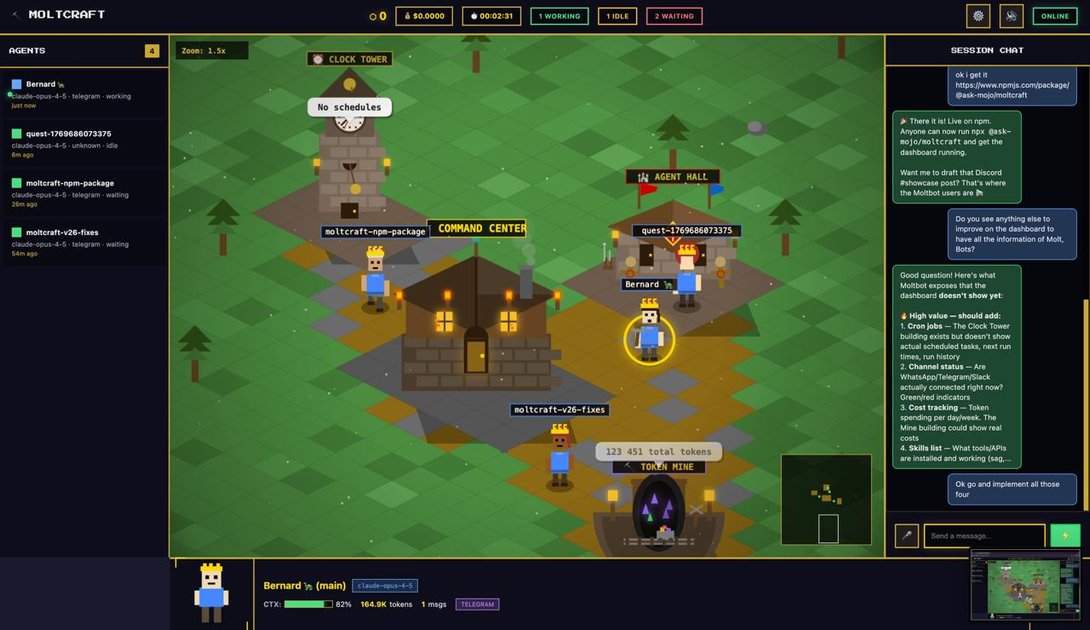
Moltcraft is a pure HTML/CSS/JS pixel-art dashboard that visualizes Moltbot AI agents as a living world. It provides real-time monitoring, interactive conversations, and hands-free control in a lightweight, self-hosted package.
What is Moltcraft?
What is Moltcraft?
Moltcraft is a pure HTML/CSS/JS pixel-art dashboard designed to visualize and monitor Moltbot, an open-source personal AI assistant. It renders each AI agent as a pixel character within a living, real-time world, so you can see at a glance what your bots are doing without scrolling logs or juggling multiple terminals. The project is lightweight (~2MB), dependency-free, and self-hosted, emphasizing privacy and performance. Moltcraft auto-discovers your Moltbot gateway and runs with a single command, making it accessible even on low-power devices like a Raspberry Pi.
Core idea
A visually engaging dashboard where AI agents inhabit a living world. You watch agents move, interact, and process tasks as part of an evolving scene rather than reading lines of logs. This approach reduces cognitive load and makes agent behavior easier to understand at a glance.
Key Features
- Real-time Living World: See all agents in one screen as pixel characters that reflect status, tokens, and conversations.
- Multi-Agent View: No need to switch between six terminals—monitor every agent from a single dashboard.
- Live Chat: Click an agent to chat, read history, and watch responses stream in without context-switching.
- Voice I/O: Built‑in voice enables hands-free interaction while you work.
- Interactive Buildings: Buildings on the map expose live data like cron jobs, token usage, skills, and connected channels, visualized as architecture.
- Zero Dependencies: Pure HTML/CSS/JS (~2MB total). No React, no build step, and it runs on devices like a Raspberry Pi.
- Quick Setup: One command to get started, minimal tooling required.
- Auto-Discovery: Moltcraft automatically discovers your Moltbot gateway for a seamless connection.
- Cloud Version on the Roadmap: If you prefer cloud access, a cloud version is in development with a waitlist.
- Open Source and Self-Hosted: MIT-licensed software that keeps your server and data under your control.
How to Use Moltcraft
-
Prerequisites: You need a running Moltbot instance. Moltcraft is a visually driven dashboard for Moltbot and does not run by itself without Moltbot.
-
Install Moltcraft: On a machine connected to your Moltbot, run the command below. It downloads and launches Moltcraft and auto-discovers your Moltbot gateway.
$ npx @ask-mojo/moltcraft -
Explore the world: Once Moltcraft is running, your agents appear as pixel characters on the map. Click an agent to start a chat, view chat history, and watch responses stream in real time. No terminal windows to open, no extra tools required.
-
Inspect buildings and data: Click buildings on the map to reveal live data such as cron jobs, token usage, agent skills, and connected channels. The data is presented in a visual, architectural layout that helps you grasp system health at a glance.
-
Cloud option: For an install-free experience, Moltcraft is working toward a cloud version. You can join a waitlist to get early access when a cloud-hosted world becomes available.
Use Cases
- Real-time AI agent monitoring: Track dozens of Moltbot agents in a single, immersive interface, ideal for developers and operators.
- Visual infrastructure dashboards: Represent cron jobs, API usage, tokens, and skills as interactive buildings, turning data into a navigable world.
- Hands-free AI interaction: Use built-in voice I/O to talk to agents while you work.
- Private, self-hosted AI assistants: Run Moltcraft on your own hardware to keep data on your terms, with the comfort of an open-source stack.
- Developer and education tooling: A compelling UI for teaching, prototyping, and showcasing how AI agents collaborate in a graphical, pixel-based environment.
FAQ
What is Moltcraft? Moltcraft is a living, pixel-art dashboard for Moltbot that visualizes AI agents as characters within a real-time world. It’s designed to replace log scrolling and terminal juggling with an intuitive, graphical overview that’s easy to watch and learn from.
Is Moltcraft free and open source? Yes. Moltcraft is MIT-licensed and open source. It’s built to be self-hosted and privacy-preserving. A cloud version is in the works, with a waitlist you can join for early access.
Do I need Moltbot to use Moltcraft? Yes. Moltcraft connects to a Moltbot gateway. You must set up Moltbot on a machine (Raspberry Pi, VPS, or laptop) before launching Moltcraft.
What are the system requirements? Moltcraft is zero-dependency HTML/CSS/JS and lightweight (~2MB). It requires a Moltbot gateway to connect. It runs without a build step and can operate on modest hardware, including Raspberry Pi. No React or complicated tooling is needed.
How do I get started?
Install Moltbot, then run Moltcraft with a single command: npx @ask-mojo/moltcraft. Moltcraft auto-discovers your Moltbot gateway and renders your world in seconds.
Is there a cloud version? A cloud-hosted Moltcraft world is in development. If you want early access, join the waitlist from the Moltcraft site.
Alternatives

AakarDev AI
AakarDev AI is a powerful platform that simplifies the development of AI applications with seamless vector database integration, enabling rapid deployment and scalability.

Devin
Devin is an AI coding agent and software engineer that helps developers build better software faster.

Biji
Biji is a versatile platform designed to enhance productivity through innovative tools and features.

Prompty Town
Prompty Town is an innovative platform that allows users to transform their links into virtual buildings, creating a unique and engaging way to share and interact with content.

Planndu: Daily Task Planner
Planndu is an intuitive productivity application designed to help users organize tasks, manage projects, build routines, and enhance focus using tools like AI generation and a built-in Pomodoro timer.

imgcook
imgcook is an intelligent tool that converts design mockups into high-quality, production-ready code with a single click.