

Natoma Playground
Natoma Playground provides a simple, fast way to discover, connect to, and try out various Model Context Protocol (MCP) servers without any local setup.
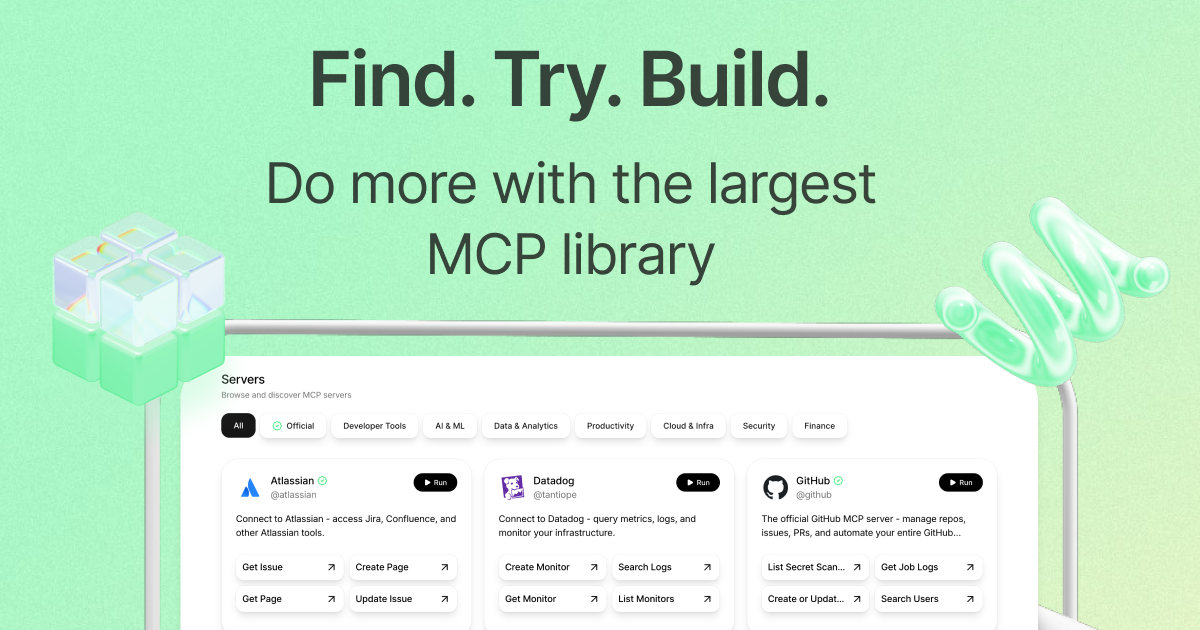
What is Natoma Playground?
What is Natoma Playground?
Natoma Playground serves as an interactive sandbox environment designed specifically for exploring and testing Model Context Protocol (MCP) servers. MCPs are specialized interfaces that allow Large Language Models (LLMs) and AI agents to securely and effectively interact with external tools, APIs, and data sources. Instead of requiring developers or users to configure complex local environments or manage API keys for every service, Natoma centralizes access to dozens of pre-configured integrations, ranging from developer tools like GitHub and AWS to productivity suites like Google Workspace and Notion.
The core value proposition of the Playground is speed and accessibility. It democratizes access to advanced AI agent capabilities by offering a zero-setup environment where users can immediately run specific actions against real services. Whether you need to query Datadog metrics, manage Jira issues, or interact with a vector database like Chroma, the Playground lets you select the relevant MCP, see the available functions (e.g., Create Issue, Run Lambda), and execute them instantly. This makes it an invaluable resource for prototyping AI workflows, testing tool compatibility, and understanding the practical application of structured tool-use in generative AI systems.
Key Features
- Extensive MCP Library: Access to a vast and growing catalog of pre-built MCP servers covering major categories including Cloud Infrastructure (AWS, Azure), Developer Tools (GitHub, CircleCI), Data & Analytics (Amplitude, Elasticsearch), and Productivity (Notion, Slack).
- Zero-Setup Execution: Run complex API calls and tool interactions directly from the browser. Users can test functionality without needing to manage local installations, environment variables, or personal API credentials for the underlying services.
- Action-Oriented Interface: The interface clearly lists the specific, actionable functions available for each MCP (e.g.,
List Secrets,Query DynamoDB,Create Design), allowing users to quickly find the exact capability they need. - Diverse Tool Categories: Servers are logically categorized (e.g., Official, Developer Tools, AI & ML, Finance), making discovery easy for users targeting specific domains.
- Real-World Integration Testing: Provides a safe space to prototype how an AI agent would interact with production systems, testing the syntax and expected output of various tool calls before deploying them in a live application.
How to Use Natoma Playground
Getting started with the Natoma Playground is designed to be intuitive and immediate:
- Browse and Select: Navigate the server list or use the categories (e.g., Servers, Browse) to find the specific tool or service you wish to interact with (e.g., GitHub, Google Workspace).
- View Available Actions: Once an MCP server is selected, the interface displays all the defined functions (actions) that an AI agent could call through that specific protocol.
- Execute a Function: Click on a desired action (e.g.,
List Repositoriesfor GitHub orSearch Logsfor Datadog). The system will prompt you for any necessary parameters. - Review Results: After execution, the Playground returns the structured output from the underlying service, allowing you to immediately verify the function's success, examine the data returned, and understand the expected response format for your AI agent.
This iterative process allows for rapid prototyping of complex, multi-tool agent workflows directly within the browser.
Use Cases
- AI Agent Prototyping and Debugging: Developers building autonomous agents can use the Playground to rapidly test the exact tool calls their agent will make. They can verify that the agent is selecting the correct MCP and formatting the parameters correctly to achieve desired outcomes, such as creating a Jira ticket or updating a database record.
- Exploring Tool Capabilities: For those new to the concept of LLM tool-use, the Playground acts as a comprehensive catalog. A user can explore the capabilities of services like AWS or Azure DevOps through a standardized interface, learning what operations are exposed without needing to read extensive API documentation.
- Validating Data Access Workflows: Data scientists or analysts can test connectivity and query capabilities against services like Amplitude or Elasticsearch to ensure that the necessary data insights can be retrieved by an AI system before integrating the MCP into a production environment.
- Security Tool Integration Testing: Security professionals can test integrations with tools like Auth0 or Brave Search to see how an AI might be used to automate security monitoring, such as listing authentication applications or performing targeted web searches for threat intelligence.
FAQ
Q: Do I need to provide my personal API keys to use the servers in the Playground? A: Generally, no. The Natoma Playground is designed to offer immediate functionality. Many servers utilize shared or demonstration credentials, or they are configured to work within the Natoma ecosystem, allowing you to test the functionality without exposing your private keys.
Q: What is an MCP server, and why is Natoma focused on them? A: An MCP (Model Context Protocol) server is a standardized wrapper that exposes the functionality of a real-world API (like Slack or Asana) in a format that AI models can easily understand and use for tool-calling. Natoma focuses on this because it standardizes the interface between LLMs and external tools, making agent development more reliable.
Q: Can I use the actions I test in the Playground directly in my own application? A: The Playground is primarily for testing and discovery. While it demonstrates the exact actions available, integrating these into your own application will require setting up your own infrastructure to communicate with the respective MCP endpoints, often involving authentication specific to your organization.
Q: How often are new servers and actions added to the Playground? A: Natoma actively maintains and expands its library. New official integrations, developer tools, and community-contributed MCPs are added regularly to keep pace with the evolving landscape of AI tools and services.
Q: Is the data I interact with in the Playground real?
A: For many services (like Jira, GitHub, or Google Workspace), the actions executed in the Playground often interact with a dedicated testing environment or use specific, non-destructive functions. However, users should always exercise caution and assume that actions like 'Create Resource' or 'Update Field' might affect live, non-production data if the server is configured that way. Always check the server details before running destructive commands.
Alternatives

AakarDev AI
AakarDev AI is a powerful platform that simplifies the development of AI applications with seamless vector database integration, enabling rapid deployment and scalability.

Devin
Devin is an AI coding agent and software engineer that helps developers build better software faster.

LobeHub
LobeHub is an open-source platform designed for building, deploying, and collaborating with AI agent teammates, functioning as a universal LLM Web UI.

Claude Opus 4.5
Introducing the best model in the world for coding, agents, computer use, and enterprise workflows.

KiloClaw
KiloClaw is a fully managed, hosted service for deploying OpenClaw, the popular open-source AI agent, eliminating the complexity of self-hosting infrastructure and maintenance.

PromptLayer
PromptLayer is a platform for prompt management, evaluations, and LLM observability, designed to enhance AI engineering workflows.