

Plus AI Presentation Agent
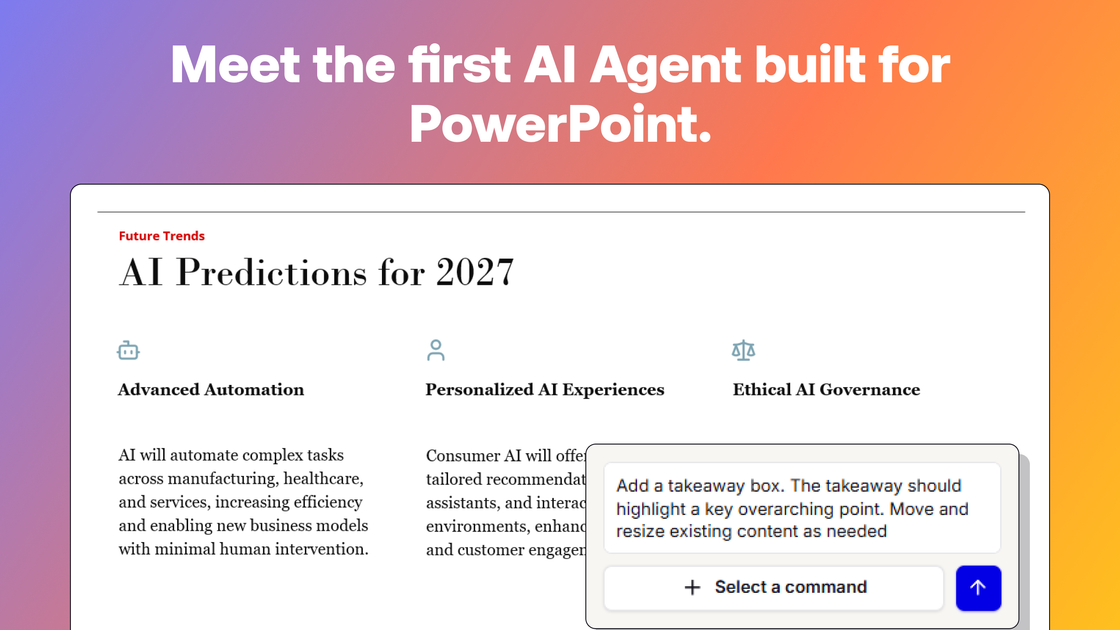
Plus AI's Presentation Agent is an advanced tool integrated within PowerPoint designed to automate complex presentation design, content creation, and slide editing tasks.
What is Plus AI Presentation Agent?
What is Plus AI Presentation Agent?
The Plus AI Presentation Agent represents a significant leap forward in automated presentation creation, specifically engineered to operate within the Microsoft PowerPoint environment. Unlike general-purpose AI chatbots, this agent is purpose-built for professional presentation workflows. Its core function is to understand complex instructions and execute multi-step actions directly on your slides, transforming raw ideas or outlines into polished, professional presentations with minimal manual intervention.
This specialized focus allows the agent to deeply integrate with your existing corporate branding and design assets. It can leverage your custom templates, pull approved imagery and icons from designated libraries, and ensure brand consistency across every slide. By automating the tedious aspects of slide layout, formatting, and content placement, the Plus AI Presentation Agent frees up presenters and business professionals to focus on the strategic message rather than the mechanics of design.
Key Features
- Agentic Action Execution: Capable of planning and executing multi-step tasks within PowerPoint, going beyond simple text generation to actively manipulate slide objects and layouts via API calls.
- Template Integration: Seamlessly works with your existing presentation templates and custom designs, ensuring all generated or edited content adheres to established corporate styles.
- Native PowerPoint Functionality: Built specifically for the PowerPoint ecosystem, offering superior performance and integration compared to generalist tools attempting slide creation.
- Content Creation & Editing: Can generate entirely new slides based on prompts or edit existing slides, applying the correct formats and styles from the current presentation.
- Security and Trust: Utilizes only purpose-built presentation tools, avoiding the execution of arbitrary or unreviewed code on local machines or cloud infrastructure, enhancing enterprise security.
- Enhanced Toolset Access: Functions as an advanced layer on top of the standard Plus AI add-in, utilizing existing tools for inserting, formatting, and rewriting content while adding complex planning capabilities.
How to Use Plus AI Presentation Agent
Getting started with the Presentation Agent is straightforward for existing Plus AI subscribers. First, ensure you have the Plus AI add-in installed and active within your Microsoft PowerPoint application.
- Access the Agent: Open your desired presentation file (or start a new one). Navigate to the editing menu within the Plus AI interface and select the "Agent mode" option.
- Provide Instructions: Clearly articulate the task you need the agent to perform. This could be anything from "Create an executive summary slide based on the following bullet points" to "Reformat slides 5 through 10 to match the new Q3 template style."
- Execution: The agent will analyze your request, plan the necessary steps (like finding the correct template elements, inserting text boxes, or applying layouts), and execute these actions directly within your PPTX file.
- Review and Refine: Once the agent completes the task, review the changes. Because the agent works natively within PowerPoint, you can easily make final manual tweaks if necessary, though the goal is high accuracy on the first pass.
For optimal results, users are encouraged to set up and utilize a custom template within Plus AI, which allows the agent to access a library of pre-approved slides and elements for faster, more consistent output.
Use Cases
- Rapid Pitch Deck Generation: Sales teams can input key talking points or rough data, and the agent can instantly structure a branded, visually appealing pitch deck ready for review, drastically cutting down on initial design time.
- Corporate Training Material Updates: HR or L&D departments can instruct the agent to update dozens of training slides across multiple presentations simultaneously, ensuring all visual elements and standard disclaimers are consistent across the organization.
- Data Visualization Formatting: When importing raw data charts, the agent can be tasked with applying specific corporate color palettes, adjusting font sizes, and ensuring all chart labels meet accessibility standards, all within the PowerPoint environment.
- Template Migration: Companies transitioning to a new brand identity can use the agent to systematically convert older presentations to the new template structure, handling the complex re-layout of content slide-by-slide.
- Executive Briefing Preparation: Executives needing a quick, high-impact summary can feed the agent a long report and ask it to distill the core findings into a concise, visually driven 10-slide presentation adhering strictly to executive branding guidelines.
FAQ
Is the Plus AI Presentation Agent included with my Plus AI subscription? Yes, the Plus AI Presentation Agent functionality is included with your existing Plus AI subscription. You can access it by opening the editing menu within PowerPoint and selecting "Agent mode."
Does the agent support Google Slides? Currently, the Plus AI agent does not work directly within Google Slides. However, it excels at creating native PPTX files that can be seamlessly uploaded and used within Google Slides.
How is this agent superior to using a general chatbot like Claude for PowerPoint tasks? The Presentation Agent is purpose-built for presentation workflows inside PowerPoint. It can generate slides using your actual templates, pull from approved icon/image libraries, and run agentic actions via API. General chatbots lack this deep, secure integration with your specific presentation assets and execution environment.
Can the agent edit slides that already exist in my presentation? Yes, the agent is fully capable of editing existing slides. It can modify content, adjust formatting, and apply new styles based on your instructions, all while respecting the current presentation's structure and template.
What happens if I use my custom templates? The agent works with your existing slides and custom templates. For the best performance and utilization of your slide library, setting up a custom template specifically within the Plus AI interface is recommended, as this allows the agent to optimize its actions.
Alternatives

ChatBA
Instantly create slide decks using ChatBA.

Beautiful.ai
Beautiful.ai is an AI-powered presentation maker that helps users create professional, client-ready slide decks quickly and effortlessly.

MagicSlides
MagicSlides is an AI-powered PPT maker that transforms any content source into professional presentations in seconds.

PXZ AI
An All-In-One AI Platform that combines tools for image, video, voice, writing, and chat to enhance creativity and collaboration.

Slidesgo
Slidesgo offers a wide variety of free Google Slides themes and PowerPoint templates for presentations.

Grok AI Assistant
Grok is a free AI assistant developed by xAI, engineered to prioritize truth and objectivity while offering advanced capabilities like real-time information access and image generation.