

SF Trip Planner
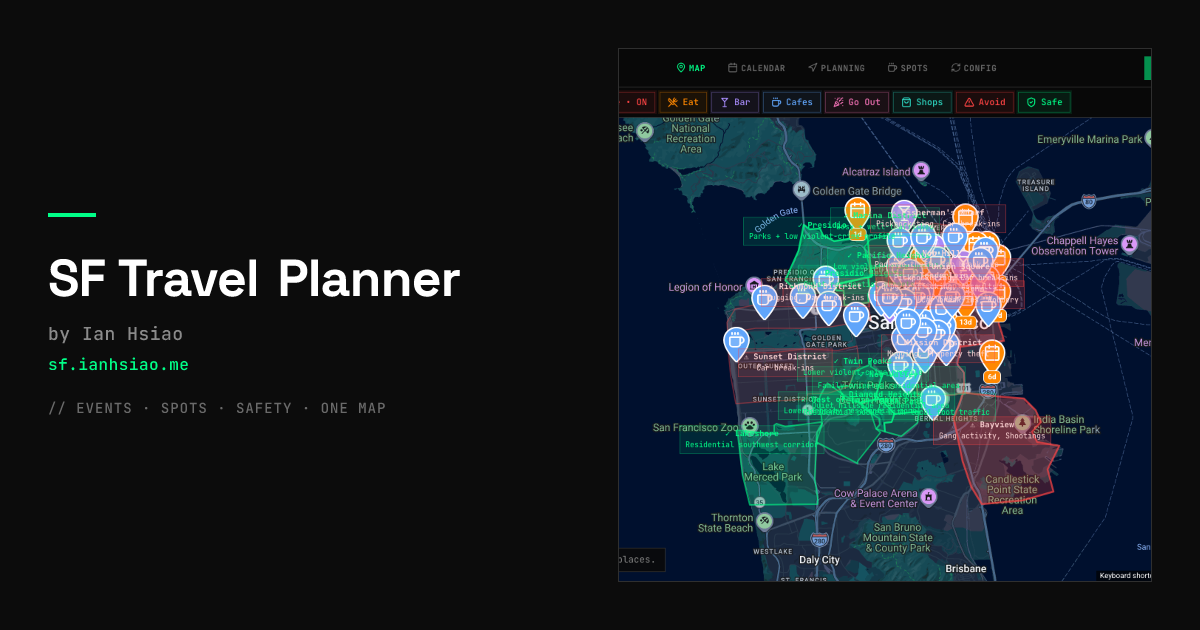
SF Trip Planner consolidates San Francisco events, curated local spots, and real-time safety data onto a single interactive map to streamline trip planning.
What is SF Trip Planner?
SF Trip Planner: Your All-in-One San Francisco Itinerary Builder
What is SF Trip Planner?
SF Trip Planner is a free, open-source web application designed to solve the common frustration of planning a trip to San Francisco. Travelers often face information overload, juggling dozens of browser tabs for events, restaurant recommendations, and crucial safety information. This tool centralizes all these disparate data sources—from event aggregators like Luma and Eventbrite to local recommendations and official crime data—onto one intuitive, interactive map interface.
The core purpose of SF Trip Planner is to enable informed decision-making before committing to any part of your itinerary. By visualizing events, points of interest (spots), and safety overlays simultaneously, users can cross-reference schedules, assess neighborhood risks, and build optimized daily plans without ever leaving the application. It transforms scattered research into a cohesive, actionable travel guide.
Key Features
SF Trip Planner stands out by integrating traditionally separate data streams into a unified planning environment:
- Unified Map View: All data—events, curated spots (cafes, restaurants, bars), and safety information—are plotted on a single interactive map using distinct, color-coded pins (e.g., orange for events, teal for cafes).
- Event Conflict Detection: Visualize overlapping events on the same day and time. A calendar view highlights days with high event density, helping users spot potential scheduling conflicts before they happen.
- Live Safety Heatmap Overlay: Integrates publicly sourced SFPD and CivicHub crime incident data to display a live crime heatmap. This allows users to assess the safety profile of specific blocks when choosing routes or venues for evening activities.
- Curated Spot Management: Easily import, tag, and categorize personal recommendations (e.g., ramen spots, rooftop bars) from various sources, making them visible alongside scheduled events for easy filtering and selection.
- Intelligent Day Planning: Features a drag-and-drop time-grid day planner. Users can arrange activities sequentially, and the system automatically updates route lines and time estimates on the map.
- Collaborative Planning: Supports shared planner rooms, allowing travel partners to view and edit their respective schedules side-by-side within the same itinerary structure.
- Seamless Export: Finalized itineraries can be exported directly as an ICS file or synced instantly with Google Calendar, ensuring the plan is accessible on mobile devices.
How to Use SF Trip Planner
Getting started with SF Trip Planner involves three main phases: Data Aggregation, Visualization & Planning, and Finalization.
- Aggregate Your Data: Begin by syncing your event feeds (if applicable) and importing your list of desired spots (restaurants, shops, etc.). Tag these spots clearly (e.g., 'Eat', 'Bar', 'Shop') so they can be filtered later.
- Visualize and Assess: Open the main map view. Toggle the live crime heatmap to understand the safety context of different areas. Review the calendar to see event density across your trip dates.
- Build Your Itinerary: Drag events and spots directly onto the time-grid day planner. Rearrange items by dragging them to optimize walking routes between locations. The map updates dynamically to show the planned path.
- Finalize and Export: Once satisfied with the daily structure, use the collaboration feature to sync schedules with friends. When the plan is locked, export the entire itinerary to your preferred calendar application (Google Calendar or iCal) for easy access during your trip.
Use Cases
- The First-Time Tourist: A visitor unfamiliar with San Francisco can use the tool to plot major attractions alongside highly-rated, safe dining options, ensuring they don't accidentally schedule a late-night walk through a high-incident area.
- Conference Attendees: Professionals attending a conference can import all official networking events, cross-reference them with nearby highly-rated happy hour spots, and quickly plan efficient evenings without extensive manual mapping.
- Group Travel Coordination: A group of friends traveling together can use the shared planner room to contribute their must-see locations while maintaining visibility on each other's commitments, preventing scheduling conflicts and ensuring everyone is accounted for.
- Optimizing Food Tours: A foodie can import dozens of restaurant recommendations from blogs and social media, filter them by 'Eat' category, and then sequence them geographically on the map to create the most efficient walking or transit route for a multi-day culinary exploration.
- Assessing Event Viability: When deciding between two competing events on the same night, users can check the immediate vicinity of both on the crime heatmap to make a safety-informed choice about which location is preferable for a late-night departure.
FAQ
Q: Is SF Trip Planner truly free to use? A: Yes, the application is explicitly advertised as free and open-source. There are no stated costs for using the core planning and mapping features.
Q: Where does the crime data come from, and is it real-time? A: The crime heatmap sources data from publicly available San Francisco safety resources, including SFPD incident reports and CivicHub live reports. While it uses live data feeds, it reflects recent incident reports rather than predicting future crime.
Q: Can I plan for transportation between locations? A: The planner automatically calculates and displays route lines between planned stops, providing time estimates based on walking or assumed transit, helping you sequence your day logically.
Q: What happens if my travel partner edits the plan? A: If you are using the shared planner room feature, you will see updates reflected in the shared view. The system is designed to allow collaborative editing while maintaining separation for individual schedules, ensuring clarity on who planned what.
Q: How do I get my final itinerary onto my phone? A: Once your plan is finalized, you can export it as an ICS file or use the direct sync feature to push all events, times, and locations directly into your Google Calendar, making it accessible offline or on the go.
Alternatives

Wanderlog
Wanderlog is a free travel planner and itinerary app that helps users create detailed itineraries, manage bookings, and optimize travel routes seamlessly.

Layla
Layla is an AI-powered trip planner that creates personalized travel itineraries tailored to your style and budget.

Herodot AI
Herodot AI offers AI-powered audio guides and self-guided tours, allowing travelers to explore cities worldwide with personalized insights directly on their phones.
DestMate
DestMate is a private travel alarm that wakes you by location, ensuring you never miss your stop during bus, train, or long rides.

iMean AI
iMean AI is an AI-powered trip planner that helps users find cheap flights, hotels, and personalized itineraries.

Gemini
Gemini is an AI tool that helps users create imaginative designs, plan trips, and develop applications through intuitive prompts and interactive features.