

Superset
Superset is the code editor for AI agents, enabling you to run and orchestrate multiple AI coding agents in parallel on your machine.
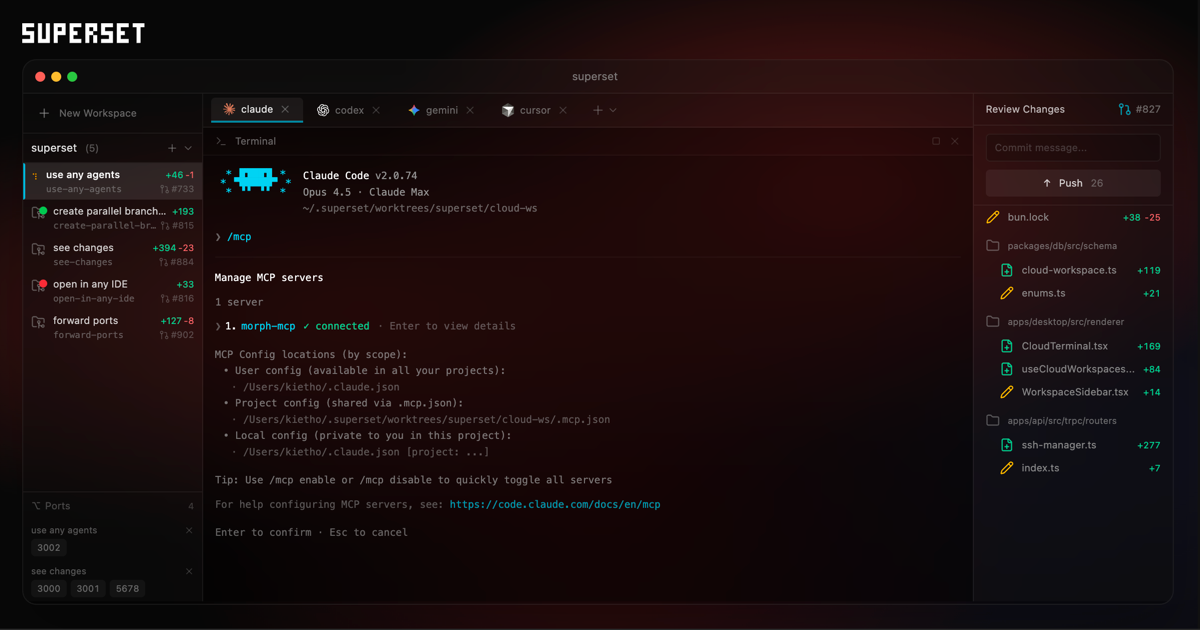
What is Superset?
What is Superset?
Superset is a revolutionary tool designed for the AI era, acting as the code editor for your AI agents. It empowers developers to run and orchestrate multiple AI coding agents, such as Claude Code, Codex, and others, in parallel directly on their local machine. Instead of waiting for one agent to complete a task, Superset allows you to spin up new coding tasks while current ones are still in progress, significantly boosting productivity and streamlining development workflows.
Built for the demands of modern AI-driven development, Superset provides a robust environment for managing complex coding projects. It integrates seamlessly with your existing tools and workflows, offering features like parallel execution, isolated worktrees, and universal compatibility with any CLI agent. This means you can leverage the power of multiple AI agents simultaneously, accelerating feature development, bug fixing, and code refactoring without the usual bottlenecks.
Key Features
- Parallel Execution: Run dozens of AI coding agents simultaneously across different tasks. Work on multiple features, fix bugs, and refactor code concurrently.
- Universal Compatibility: Works with any CLI agent, including Claude Code, OpenCode, Cursor, and any other command-line based coding tool. Seamlessly switch between agents.
- Isolated Worktrees: Each agent operates within its own isolated Git worktree, preventing merge conflicts and ensuring that changes from one agent do not interfere with another. Review and merge work independently.
- Open in Any IDE: Jump into your worktree with a single click from your favorite IDE, including VS Code, Cursor, Xcode, JetBrains IDEs, or any terminal.
- Port Forwarding: Easily forward ports from your agent environments to your local machine for seamless development and testing.
- Agent Orchestration: Manage and coordinate multiple AI agents, creating swarms that work together on complex problems.
- Intuitive Interface: A user-friendly interface that simplifies the management of parallel coding tasks and agent interactions.
How to Use Superset
Getting started with Superset is straightforward:
- Download and Install: Download Superset for macOS from the official website or explore the project on GitHub.
- Create a New Workspace: Launch Superset and create a new workspace. Superset will handle the setup, including creating worktrees, installing dependencies, and configuring the environment.
- Select Your Agents: Choose the AI agents you wish to use (e.g., Claude Code, Codex, Gemini, Cursor). Superset supports a wide range of CLI agents.
- Start Parallel Tasks: Initiate multiple coding tasks. Superset will automatically create isolated worktrees for each task, allowing agents to work in parallel.
- Monitor Progress: Track the progress of your agents through the Superset interface, which displays tasks in progress and their status.
- Review and Merge: Once agents complete their tasks, review the changes within their isolated worktrees. You can then commit and merge your work without conflicts.
- Open in IDE: Seamlessly open any worktree in your preferred IDE or terminal for further development or inspection.
Use Cases
- Accelerated Feature Development: Develop multiple features simultaneously by assigning each feature to a separate AI agent in parallel. This drastically reduces the time to market for new functionalities.
- Rapid Bug Fixing: Isolate and fix bugs concurrently. Assign different potential bug fixes to various agents, allowing for faster identification and resolution.
- Large-Scale Refactoring: Undertake complex code refactoring projects by dividing the work among multiple agents. Each agent can focus on a specific module or set of files in its own worktree, ensuring a clean and manageable process.
- AI-Powered Code Reviews: Utilize agents to generate code suggestions or perform initial reviews on different branches or features in parallel, providing faster feedback loops.
- Personalized Development Environments: For solo developers, Superset provides an efficient way to manage multiple concurrent tasks without interference, acting as a powerful personal coding assistant.
FAQ
-
What AI agents are compatible with Superset? Superset is designed to be universal and works with any CLI-based coding agent. This includes popular options like Claude Code, Codex, Gemini, Cursor, and any custom agents you might have set up.
-
Is Superset free to use? Superset is available for download, and its core functionality is accessible. For specific details on licensing or potential enterprise features, please refer to the official website or GitHub repository.
-
What operating systems does Superset support? Currently, Superset is available for macOS. Support for other operating systems may be added in the future.
-
How does Superset prevent merge conflicts? Superset creates a separate, isolated Git worktree for each parallel task. This isolation ensures that agents work on independent copies of the codebase, preventing direct conflicts and allowing for controlled merging later.
-
Can I use Superset with my existing IDEs? Absolutely. Superset offers a one-click option to open any worktree in your preferred IDE, including VS Code, Cursor, Xcode, JetBrains IDEs, or any terminal-based editor.
Alternatives

Devin
Devin is an AI coding agent and software engineer that helps developers build better software faster.

SkillKit
SkillKit provides a universal set of skills allowing developers to write code instructions once and deploy them across 32 different AI coding agents, ensuring consistency and broad compatibility.

CodeSandbox
CodeSandbox is a cloud development platform that empowers developers to code, collaborate and ship projects of any size from any device in record time.

AakarDev AI
AakarDev AI is a powerful platform that simplifies the development of AI applications with seamless vector database integration, enabling rapid deployment and scalability.

imgcook
imgcook is an intelligent tool that converts design mockups into high-quality, production-ready code with a single click.

Claude Opus 4.5
Introducing the best model in the world for coding, agents, computer use, and enterprise workflows.