

Taskvox
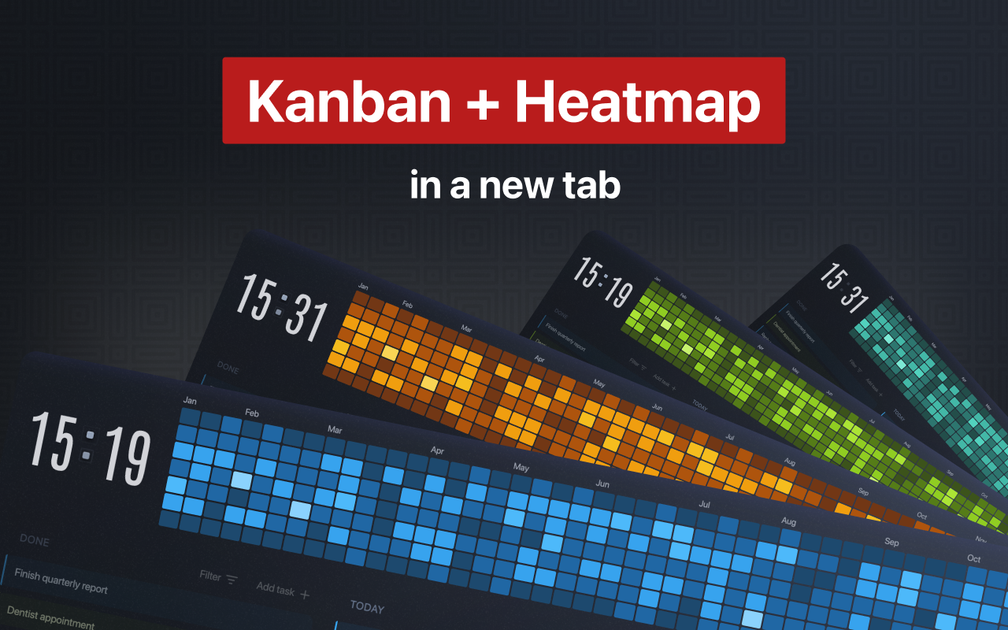
Taskvox is a Chrome extension that combines a Kanban-style task manager with a yearly heatmap visualization directly in your new tab. It helps you track completed tasks and visualize your progress over time.
What is Taskvox?
Taskvox is an innovative Chrome extension designed to streamline your personal task management by integrating a familiar Kanban board with a unique yearly heatmap, all within your browser's new tab page. It aims to provide a simple yet powerful tool for individuals looking to organize their tasks, visualize their productivity, and gain insights into their work patterns without the clutter of complex project management software.
Inspired by the visual progress tracking of GitHub's contribution graph, Taskvox transforms your completed tasks into a colorful, year-long heatmap. This visual representation allows you to see your consistent effort across various projects and time periods, offering a motivational overview of your accomplishments. It's built for the solo user, focusing on personal productivity and ensuring your task data remains private and secure.
Key Features
- Kanban Board Integration: Easily manage your tasks with a drag-and-drop interface similar to popular tools like Trello. Add, organize, and move tasks between different stages of your workflow.
- Yearly Heatmap Visualization: See your completed tasks visualized on a calendar spanning a full year. Each completed task contributes to the heatmap, providing a visual history of your productivity.
- Project and Color Labeling: Organize tasks visually using customizable color labels. Assign labels to group related work, making it easier to sort and filter your tasks.
- Due Dates: Set deadlines for tasks when needed, helping you stay on track with time-sensitive items.
- Filtering Capabilities: Narrow down your view by project, color label, or date range. This allows you to focus on specific types of work or time periods, helping you understand where your time is going.
- Task Filtering by Age and Priority: Easily find older tasks that might have slipped through the cracks or prioritize urgent items to ensure nothing important is missed.
- Dark Mode: Enjoy a comfortable viewing experience with a clean, eye-friendly dark theme, especially beneficial for late-night work sessions.
- Minimalist Design: A clutter-free interface that focuses on your tasks and progress, minimizing distractions.
- One-Person Focus: Designed specifically for individual task management, not team collaboration.
- Cross-Device Sync: Sign in to sync your tasks across all your devices, ensuring your data is accessible wherever you are.
- Data Privacy: Your tasks are private and are not sold or shared with third parties.
How to Use Taskvox
Getting started with Taskvox is designed to be effortless:
- Installation: Install the Taskvox Chrome extension with a single click from the Chrome Web Store.
- Open New Tab: Every time you open a new tab in Chrome, you'll be greeted by your Taskvox dashboard.
- Add Tasks: Use the intuitive interface to add new tasks. You can simply type a task name or add optional details like color labels and due dates.
- Organize Tasks: Drag and drop tasks between different columns or sections of your Kanban board to reflect their current status (e.g., To Do, In Progress, Done).
- Visualize Progress: As you complete tasks, they are automatically added to your yearly heatmap. Watch your heatmap fill up over time to see your consistent effort.
- Filter and Review: Utilize the filtering options to view tasks by project, color, date, age, or priority. This helps you analyze your productivity patterns and identify areas for improvement.
Use Cases
- Personal Productivity Tracking: Individuals who want a simple way to manage daily to-dos, personal projects, and long-term goals while visualizing their overall progress.
- Habit Building: Users aiming to build consistent habits (e.g., daily exercise, reading, coding practice) can use Taskvox to track completed actions and see their streak visualized on the heatmap.
- Freelancers and Solopreneurs: Independent professionals managing multiple client projects can use color labels and filters to keep track of different workstreams and ensure deadlines are met.
- Students: Organizing study schedules, assignments, and personal projects, with the heatmap providing a visual incentive for consistent academic effort.
- Creative Individuals: Artists, writers, or designers managing personal creative projects can track their progress and maintain motivation through the visual representation of their work.
FAQ
-
Q: Is Taskvox free to use? A: Taskvox is currently offered as a free Chrome extension. Check the official website or Chrome Web Store for the most up-to-date pricing information.
-
Q: What browsers is Taskvox compatible with? A: Taskvox is a Chrome extension, so it is primarily designed for Google Chrome. It may work on other Chromium-based browsers, but compatibility is best guaranteed on Chrome.
-
Q: Can I use Taskvox for team projects? A: No, Taskvox is specifically designed for individual task management and personal productivity. It does not include features for team collaboration.
-
Q: How is my data stored and is it private? A: Taskvox syncs your tasks across devices via your account. The developers state that your tasks are yours and they do not sell your data.
-
Q: How does the heatmap work? A: The heatmap is inspired by GitHub's contribution graph. Each time you mark a task as complete, it adds a data point to the corresponding day on your yearly calendar, visually representing your activity and consistency over time.
Alternatives

Biji
Biji is a versatile platform designed to enhance productivity through innovative tools and features.

Planndu: Daily Task Planner
Planndu is an intuitive productivity application designed to help users organize tasks, manage projects, build routines, and enhance focus using tools like AI generation and a built-in Pomodoro timer.

Chores
Chores is a free iOS app designed for couples, families, and roommates to collaboratively manage household tasks using smart scheduling, contribution tracking, and motivational rewards.

Decision Jar
Create virtual jars of options with Decision Jar—shake your phone to pick instantly, use AI suggestions, and view decision logs over time.

BotBoard
Manage AI agents like a team with a shared backlog, structured context, and human review workflow to assign, track, and approve outputs.
MealTime
MealTime is your personal, offline-first recipe companion designed to help you save, organize, plan meals, and generate smart grocery lists, all while keeping your data private.