

Umbrel Pro
The Umbrel Pro is an ultimate home cloud server offering up to 16TB of local SSD storage, designed for complete digital ownership, privacy, and running powerful applications like AI agents and Bitcoin nodes.
What is Umbrel Pro?
What is Umbrel Pro?
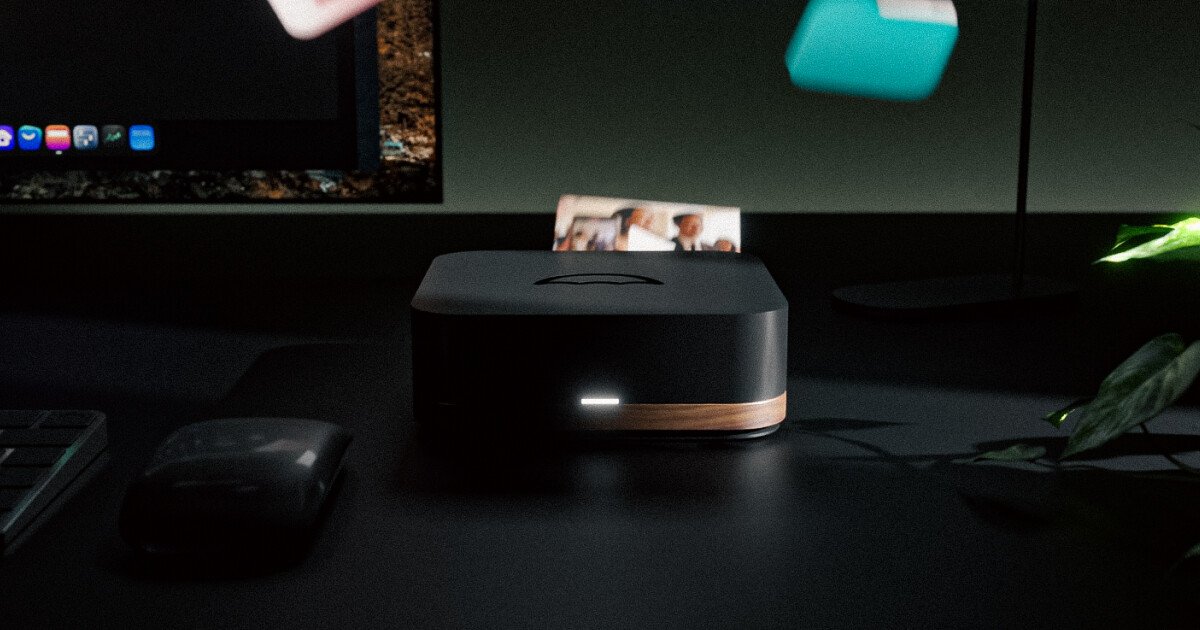
The Umbrel Pro is a premium, high-performance home cloud server designed to give users complete ownership and control over their digital lives, eliminating reliance on costly and privacy-invasive third-party cloud services. It functions as a powerful, always-on local server capable of storing massive amounts of data—up to 16TB via four NVMe SSD slots—while simultaneously running sophisticated applications like local Large Language Models (LLMs) via OpenClaw, hosting media servers, and operating a private Bitcoin node.
Crafted with premium materials, featuring an aluminum chassis accented with American Walnut, the Umbrel Pro is built for performance and aesthetics. It runs on umbrelOS, a beautifully simple, open-source operating system that allows for one-click installation of over 200 self-hosted applications, ensuring that your data stays safe, private, and accessible only by you, without any recurring monthly fees.
Key Features
- Massive Local Storage: Supports up to four M.2 2280 NVMe SSD slots, allowing for expansion up to 16TB of secure, local storage for photos, 4K footage, and files.
- OpenClaw AI Agent: Run OpenClaw, a sandboxed AI agent, to automate tasks like inbox management and web browsing directly on your hardware, ensuring 24/7 operation and data privacy.
- Premium Build Quality: Features a precision-milled aluminum body with real American Walnut accents, combining high-end aesthetics with robust thermal management.
- RAID-Powered Resilience (FailSafe Mode): Implements RAID functionality across the SSDs, ensuring that if any single drive fails, data integrity is maintained, and operation continues without interruption or loss.
- High-Performance Hardware: Powered by an 8-Core, 3.8GHz Intel® Core™ i3-N300 processor and 16GB of LPDDR5 RAM, supported by a 2.5 Gbps Ethernet port for fast local networking.
- Effortless umbrelOS: A user-friendly, open-source Home Cloud OS accessible via any web browser, enabling setup in under 5 minutes, one-click app installation, and intuitive storage management.
- Superior Connectivity: Includes two USB 3.2 Gen 2 Type-C ports (10 Gbps) and two Type-A USB 3.0 ports for versatile peripheral connection.
How to Use Umbrel Pro
Getting started with your Umbrel Pro is designed to be exceptionally straightforward, focusing on minimal setup time:
- Install SSDs: Unlatch the magnetic lid (which doubles as a heatsink) and slide your M.2 2280 NVMe SSDs into the available slots. No tools are required for this step.
- Power On & Connect: Plug in the power adapter and connect the device to your network via the 2.5 Gbps Ethernet port.
- Access umbrelOS: On any device connected to your local network, navigate to
http://umbrel.localin your web browser. The system will guide you through the final configuration steps. - Install Applications: Once logged into the umbrelOS dashboard, browse the App Store and install desired applications—such as OpenClaw, media servers, or Bitcoin nodes—with a single click.
- Manage Data: Utilize the intuitive UI to monitor SSD health, manage network sharing (SMB access for Dropbox-style file access), and set up remote access using integrated tools like Tailscale.
Use Cases
- The Privacy-Focused Media Enthusiast: Stream your entire 4K HDR movie and music library to any device, anywhere, without relying on subscription services. The 16TB capacity ensures even large media collections are stored securely and locally.
- The Bitcoin Maximalist: Run a full, self-sovereign Bitcoin node directly from your desk. Connect your wallet securely to your own node for faster sync times and complete verification of the blockchain, enhancing financial sovereignty.
- The Productivity Power User: Deploy OpenClaw, the local AI agent, to handle repetitive digital tasks 24/7. Since the processing and data remain sandboxed on your Umbrel Pro, you gain AI automation without sacrificing proprietary information.
- The Digital Archivist: Securely back up and store millions of high-resolution photos and critical work files. With RAID-like resilience, you have peace of mind knowing that hardware failure of a single drive will not result in data loss.
- The Self-Hosting Beginner: Leverage the one-click app store and the simple web interface to explore the world of self-hosting (from home automation to file sharing) without needing command-line expertise or complex server configuration.
FAQ
Q: Which SSDs are supported by the Umbrel Pro? A: The Umbrel Pro supports standard M.2 2280 NVMe SSDs. For configurations that include pre-installed storage (like the 4TB model), industrial-grade NVMe SSDs built for always-on operation are used.
Q: Does the Umbrel Pro require an internet connection to function? A: No. While an internet connection is needed for initial setup, app downloads, and remote access (if configured), the core functions—file storage, local streaming, and running local applications—operate entirely offline, ensuring continuous service even during outages.
Q: What is the difference between Umbrel Home and Umbrel Pro? A: The Umbrel Pro is the ultimate server, featuring a significantly more powerful Intel Core i3 processor, 2.5 Gbps Ethernet, 16GB RAM, and four SSD slots for up to 16TB storage. Umbrel Home is the essential starter server with less storage capacity and a lower-tier processor.
Q: How does the FailSafe Mode protect my data? A: FailSafe Mode acts similarly to RAID 1 or RAID 5 configurations across the installed SSDs. If one SSD fails, the system automatically shifts operation to the remaining drives, preventing data loss and service interruption until the failed drive can be replaced.
Q: Can I access my files when I am away from home? A: Yes. UmbrelOS supports remote access, often facilitated through integrated solutions like Tailscale, allowing you to securely access your network drives and applications from any device outside your home network.
Alternatives

AakarDev AI
AakarDev AI is a powerful platform that simplifies the development of AI applications with seamless vector database integration, enabling rapid deployment and scalability.

LobeHub
LobeHub is an open-source platform designed for building, deploying, and collaborating with AI agent teammates, functioning as a universal LLM Web UI.

Claude Opus 4.5
Introducing the best model in the world for coding, agents, computer use, and enterprise workflows.

Biji
Biji is a versatile platform designed to enhance productivity through innovative tools and features.

Prompty Town
Prompty Town is an innovative platform that allows users to transform their links into virtual buildings, creating a unique and engaging way to share and interact with content.

Planndu: Daily Task Planner
Planndu is an intuitive productivity application designed to help users organize tasks, manage projects, build routines, and enhance focus using tools like AI generation and a built-in Pomodoro timer.