
Multiple export formats
Convert PDF and scanned bank statements into CSV, Excel, QBO/QuickBooks, OFX, QFX, MT940, CAMT.053, Tally XML, BAI2, Sage, Xero, MYOB, DATEV, and JSON outputs.

Bank Statement Conversion turns PDF and scanned bank statements into accounting, spreadsheet, and payment-file formats. It is aimed at accountants, finance teams, investigators, developers, and business owners who need structured transaction data or automation.
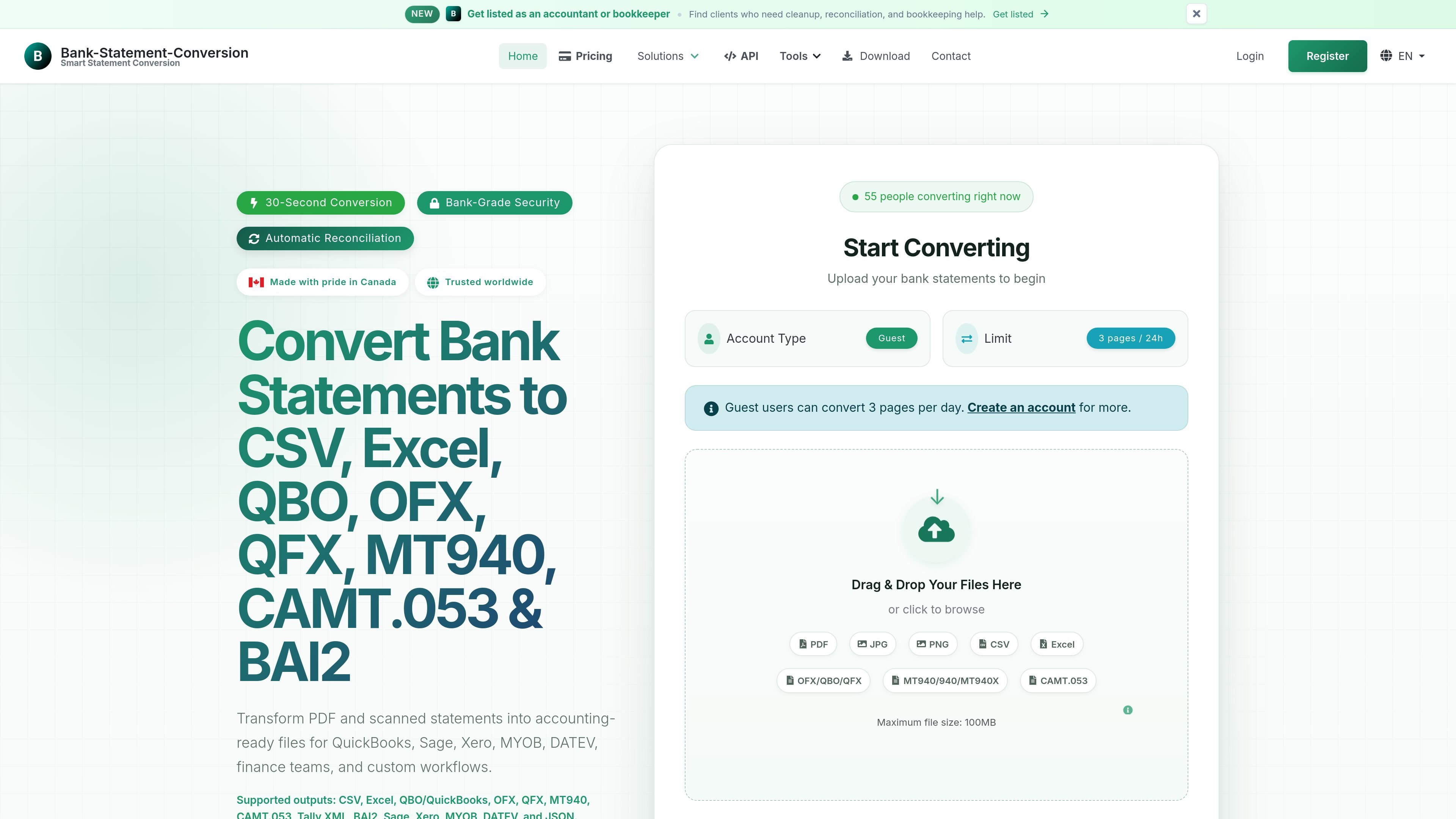
Bank Statement Conversion is a document conversion service that turns bank statements into spreadsheet, accounting, and payment-file formats. The public site positions it for accountants, finance teams, investigators, business owners, and developers who need structured data from PDF or scanned statements.
The core workflow is straightforward: upload a statement, choose an output format, and download the result. The product also offers OCR for scanned documents, automated reconciliation, transaction categorization, and an API for apps or AI clients that need to call the same conversion flow programmatically.
Convert PDF and scanned bank statements into CSV, Excel, QBO/QuickBooks, OFX, QFX, MT940, CAMT.053, Tally XML, BAI2, Sage, Xero, MYOB, DATEV, and JSON outputs.
Use OCR to process scanned statements and photo uploads, not just digital PDFs.
Review opening and closing balances, compare calculated and stated values, and surface discrepancies in the conversion flow.
Organize transactions by description patterns and export structured data that can be mapped into accounting tools.
Create payment files from CSV or Excel rows, including ACH/NACHA, CPA005, SEPA XML, BACS, ABA, and New Zealand formats.
Expose the conversion workflow through API endpoints and an MCP-compatible remote endpoint for developers and AI clients.
Convert client bank statements into QuickBooks, Excel, or CSV so accountants and bookkeepers can reduce manual entry and work from structured transaction data.
Prepare court-ready financial evidence with converted statements and reconciliation data for attorneys and legal investigators.
Support fraud detection and forensic analysis by turning statements into sortable data that can be checked for patterns and anomalies.
Generate payment files from CSV or Excel rows for bank review and later production use, including ACH/NACHA, SEPA XML, BACS, ABA, and similar formats.
Build statement conversion into custom apps or AI workflows through the public API, OpenAPI schema, or MCP endpoint.
The site says statements can be uploaded as PDF, JPG, PNG, CSV, Excel, OFX, QBO, QFX, MT940, MT940X, or CAMT.053, and the service also mentions OCR for scanned statements. The public API docs describe a workflow of upload, status polling, and download.
The pricing page says free accounts include daily pages, and paid plans add monthly page allowances, batch processing, longer history, support levels, and wider export formats. There is also a pay-as-you-go option and enterprise tiers for higher-volume use.
Yes. The API docs say registered users can generate API tokens from the dashboard, and AI clients can use the same conversion workflow through the remote MCP endpoint or OpenAPI schema.
The pricing page says the service uses 256-bit encryption and is SOC 2 Type II certified. The homepage also describes bank-grade security and mentions SSL encryption.
The site says the standard web workflow is upload, select a format, and download the result. The API workflow adds job status polling before download.

KlutterAI is an AI-powered expense tracker that helps people capture receipts, categorize spending, and monitor budgets from iOS or Android. The product also surfaces recurring charges, spending alerts, and exportable reports.

nolainocr is an AI OCR tool that extracts structured data from PDF invoices, receipts, forms, contracts, and bank statements. It helps teams move document data into Excel, Google Sheets, JSON, or CSV without manual entry.

Letra is a menu bar OCR utility for macOS Sonoma 14 or later that copies text from screen regions, videos, PDFs, screenshots, and screen shares to the clipboard. It also supports on-device recognition, QR and barcode decoding, searchable capture history, and copied image or file input.

Timebook is a time tracking, invoicing, and bookkeeping app for freelancers and single-member LLCs. It combines hours, invoices, and basic books in one place, with optional Plaid bank sync and AI-agent support.
司马阅是一款面向企业的AI文档智能体平台,帮助团队把分散在文档中的知识转成可用于问答、检索、写作和审查的结构化能力。它适合对准确性和数据安全要求较高、且有大量文档工作流程的企业。

Capso is a native macOS screenshot and screen recording app for capturing, annotating, recording, and extracting text from screen content. It is free forever, open source, and positioned as an alternative to CleanShot X.