
Parametric dieline design
Build boxes, bags, labels, posters, banners, menus, and other formats on editable dieline templates. Dimensions can be set in millimetres, centimetres, metres, or inches, and structural elements rebuild when sizes change.

Drint is browser-based packaging design and print-prepress software for creating boxes, bags, labels, and other printed formats on real dielines. It helps designers preview structures in 3D, check files before export, share reviews, and present finished work to clients or print-shop customers.
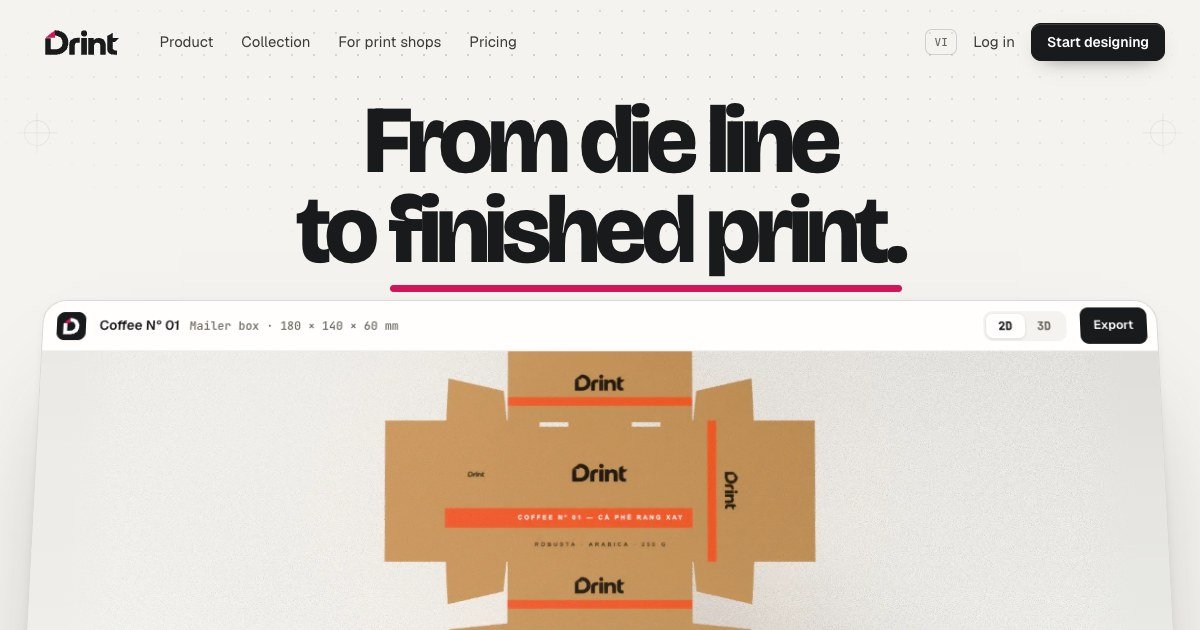
Drint is browser-based packaging design software for creating boxes, bags, labels, and other printed formats on real-size dieline templates. Users set dimensions, place artwork on the flat die, and see the structure fold into a 3D mockup as they work.
The workflow continues through preflight and production handoff: Drint checks items such as bleed, total ink, white ink, varnish plates, and separations, then exports print-oriented files including CMYK PDF/X-4. It also provides mockups, 3D presentation scenes, client review links, and portfolio pages for showing finished work.
Build boxes, bags, labels, posters, banners, menus, and other formats on editable dieline templates. Dimensions can be set in millimetres, centimetres, metres, or inches, and structural elements rebuild when sizes change.
Draw on the flat die while the package updates in 3D. The preview reflects cuts and creases and can show materials or finishes such as foil, embossing, soft-touch, and kraft.
Run preflight checks before export, including total ink by stock, bleed, white-ink and varnish plates, and separations. Exports include CMYK PDF/X-4, with the die line on its own layer.
Use browser-based 3D mockups for bags, jars, pouches, cans, cartons, and other products. Pro includes higher-resolution mockups and video exports without the free-plan watermark grid.
Assemble product scenes from a 3D library with props, lighting, backdrops, camera angles, real 3D-scanned objects, and photographed materials, then export the result.
Share review links for clients and publish selected projects to a personal portfolio page. Clients can rotate linked 3D models, comment, and approve without creating an account.
Set the length, width, and height of a box or bag, work on the flat dieline, and inspect how folds, flaps, and locks behave in 3D before preparing files for production.
Prepare a print handoff by checking bleed, ink coverage, white ink, varnish plates, and separations, then exporting a CMYK PDF/X-4 or other supported production file.
Create realistic product presentations using packaging mockups, photographed materials, props, lighting, backdrops, and camera angles without leaving the browser.
Send a review link to a client so they can rotate a 3D design, leave pinned comments, and approve it without registering for an account.
Publish selected projects to a personal portfolio page or use a print-shop catalog to present models, dimensions, live 3D views, and contact options to prospective customers.
No installation is required. Drint runs in Chrome, Edge, or Safari, and projects save as you work and sync across devices.
You can create designs on real dieline templates, view the package folding in 3D, and export print files. The site lists PDF/X-4 and TIFF exports in CMYK, with separations available on the Pro plan; die files can be exported as PDF, AI, and SVG, while DXF and CF2 die-maker files are available on Pro.
No. Clients can open a review link without an account, rotate the 3D view, pin comments on pictures, and press Approve.
Yes. Drint states that commercial and client work is allowed on every plan. The free plan includes design, 3D, and preflight, but exports and presentation features have limits such as watermarks, lower-resolution pictures, and a monthly die-file allowance.
Yes. A project can be switched to Public and then appears on a page at drint.io/your-name. Free pages show up to 12 projects and include a “Made with Drint” line; Pro pages show every project without that line.
PixelDrive is a bulk image generation API for creating many on-brand images from one template through a browser editor, REST API, CSV batch, or MCP. It suits teams that need repeatable image output with cacheable renders and usage-based pricing.

Napkin AI convierte texto en visuales editables para presentaciones, documentos y contenido compartible. Generación desde texto y exportación a PPT, PNG, SVG o PDF.

appdesigns is a browser-based tool for creating App Store and Google Play screenshots from uploaded app images. It helps developers and designers add device frames, customize layouts, and export unlimited watermark-free PNGs without an account.

Shotie is a Mac app for creating localized App Store and Google Play screenshots from simulator or emulator captures, generated screens, or uploads. It provides chat-based editing, render checks, and one-zip export for store workflows.

Refero MCP for AI agents connects an MCP-compatible agent to Refero’s curated library of web and iOS product interfaces and user flows. It helps agents research real design patterns before generating UI, with access included in the Refero Pro plan.

Pass Designer is a macOS beta tool for creating and previewing Apple Wallet passes. It helps businesses, developers, and design teams combine templates, custom imagery, pass fields, colors, and semantic data while checking how passes render on iPhone and Apple Watch.