
Point to page elements
Select an element in a running page in normal Chrome, including localhost, and write the desired outcome instead of describing the element’s location manually.

EditUI is a Chrome extension that lets you point at elements in a running web app, describe the desired changes, and copy one contextual prompt for Claude Code, Cursor, Codex, or another coding agent. It helps developers and reviewers batch visual UI feedback without adding code to the repository.
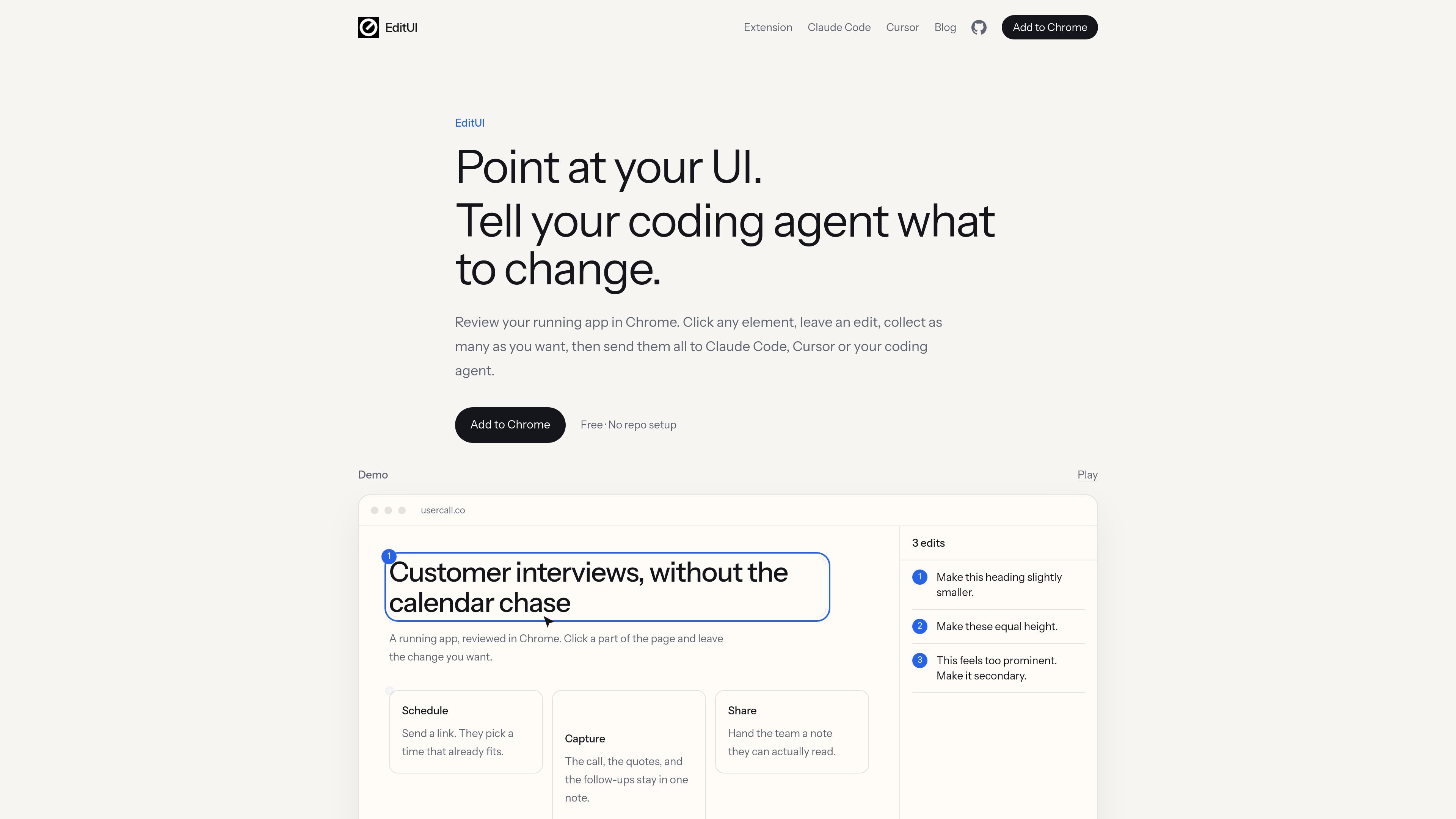
EditUI is a Chrome extension for giving coding agents precise visual feedback on a running web application. Instead of annotating screenshots or manually identifying selectors, you open the page in normal Chrome, click the element that needs attention, and describe the change in plain language.
The extension collects the review into one prompt for a later implementation pass. That prompt includes the page URL, viewport, each note, and contextual information about the selected elements. You paste it into the coding agent that has the relevant repository, then review the reloaded page and follow up on any changes that missed the mark.
Select an element in a running page in normal Chrome, including localhost, and write the desired outcome instead of describing the element’s location manually.
Keep clicking and documenting issues during one review pass. EditUI retains the notes so multiple changes can be sent together rather than as separate prompts.
Copy a single plain-text prompt containing the reviewed URL, viewport, requests, and selected-element context such as DOM details, visible text, nearby markup, computed styles, and bounds.
Use the same copied output with Claude Code, Cursor, Codex, Windsurf, or another coding agent that accepts pasted prompts.
Run the review without adding files to a repository or connecting the extension to a codebase. The coding agent handles implementation after the prompt is pasted.
Keep page context in the browser during review. The extension content script remains inactive until Edit Mode is enabled, and notes are stored locally in chrome.storage.local.
Open the local development URL at the viewport where an issue appears, mark the affected heading, card, button, or spacing, and send the complete review to the agent working in the project repository.
Collect several visual issues—such as hierarchy, alignment, spacing, responsive stacking, and button emphasis—during one pass, then hand the numbered list to the agent for implementation.
Review the same running application in normal Chrome when the implementation workflow is based in Claude Code, Codex, or another agent rather than Cursor’s browser.
Let a designer, product reviewer, or developer describe visible outcomes by pointing at the affected elements, while the developer uses the resulting prompt in the repository that renders the page.
Install the Chrome extension, open the running app in Chrome—including a localhost URL—and turn on Edit Mode from the toolbar or with Command-Shift-E on macOS (Ctrl-Shift-E on Windows). Click an element, describe the desired outcome, and continue adding edits before copying the batch.
EditUI creates one plain-text prompt containing the page URL, viewport, each request, and context for the selected elements, such as tags, visible text, nearby markup, selected attributes, computed styles, and bounds. Paste that prompt into Claude Code, Cursor, Codex, or another tool that accepts pasted prompts.
No. EditUI does not read repositories, edit source files, call a model, open pull requests, or maintain a connection to a coding agent. The agent needs access to the repository that renders the reviewed page and applies the changes after you paste the prompt.
The extension processes page context locally. Notes are stored in chrome.storage.local and leave the browser only when you press Copy all and paste the prompt into a tool you choose. The site states that no account is required.
It works with any agent that can accept a pasted prompt, including Claude Code, Cursor, and Codex. The copied prompt is plain text, so the workflow is not tied to one coding agent or to Cursor's browser.

ByteAsk is a terminal-first AI coding agent for C and C++ that edits repositories and verifies changes with the real compiler, debugger, sanitizers, and tests before showing a diff. It offers a free tier plus paid plans, with editor connectors and zero-retention handling described in the source.

Epherem is a static security scanner for web apps built with AI coding tools such as Lovable, Bolt, v0, Replit, Cursor, and Claude Code. It checks source files and dependencies for common security mistakes, then provides categorized findings and suggested fixes without running the app.

CreateOS Sandbox is an isolated compute environment for running code and agent workloads inside Firecracker micro-VMs. It is designed for workflows that need machine-level isolation, private networking between sandboxes, and programmatic control through SDK, CLI, or MCP.

GitBot is a local browser-based workspace for creating reusable coding bots powered by Claude Code, Codex, or OpenCode. It helps developers run those agents across repository folders with persistent threads and configurable permissions.

hob is an independent workspace for coding agents that keeps agent sessions, terminals, history, and follow-up work organized around the tools and providers you already use. It is aimed at developers who want local control over routing, history, and workspace structure rather than a bundled model stack.

Ably Chat is a chat API platform for building custom realtime chat applications. It supports room-based messaging, typing indicators, presence, reactions, and message updates, with usage-based pricing options for different deployment stages.