
Regional currency presets
Select a company region and base currency from supported presets including the United Kingdom, United States, Eurozone, Australia, Canada, Nordics, New Zealand, Singapore, or Other.

FixMyFX is a browser-based calculator that estimates foreign-exchange fees on international revenue and expenses. It helps founders compare a Stripe-and-bank setup with a multi-currency workflow and estimate potential annual savings.
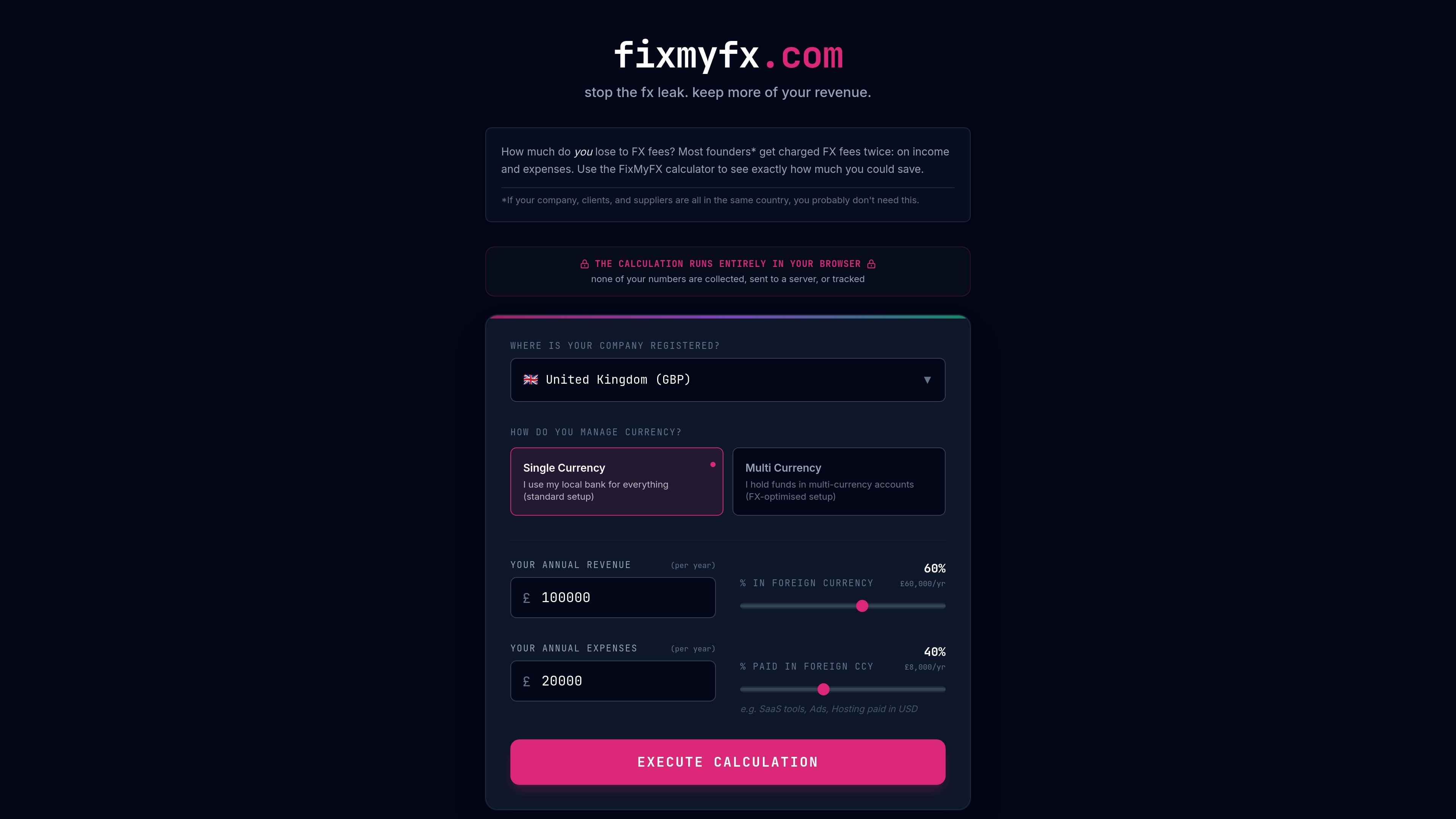
FixMyFX is a browser-based foreign-exchange fee calculator for founders and businesses that receive revenue or pay expenses in more than one currency. It estimates the annual cost of a conventional setup—Stripe auto-conversion combined with bank FX—and compares it with a multi-currency approach designed to retain foreign currency for matching expenses.
Users select a company region, choose between a single-currency or multi-currency setup, and enter annual revenue, foreign-currency revenue, annual expenses, and foreign-currency expenses. The tool then estimates potential savings over 12 months and provides a suggested workflow: receive foreign-currency payouts into matching accounts, pay foreign bills from those balances, and convert only the remaining net profit back to the home currency.
Select a company region and base currency from supported presets including the United Kingdom, United States, Eurozone, Australia, Canada, Nordics, New Zealand, Singapore, or Other.
Enter annual revenue and expenses, along with the percentage of each that is in or paid in foreign currency, to model a cross-border business profile.
Compare estimated annual fees for Stripe auto-conversion plus bank FX with an FX-optimised multi-currency setup.
The estimate applies stated assumptions: Stripe auto-conversion of 1% in the US or 2% in the UK, EU, and Rest, approximately 3% bank FX markup on foreign spending, and approximately 0.4% for net-profit conversion.
View potential annual savings over a 12-month period and express the result in illustrative equivalents such as products, software subscriptions, or coffees.
Run the calculation locally in the browser; the site says the entered numbers are not collected, sent to a server, or tracked.
A founder receiving customer payments in currencies such as EUR, GBP, or USD can estimate how Stripe auto-conversion may affect annual revenue before deciding whether to maintain matching currency accounts.
A business paying for SaaS, advertising, or overseas contractors can include its foreign-currency expenses to see how bank FX markups may add to the cost of operating internationally.
A company considering a move from a single-currency bank setup can compare its current estimate with a multi-currency setup that retains foreign funds for direct payouts and spending.
A business owner can use the 12-month savings estimate to quantify whether reducing unnecessary conversions is material enough to investigate account and payout changes.
FixMyFX is a browser-based calculator. Enter the company registration region, annual revenue, share of revenue received in foreign currency, annual expenses, and share of expenses paid in foreign currency, then run the calculation.
The calculator compares estimated annual fees under a current setup using Stripe auto-conversion and bank FX against an FX-optimised setup using matching multi-currency accounts, direct foreign-currency spending, and conversion of net profit back to the home currency.
The calculation is performed entirely in the browser. The site states that entered numbers are not collected, sent to a server, or tracked.
The site suggests opening multi-currency accounts matching the currencies customers pay in, connecting those accounts to Stripe for direct payouts, paying foreign expenses from matching currency balances, and converting only the remaining profit back to the home currency.
The results are estimates based on standard publicly available fee structures and are not financial advice. The site advises users to check their own bank's product disclosure statement.

Timebook is a time tracking, invoicing, and bookkeeping app for freelancers and single-member LLCs. It combines hours, invoices, and basic books in one place, with optional Plaid bank sync and AI-agent support.

Finchum is a personal finance planning tool that aggregates accounts and forecasts future balances for users in the US and Canada. It supports secure sync without sharing bank passwords, with OAuth where available and file-based imports as a fallback.

KlutterAI is an AI-powered expense tracker that helps people capture receipts, categorize spending, and monitor budgets from iOS or Android. The product also surfaces recurring charges, spending alerts, and exportable reports.

CashPylot is finance software for startups and freelancers that combines invoicing, expense tracking, cashflow monitoring, budgets, and client management in one platform. It offers a 7-day free trial on a single paid plan.

Finamie is a personal finance app that uses voice input to log expenses and generate financial insights automatically. It supports English and Spanish, with a free tier and a Premium plan for heavier use.

SimplyPortfolio is a manual portfolio tracker for stocks, ETFs, gold, and silver that combines multiple accounts into one dashboard. It supports multi-currency reporting, cost-basis tracking, and CSV export, with a free tier for up to 3 holdings.