
Local playback and playlists
Play locally stored MP3, AAC, M4A, FLAC, Apple Lossless, WAV, AIFF, CAF, AC3, and other formats decoded natively by macOS. Load and save M3U playlists, and import music by dropping files or folders into the app.

GhostDeck is an offline music player for macOS that plays local audio files in a retro, modular deck interface. It supports common native formats, M3U playlists, equalizer controls, five animated low-poly worlds, and offline playback without accounts or network access.
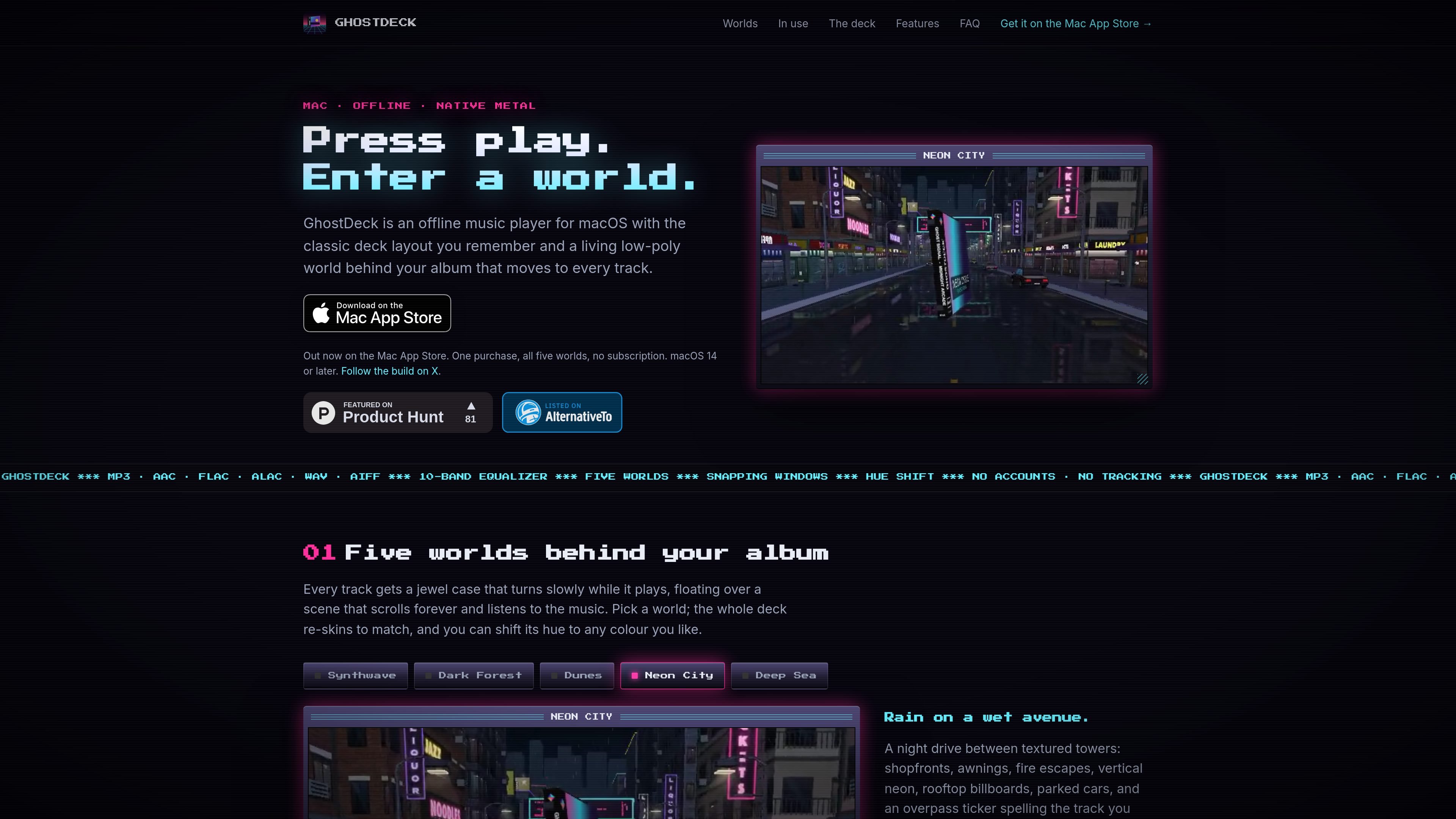
GhostDeck is an offline music player for macOS that plays audio files from folders on your Mac. It uses a classic deck-style interface with four snap-together modules for playback, playlists, equalizer controls, and visual feedback.
While a track plays, its artwork appears in a slowly turning jewel case over one of five low-poly scenes. The native Metal renderer generates the environments on the Mac, while controls such as playlist management, keyboard shortcuts, media keys, and dockable windows support desktop listening without a network connection.
Play locally stored MP3, AAC, M4A, FLAC, Apple Lossless, WAV, AIFF, CAF, AC3, and other formats decoded natively by macOS. Load and save M3U playlists, and import music by dropping files or folders into the app.
Shape playback with a 10-band equalizer, preamp, live response curve, and presets including Flat, Bass, and Headphones.
View a 32-band analyser, scrolling track title, and elapsed or remaining time while music plays.
Choose among five low-poly worlds, then shift a theme’s hue across the colour spectrum. The scenes are rendered in Metal with generated geometry, lighting, fog, reflections, and vignette effects.
Use four modules that snap together, dock the deck near a screen edge, and select a 1x–4x pixel scale. Keyboard shortcuts, media keys, the menu bar, and the Now Playing widget support control outside the main window.
The native macOS app runs offline, has no account or analytics, and is sandboxed to folders the user opens. The site states that the app is about 12 MB and idles at a few percent of one CPU core.
Open a music folder and play files recursively without sending the library to an online service. The app can use embedded artwork or nearby cover files, with a generated sleeve when neither is available.
Load or save M3U playlists, shuffle or repeat tracks, and control playback with keyboard shortcuts, media keys, the menu bar, or the Now Playing widget.
Select one of five scenes, adjust its hue, choose an equalizer preset, and dock the deck in a screen corner while it runs alongside other Mac work.
Use the 10-band equalizer, preamp, live response curve, spectrum analyser, and elapsed or remaining time display for more detailed playback control.
No. GhostDeck plays files stored on your Mac rather than streaming from Spotify or Apple Music. Select a folder and it scans its contents recursively.
It supports formats macOS can decode natively, including MP3, AAC, M4A, FLAC, Apple Lossless, WAV, AIFF, CAF, and AC3. M3U playlists can be loaded and saved.
GhostDeck requires macOS 14 Sonoma or later and supports both Apple silicon and Intel Macs.
Artwork is taken from embedded tags first, then cover.jpg or folder.jpg beside the track. If no artwork is available, GhostDeck generates a retro sleeve based on the title.
The app has no account requirement, analytics, or network access. It is sandboxed and only sees folders that you open.
Tuck is a free menu bar manager for macOS 27 or later that lets users arrange, hide, search, and conditionally reveal Mac menu bar icons. It helps keep frequently used controls visible while preserving the layout across restarts and software updates.

Rank Kiwi is a Chrome extension for researching creator content on Instagram and YouTube. It ranks visible posts and channel uploads by a creator-relative Outlier Score, with filters and CSV or JSON export for content research workflows.

Letra is a menu bar OCR utility for macOS Sonoma 14 or later that copies text from screen regions, videos, PDFs, screenshots, and screen shares to the clipboard. It also supports on-device recognition, QR and barcode decoding, searchable capture history, and copied image or file input.

The Computer Game is a browser-based strategy and simulation game in which players progress from gathering raw materials to designing chips and building computers. It supports solo play, trading and world visits with other players, and optional collaboration with AI applications such as Claude or ChatGPT.

Naarchy is a free, open-source Linux desktop utility that gathers files, clipboard content, music controls, a timer, calendar access, and configurable widgets in one compact on-screen island. It is built with Rust and GTK4 for a Wayland-oriented workflow.

KernelAI is a mobile AI app that runs 53 open-weight models locally on iPhone, iPad, and Android devices. It helps users chat, work with documents and images, code, and use AI offline without an account or subscription.