
AI image descriptions
Upload an image or paste an image URL, then generate either a short description or a more detailed account of the visible scene, objects, actions, and context.

Image Describer is a web-based AI tool that analyzes uploaded images or image URLs to generate descriptions, alt text, OCR results, SEO copy, social content, and image-generation prompts. It supports individual analysis and batch processing for content, accessibility, creative, and media-library workflows.
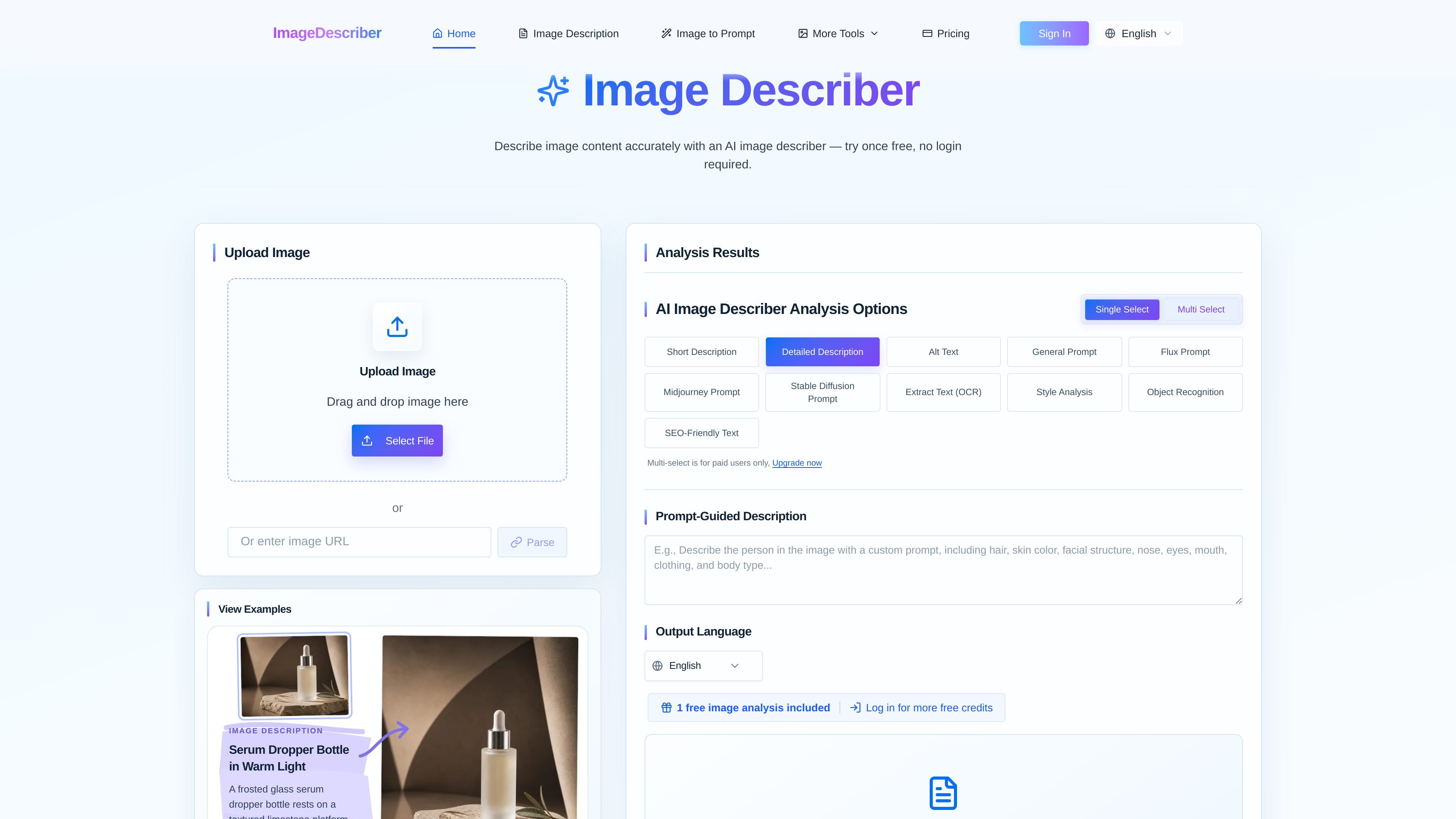
Image Describer is a web-based AI image analysis tool from imagedescriber.dev. It accepts uploaded images or image URLs and produces natural-language descriptions of visual content, including subjects, objects, scenes, actions, and context.
The product is designed for practical content workflows rather than a single output format. Users can create descriptions, accessibility alt text, SEO copy, creative prompts, OCR text, and social media content, then process images individually or in batches and export structured results.
Upload an image or paste an image URL, then generate either a short description or a more detailed account of the visible scene, objects, actions, and context.
Create alt text for screen readers, SEO-friendly image text, and social media captions or hashtags from visual content.
Turn a reference image into prompts for Midjourney, Stable Diffusion, Flux, and DALL·E, with options covering subjects, setting, style, lighting, color, composition, and materials.
Extract readable text from screenshots, photographs, and scanned documents, with the option to describe the image alongside its detected text.
Process collections using the same analysis settings, generate consistent outputs, and download results as CSV, JSON, or Excel for reuse.
Choose among analysis options including style analysis, object recognition, multiple output languages, and prompt-guided descriptions. Multi-select analysis options are available to paid users.
Generate alt text for product, editorial, or website images so publishing teams can add clearer image context for screen reader users.
Analyze product and catalog imagery to create reusable descriptions, SEO-friendly text, and metadata across many visual assets.
Upload a reference image and produce structured prompts that preserve visual elements such as composition, lighting, color, and style for downstream image-generation work.
Run OCR on screenshots, scans, posters, or photographed documents when readable text needs to be extracted and interpreted with surrounding visual context.
Process a folder or collection with consistent settings, review the generated results, and export a report for a CMS, spreadsheet, or database.
Upload an image or paste an image URL, choose one or more analysis options, and start the analysis. The site supports JPG, PNG, WebP, and HEIC for the standard workflow; batch processing also lists GIF, BMP, and HEIF support.
The service can generate short or detailed descriptions, alt text, general and model-specific prompts, OCR text, style analysis, object recognition, SEO-friendly text, and prompt-guided descriptions. Social media captions and hashtags are also presented as a use case.
Yes. The accessibility workflow generates context-aware alt text intended to help screen reader users understand images and support WCAG-oriented publishing.
Yes. The batch page states that up to 100 images can be selected at one time. Multiple batches can be run consecutively for larger collections.
Results can be exported in CSV or JSON, and the batch workflow also lists Excel export. The site describes these exports as suitable for reuse in CMSs, spreadsheets, or databases.

Munch is a social app for food and recipes that lets people discover, share, and organize recipes in one place. It also includes AI-assisted recipe formatting and ingredient scanning for quick meal ideas.
LabelLens escanea etiquetas de alimentos envasados desde una foto o subida y ofrece una puntuación nutricional con un resumen claro de ingredientes, aditivos y valores clave.

Snapmark is a VS Code extension that lets you annotate clipboard screenshots before pasting them into AI chats. It supports blur redaction, numbered callouts, and automatic resizing for large images.

Arduino VENTUNO Q is an edge AI computer for AI and robotics applications. It combines AI inference and deterministic control on a single board and is designed to work with Arduino App Lab.

Letra is a menu bar OCR utility for macOS Sonoma 14 or later that copies text from screen regions, videos, PDFs, screenshots, and screen shares to the clipboard. It also supports on-device recognition, QR and barcode decoding, searchable capture history, and copied image or file input.

KlutterAI is an AI-powered expense tracker that helps people capture receipts, categorize spending, and monitor budgets from iOS or Android. The product also surfaces recurring charges, spending alerts, and exportable reports.