
One-click LinkedIn import
Pull a LinkedIn profile into Foundire without copy/paste so you can start from existing profile data instead of a blank document.

Foundire’s LinkedIn to Hired Chrome Extension imports a LinkedIn profile into Foundire, lets applicants tailor the content with AI, and exports a resume as a PDF. It is designed for people who want to turn an existing LinkedIn profile into a structured resume draft more quickly.
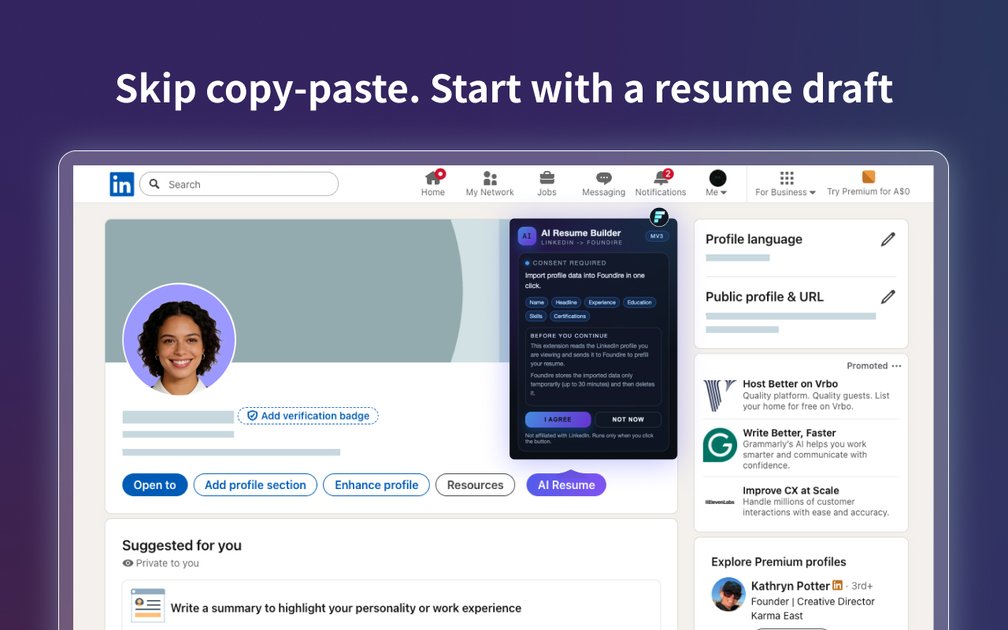
Foundire’s LinkedIn to Hired Chrome Extension turns a LinkedIn profile into a structured resume draft inside Foundire. It is positioned for applicants who want to move from profile data to a role-tailored resume without copying details manually.
The extension imports core profile information, lets Foundire rewrite content with AI for a target role, and exports the result as a PDF. The page presents the workflow as install, open LinkedIn, import into Foundire, tailor, and export when the resume is ready.
Pull a LinkedIn profile into Foundire without copy/paste so you can start from existing profile data instead of a blank document.
Refine summaries and bullet points for a specific role using AI, helping adapt the same profile to a target job.
Export the finished resume as a clean PDF when you are ready to submit or share it.
Bring across profile essentials such as headline, location, experience, education, skills, and highlights into a structured draft.
Use a three-step flow: install the extension, open your LinkedIn profile, then import, tailor, and export.
Start a new resume from the profile fields already present in LinkedIn instead of rebuilding your work history by hand.
Adjust resume language for a specific opening by using AI to rewrite summaries and bullet points around the role requirements.
Move quickly from draft to submission by exporting a clean PDF after the import and editing steps are complete.
Capture a more consistent version of your experience, education, skills, and achievements in one structured draft.
Foundire says the extension lets you add your LinkedIn profile to Foundire, tailor the resume with AI, and export a PDF. The page describes a three-step flow: install the extension, open your LinkedIn profile, then import, tailor, and export.
The page shows the extension is installed from the Chrome Web Store and used from your LinkedIn profile page. After import, Foundire can refine the resume with AI and export a polished PDF.
The extension page is aimed at applicants who want to turn a LinkedIn profile into a structured resume draft. Foundire’s broader site also includes hiring workflows for teams, but the extension page itself is focused on applicant resume creation.
The pricing page shows a Free plan and paid Pro and Enterprise plans for Foundire. The extension page does not list separate pricing for the add-on itself.

Mockin is an AI career toolkit for UX/UI and Product Designers that combines resume checking, portfolio review, LinkedIn checking, job matching, and mock interview practice. It helps users improve application materials and practice structured interview answers before applying or interviewing.

AIApply is a job application AI for jobseekers that helps generate tailored resumes and cover letters, auto-apply to matched roles, and prepare for interviews. The site also presents resume scanning, a job board, and live interview help.

TalentAid es una plataforma de matching de empleos con IA: filtra ofertas de portales y recomienda roles según tus habilidades, experiencia y objetivos.

CVComp is an ATS resume scanner and resume builder that helps job seekers check keyword fit, fix formatting issues, and export updated resumes. It supports job-specific matching, live editing, and PDF or DOCX output.

Hire ID is a verification-first hiring platform for candidates and employers. It helps users verify identity, work history, and education, then share trusted profiles and build resumes from checked credentials.

Simplify is an AI job search platform that helps individual job seekers find matched roles, tailor resumes, autofill applications, build recruiter connections, and track submissions in one place. It also offers a Chrome extension for browser-based application autofill and tracking.