
Template and custom motion references
Preview a motion template and load its clip as the movement reference, or upload a prepared video for a different action.

Motion Transfer AI is a browser-based tool that animates a still character or subject image using a motion template or uploaded reference video. It is suited to short gestures, portrait clips, character experiments, outfit-change concepts, and pet animations, with model settings and credit estimates shown before generation.
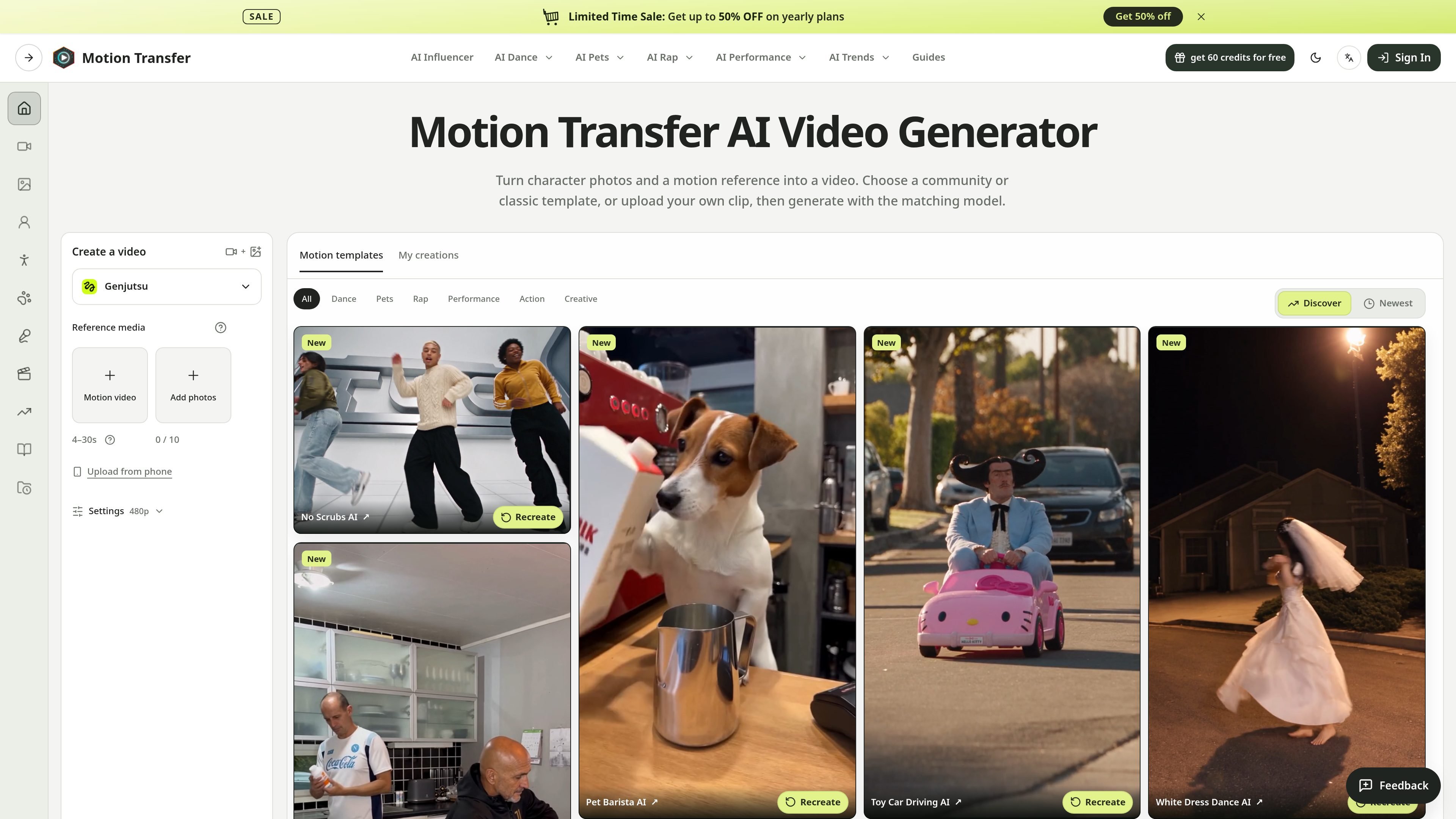
Motion Transfer AI is a browser-based AI video tool that transfers movement from a reference video to a still character or subject image. Users can select a motion template or upload their own clip, add an image, adjust available model and generation settings, and preview the resulting video.
The workflow is intended for short animated portraits, gestures, character clips, and other reference-driven scenes. Results are generated interpretations rather than exact copies: facial details, clothing edges, lighting, backgrounds, and some motion can change, so the finished clip should be reviewed before sharing. The service shows an estimated credit cost before generation and stores completed results in My creations for playback and download.
Preview a motion template and load its clip as the movement reference, or upload a prepared video for a different action.
Animate a still subject photo with a reference action, including gestures, portrait movements, and larger body motions when the source framing supports them.
Choose among listed models and settings, including Kling 2.6 Motion Control, Kling 3.0 Motion Control, Wan 2.2 Animate Move, and Wan 2.2 Animate Replace. Available resolutions vary by model.
Use built-in or general prompts by default, with a Custom prompt option for supported models when more control over the character, scene, or action is needed.
Review the estimated credit cost before submitting, then inspect completed clips in My creations and download the selected result.
The service uses one credit balance for image creation, video creation, and motion transfer. Paid plans include watermark-free downloads; the basic tier provides watermarked previews and downloads.
Pair an upper-body or full-body character image with a readable wave, greeting, or expressive arm movement. This supports short social clips and character introductions, provided the relevant hands and limbs remain visible.
Apply one motion reference to a realistic portrait and an illustrated character, then compare how the same performance reads across visual styles. Similar crops make the comparison easier to assess.
Animate a clear portrait with a smile, blink, head turn, or small upper-body action. A close reference works best for a close movement, while a full-body action needs a wider source image.
Use the prepared outfit-change workflow with one full-body person photo and three outfit references. The template supplies a mirror-selfie sequence, while the model interprets the clothing images and may vary in garment detail or order.
Create a short pet portrait animation from a single dog photo using the prepared smiling-dog workflow. The reference sequence supplies the blinks, smile, and head movement; the result should be checked for facial and marking consistency.
Motion Transfer AI accepts different inputs depending on the model. Kling 2.6 and Kling 3.0 use one JPEG or PNG image up to 10 MB; Wan 2.2 also accepts WebP. Seedance 2.0 and 2.5 support multiple reference images plus a motion video. Reference video length limits vary by model and setting, so users should follow the upload guidance shown in the workspace.
No. Generation can use a template's built-in prompt or a general prompt for uploaded media. A Custom prompt setting can be enabled for models that support prompts, allowing users to view, edit, or replace the text.
Yes. Users can preview and select motion templates, then add their own character photo. Templates provide the movement reference, while the uploaded photo supplies the subject to animate. Users can also upload their own motion video when a template does not fit.
New accounts receive 18 one-time starting credits. The site also states that weekly check-ins can provide up to 60 additional credits across the reward cycle. The workspace displays an estimate before generation, and the amount varies with the model, resolution, and clip length.
Use your own likeness or media you are explicitly authorized to depict, and obtain permission for source images, videos, people, performances, or characters. Generating a video does not grant those rights.

VIDEOAI.ME is an AI video generator for making spokesperson-style videos, ads, explainers, and social content from a script. It is aimed at founders, marketers, agencies, and creators who want to produce videos without filming.

Omni AI is a browser-based image and video generator for creating visuals from text prompts or reference photos. It supports text-to-image, image-to-image, text-to-video, and image-to-video workflows, with free sign-up credits and downloadable results.
艺映AI is a free AI video creation tool for generating video from text, images, or existing footage. It is positioned for short-form social content, promotional clips, and stylized AI video projects.

讯飞绘镜 (iFlytek Huijing) es una plataforma de creación de videos impulsada por IA que transforma ideas creativas en guiones, imágenes de storyboard y videos dinámicos de manera rápida y eficiente.

Topview AI is a web-based AI video creation platform for social ads, ecommerce creatives, avatar videos, and short drama workflows. It combines channel-based templates, prompt-driven generation, reference uploads, and storyboard-based production tools.
MIRA vision develops synthetic-data-driven AI for pathology image analysis in medical diagnostics. Its website positions the product for teams that need privacy-compliant training data, automatic annotations, and controlled data generation.