
Multi-platform data API
Use one API key and a common API service for more than 100 endpoints across 20+ platforms, with platform and endpoint availability documented in the platform directory.

Qovia is a usage-based API for structured social, creator, e-commerce review, and public web data across 20+ platforms. Developers can use REST or MCP access, cross-platform search, and platform-specific endpoints without maintaining separate integrations for each source.
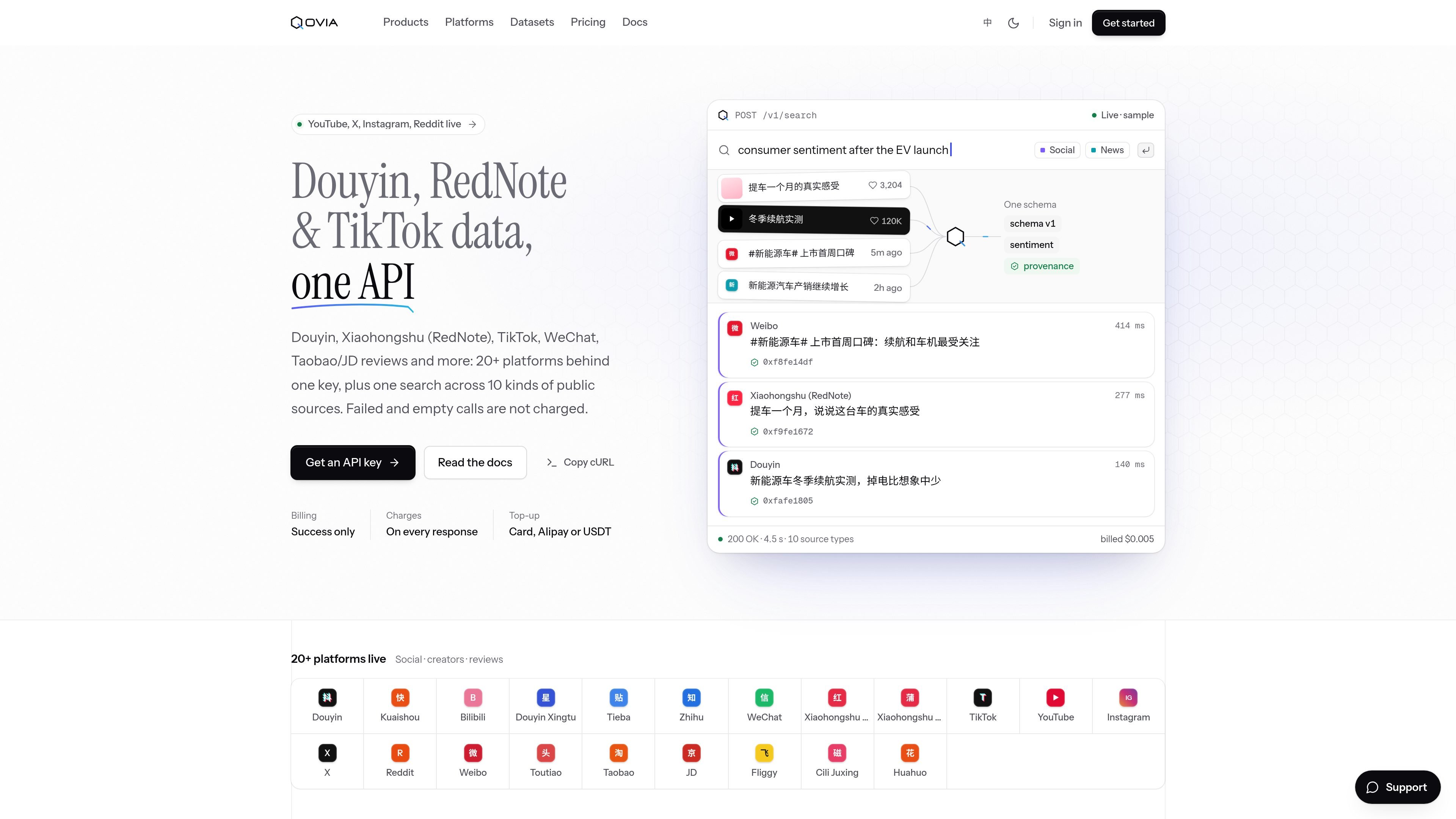
Qovia is a usage-based data API for social platforms, creator networks, e-commerce reviews, and public web sources. It provides one API key for more than 100 endpoints across 20+ platforms, including services such as Douyin, Xiaohongshu (RedNote), TikTok, Weibo, Bilibili, WeChat, Taobao/Tmall, JD.com, and Fliggy.
Its cross-platform search is designed to return comparable records from multiple public source types through one query. Depending on the source and endpoint, returned data can include text, engagement metrics, creator information, review details, sentiment, publication time, original URLs, and provenance fields. Qovia is aimed at developers and teams that need structured access to this data without maintaining a separate integration for every platform.
Use one API key and a common API service for more than 100 endpoints across 20+ platforms, with platform and endpoint availability documented in the platform directory.
Query multiple public source types through one search workflow, with filters for date, platform, content type, and sentiment. Search results use a common field structure and include sentiment, publication time, and an original link.
Retrieve social posts, videos, comments, creators, engagement data, reviews, ratings, photos, seller replies, and related records from supported services. The exact data types depend on the endpoint.
Responses can include provenance information such as a source record, capture time, live-or-cache indicator, and checksum hash, helping applications trace returned records back to their source.
Use REST requests from different programming environments or connect through MCP for AI agents and MCP clients such as Claude and Cursor.
Create scoped API keys, inspect account balance and limits, and see request IDs and billing details in responses and the console. Successful non-empty calls are billed; failed and empty calls are not charged.
Search posts, videos, comments, and public discussions across supported Chinese and international platforms using common fields, then filter results by date, source, content type, or sentiment for topic monitoring.
Collect review ratings, photos, follow-ups, seller replies, and related product feedback from supported marketplaces and commerce platforms for product or customer-experience analysis.
Use creator profiles, audience and reach information, rate cards, video metrics, and related endpoint data to support creator discovery and campaign research where those fields are available.
Connect an application, internal workflow, or AI agent to Qovia through REST or MCP instead of implementing separate platform-specific data connections.
Request quoted custom collection when standard endpoints are not sufficient for a scoped need involving near-complete Douyin, Weibo, or Xiaohongshu data by keyword, brand, or industry.
Create an API key in the Qovia console, save it when it is shown, and send it with requests as a Bearer token in the Authorization header. You can then check the account endpoint before making a data call.
Qovia provides a REST API under https://api.qovia.ai. The documentation also describes Python, JavaScript, Java, cURL, HTTP, and MCP usage, although endpoint-specific parameters and response examples should be checked in the API reference.
A new account includes 50 trial calls, counted when a call returns data. After that, usage is paid from a prepaid balance. The pricing pages state that successful non-empty requests are billed, while failures and empty results are not charged.
The platform directory lists live social, creator, e-commerce, and web coverage, including Douyin, Xiaohongshu (RedNote), TikTok, Weibo, Bilibili, WeChat, Zhihu, Instagram, YouTube, X, Reddit, Taobao/Tmall, JD.com, Fliggy, and others. Coverage status and endpoint availability vary by platform.
Qovia is intended for structured access to social, creator, review, and cross-platform public-source data. The site also offers quoted custom data collection for near-complete Douyin, Weibo, and Xiaohongshu data scoped by keyword, brand, or industry.

Mindcase is a web data API and console for extracting structured data from websites and major online platforms. It helps users retrieve clean rows of data through prompt or API access, with prepaid per-record billing.

ByteAsk is a terminal-first AI coding agent for C and C++ that edits repositories and verifies changes with the real compiler, debugger, sanitizers, and tests before showing a diff. It offers a free tier plus paid plans, with editor connectors and zero-retention handling described in the source.

Epherem is a static security scanner for web apps built with AI coding tools such as Lovable, Bolt, v0, Replit, Cursor, and Claude Code. It checks source files and dependencies for common security mistakes, then provides categorized findings and suggested fixes without running the app.

CreateOS Sandbox is an isolated compute environment for running code and agent workloads inside Firecracker micro-VMs. It is designed for workflows that need machine-level isolation, private networking between sandboxes, and programmatic control through SDK, CLI, or MCP.

GitBot is a local browser-based workspace for creating reusable coding bots powered by Claude Code, Codex, or OpenCode. It helps developers run those agents across repository folders with persistent threads and configurable permissions.

hob is an independent workspace for coding agents that keeps agent sessions, terminals, history, and follow-up work organized around the tools and providers you already use. It is aimed at developers who want local control over routing, history, and workspace structure rather than a bundled model stack.