
Flexible screen capture
Capture a display, window, or selected area, with camera, microphone, and system audio recorded as separate tracks. An optional camera bubble can be repositioned or resized after recording.

Reelbird is a free, open-source screen recorder for Macs running macOS 15 or later. It records screen, camera, microphone, and system audio, then lets users share from their own storage and polish the same recording with zoom, cursor, audio, and captions.
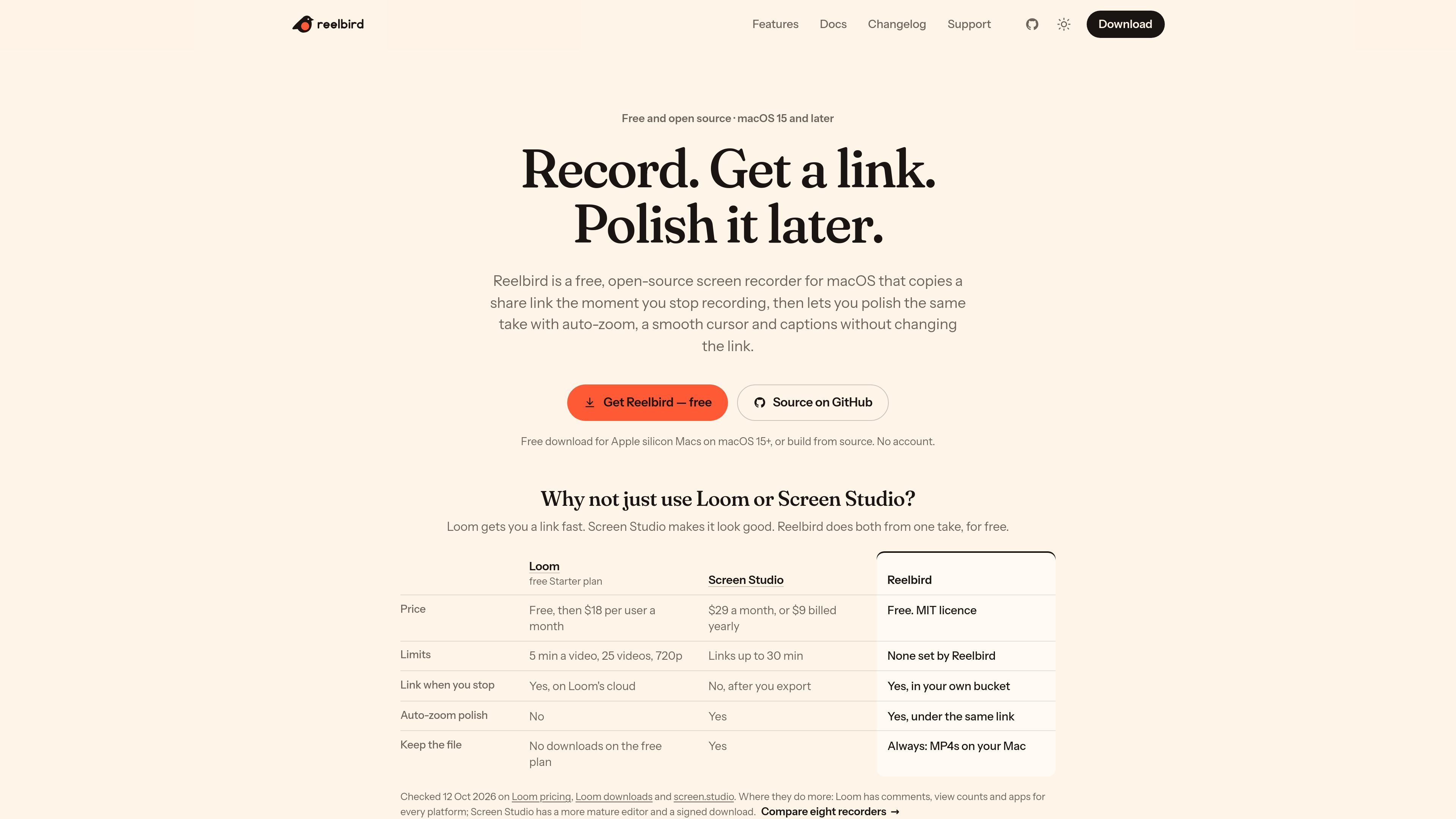
Reelbird is a free, open-source screen recorder for macOS 15 and later. It captures a display, window, or selected area along with camera, microphone, and system audio, then keeps those sources as separate tracks for later editing. The app is available for Apple silicon Macs as a download or from source, and it does not require a Reelbird account.
Its sharing workflow is designed around recording first and polishing later. When Share while recording is enabled, Reelbird uploads a stream to a storage bucket you configure and puts the share link on your clipboard when you stop. You can later add auto-zoom, a smoother cursor, framing, audio processing, or captions and update the same URL. Recordings and projects remain available locally as MP4-based files and .reelbird project folders.
Capture a display, window, or selected area, with camera, microphone, and system audio recorded as separate tracks. An optional camera bubble can be repositioned or resized after recording.
Reelbird copies a browser share link to the clipboard when recording stops. With sharing enabled, it uploads to a bucket you control, and Update link replaces the video without changing the URL.
Auto-zoom is planned from clicks and typing, while the cursor is redrawn from the event log so it moves smoothly. Zooms remain editable, and the cursor can be resized or hidden after recording.
The app can normalize voice audio to −16 LUFS, apply on-device voice enhancement, duck system audio while you speak, remove long silences, and cap peaks at −1.5 dBFS. Captions are generated on the Mac and can be burned in or offered as a viewer-selectable track.
Takes are written to disk in two-second segments from the first frame, allowing Reelbird to recover a recording after a crash with at most two seconds missing. The recording bar warns about issues such as a silent microphone, stalled capture, audio drift, a filling disk, or delayed uploads.
Use the app, command-line tool, or MCP interface to list screens, record demos, edit takes, export, and share with JSON output. Keyboard shortcuts include ⌥⇧R to start recording and ⌘E to export.
Capture a bug, configuration change, or short walkthrough from any display, window, or selected area. The CLI and MCP interface can record a timed demo and return a share link for handoff.
Record a product explanation once, then refine the same take with zooms, cursor movement, framing, audio cleanup, and captions before sending the existing link to a client or colleague.
Keep screen, camera, microphone, and system audio separate when recording training or presentation material. Reposition the camera bubble and choose a landscape, square, vertical, or 4:3 export afterward.
Use local recordings and on-device speech processing when you want the source project, captions, and transcripts to stay on the Mac. Enable sharing only when a browser link is needed.
Reelbird is a free, MIT-licensed macOS application. The source states that it has no paid tier, watermark, or export limit. Sharing requires storage that you configure, such as Cloudflare R2 or another S3-compatible service, and that provider may charge for storage or requests.
No. Reelbird supports macOS 15 and later and is built around Apple frameworks including ScreenCaptureKit and Metal. The site says Windows and Linux are not supported and are not planned.
For sharing, enable Share while recording and connect Reelbird to a bucket you control. The documented setup uses a bucket, a scoped API token, and a public URL. Reelbird uploads a browser viewer and video files to that bucket, then copies the share link when recording stops. The link remains the same when you later choose Update link.
No Reelbird account is required. Recordings, edits, captions, and transcripts remain on the Mac unless you enable sharing; shared files go to the storage bucket configured by you. The sharing credentials are stored in the macOS Keychain.
Reelbird records the screen, camera, microphone, and system audio as separate tracks. It can export MP4, HEVC, ProRes, or GIF with hardware encoding, in landscape, square, vertical, or 4:3 formats. Projects are also kept as .reelbird folders containing standard MP4 files, JSON, and an event log.

Tavus is an AI video platform for building real-time, face-to-face agents, digital twins, and AI companions. It combines APIs, custom replicas, and multilingual conversational workflows for developers and teams.

HiringPartner.ai is an autonomous AI recruiting platform for sourcing, screening, and interviewing candidates 24/7. It supports ATS-connected workflows, bulk resume uploads, and reviewable interview outputs for hiring teams.

CAKIE is a Mac app for recording your screen and voice for an AI agent. It adds a transcript and screenshot highlights, then lets you copy a prompt and paste or attach the context in another AI app.

Zella is a screen recorder and on-device AI video editor for Mac and iPhone. It helps creators record screens or cameras, automatically clean up footage, add captions, reframe clips, and export videos without uploading the core project to the cloud.

Bezel es una app para macOS que duplica y graba dispositivos Apple en Mac con AirPlay o USB, ideal para demos, presentaciones y grabaciones.

Capso is a native macOS screenshot and screen recording app for capturing, annotating, recording, and extracting text from screen content. It is free forever, open source, and positioned as an alternative to CleanShot X.