
Native 30-second video generation
Generate a full video in a single pass rather than stitching short clips together. The homepage describes native 30-second output with 4K support and continuous storytelling.

Seedance 2.5 is an AI video generator that turns prompts and multimodal reference assets into native 30-second videos. It is built for creators and teams that want structured control over generation, output settings, and local edits without stitching clips manually.
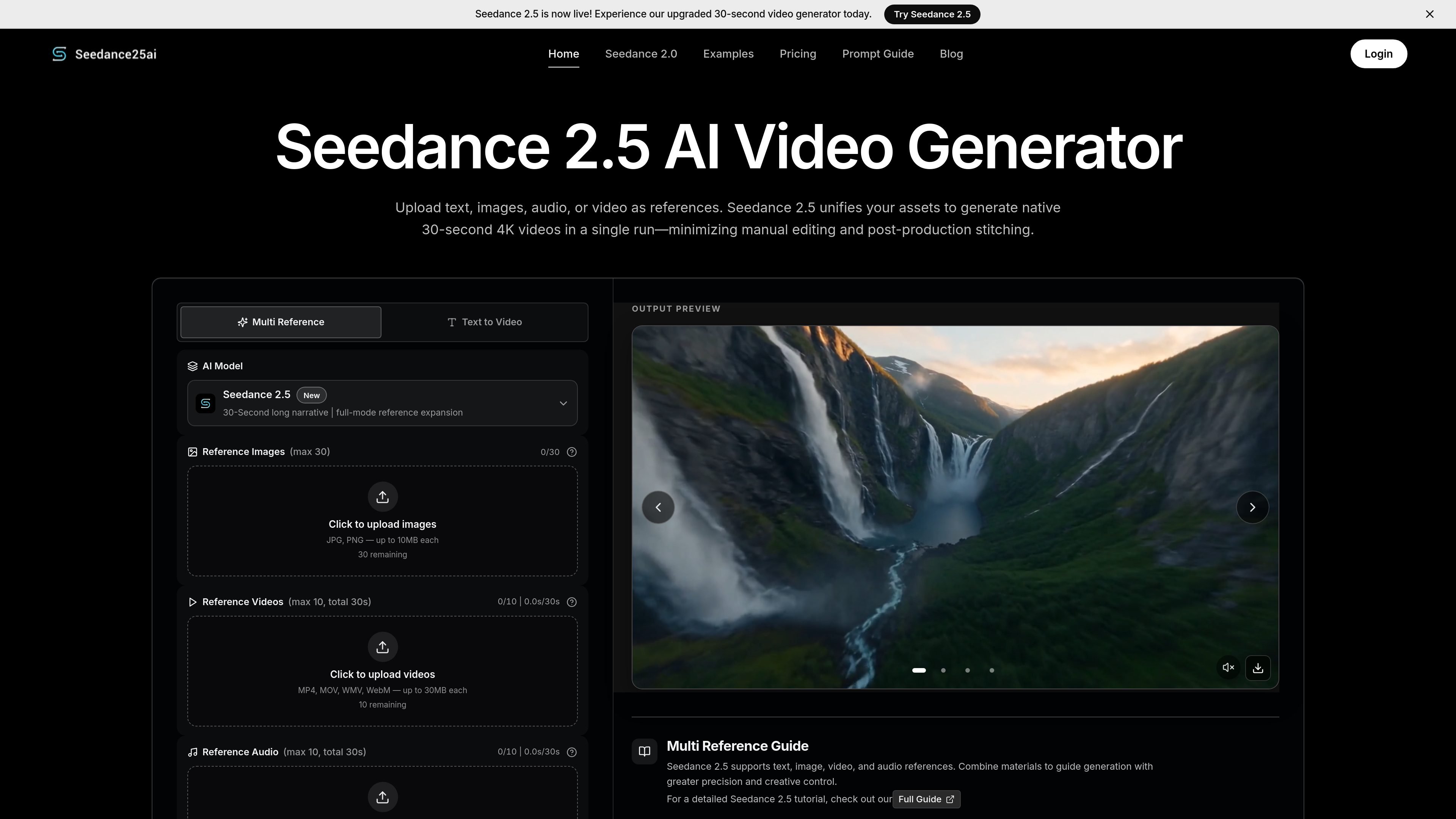
Seedance 2.5 is an AI video generator focused on creating a single native clip from text prompts and reference assets. The site positions it as ByteDance’s next-generation video model and presents it as an upgrade over Seedance 2.0 for longer output, multimodal inputs, and editing control.
The product is built for users who want a more structured video creation workflow. You can upload images, video, and audio references, set output options such as resolution and aspect ratio, and generate clips up to 30 seconds long with a workflow that aims to reduce manual stitching and post-production work.
Generate a full video in a single pass rather than stitching short clips together. The homepage describes native 30-second output with 4K support and continuous storytelling.
Combine text, images, video, and audio in one project. The site says Seedance 2.5 supports up to 50 total reference assets to keep the generation aligned with your brief.
Insert uploaded files directly into your prompt using @ references. This makes it easier to point the model at a specific image, clip, or audio file without rewriting the prompt.
Adjust specific parts of a generated clip, such as products, characters, backgrounds, or green screens, without regenerating the entire video. The site presents this as local video editing.
Set output options such as resolution, duration, aspect ratio, and whether to return the last frame. The interface shows preset options including 480p, 720p, 1080p, and 4K.
Write prompts in multiple languages. The homepage says the model supports complex prompt directions natively in more than 10 languages, including Spanish, Arabic, Japanese, and English.
Create short social clips for TikTok, Instagram Reels, or YouTube Shorts when you want a consistent look across a series and want to guide the model with reference media rather than only text.
Build product ads, campaign hooks, and branded promo videos from reference images or product shots. The site specifically frames the tool as useful for marketing teams that want to test multiple creative variations.
Turn product features, interface flows, or physical details into motion concepts and demos before a full shoot. This is useful for ecommerce brands that need a visual draft of how a product might appear on screen.
Produce structured clips for onboarding, product education, training, or previsualization when a team needs a clear scene plan and consistent visuals across the whole video.
Explore prompts and examples from the site’s gallery, then copy or adapt a sample prompt to speed up early iteration when you are still shaping the scene, style, or camera direction.
Yes. The pricing page says new users can receive free starter credits to test Seedance 2.5 before buying a paid credit pack.
The site says credits are added to the account used during checkout and that paid credit packs do not expire. It also notes that purchases are processed through Stripe.
You can upload text prompts plus reference images, video, and audio, then generate a clip and refine it with local editing if needed. The homepage says the tool supports combined multimodal inputs and native 30-second output.
The homepage states that the generator can accept up to 50 total reference assets across images, videos, and audio, while the pricing page says plan details vary by pack. The site also notes output up to 4K and watermarked-free MP4 downloads on paid packs.
The site says paid packs include commercial usage rights for successfully generated videos, subject to the site's terms and any third-party rights in uploaded or referenced materials.

ngram is an AI video generator and editor for teams and individual creators. It turns prompts, uploaded files, or screen recordings into editable videos for demos, training, onboarding, sales enablement, explainers, and launches.

艺映AI is a free AI video creation tool for generating video from text, images, or existing footage. It is positioned for short-form social content, promotional clips, and stylized AI video projects.

Coursebox AI Training Video Generator creates training videos from scripts, slides, or avatar-based setups. It is aimed at course authors and teams that want to produce training content without filming equipment or manual editing.

Vizard Agent is a web-based AI video creation tool that can generate finished videos from footage or from a prompt with no source material. It offers templates and a blank-project workflow for tasks like ads, explainers, and other video formats.

VIDEOAI.ME is an AI video generator for making spokesperson-style videos, ads, explainers, and social content from a script. It is aimed at founders, marketers, agencies, and creators who want to produce videos without filming.

Official HeyGen API documentation for building AI avatar videos, translations, lipsync, and interactive video-agent sessions. It supports direct API use plus MCP and CLI-style workflows for developers and AI agents.