
Text-to-video generation
Generate Seedance clips from written direction, with examples covering cinematic scenes, animation, dialogue, product shots, and portrait stories.

SeedanceAI.dev is an independent browser-based AI video workspace for creating Seedance clips from text prompts, images, and supported visual references. It offers model and shot controls, prompt guidance, and an upfront credit estimate for creators prototyping cinematic, product, animated, or narrative video.
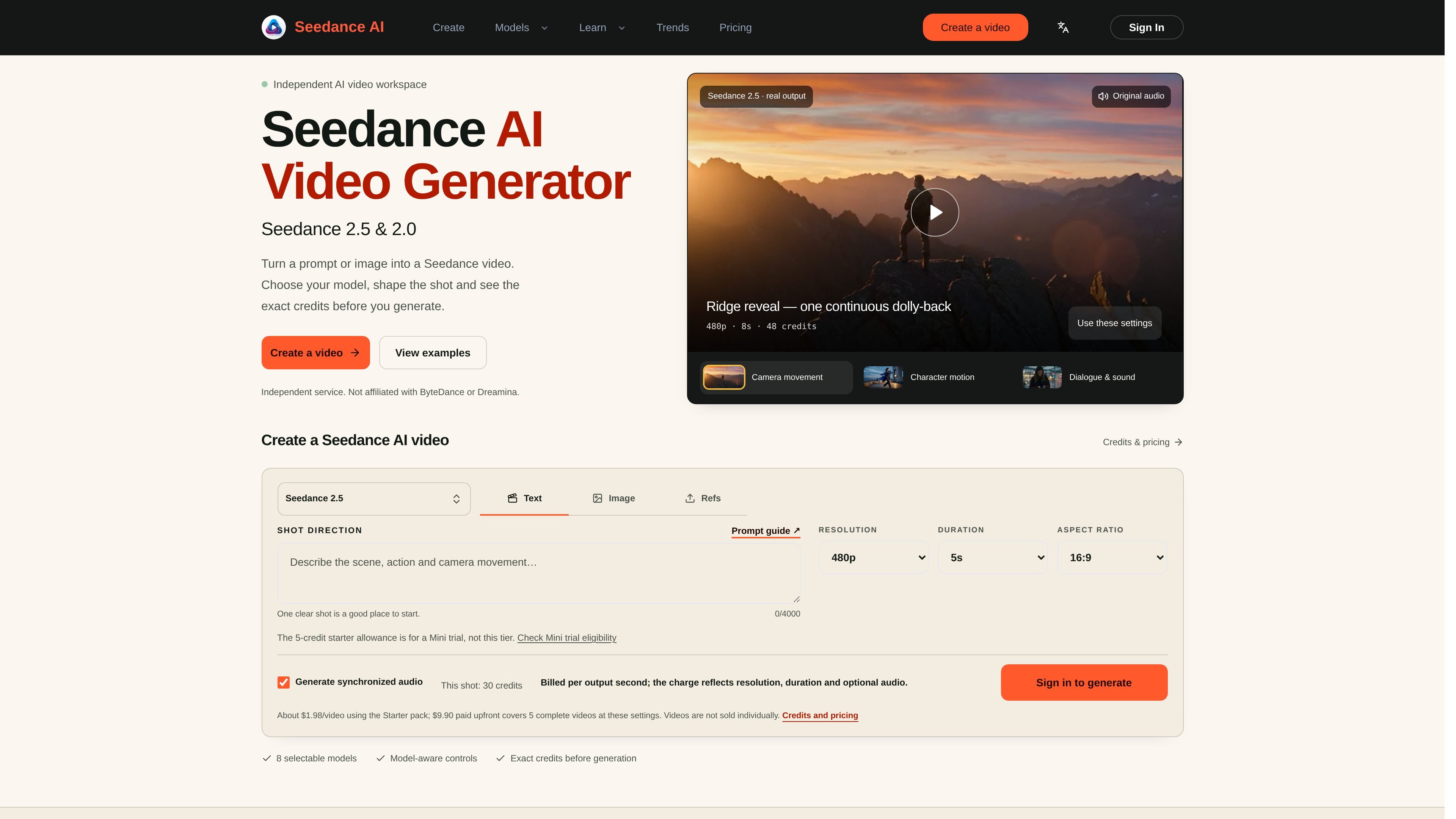
SeedanceAI.dev is an independent browser-based workspace for generating short AI videos with Seedance models. It accepts text prompts, images, and supported visual references, then lets users select a model and shape the shot with controls such as resolution, duration, aspect ratio, and optional synchronized audio.
The workspace is designed around review before generation: users can inspect the prompt, settings, and calculated credit charge before submitting. Its examples and prompt guide focus on directed shots, including camera movement, timecoded actions, dialogue, ambience, product motion, animation, and image-to-video transitions.
Generate Seedance clips from written direction, with examples covering cinematic scenes, animation, dialogue, product shots, and portrait stories.
Use a starting image for image-to-video work, including examples where a subject's clothing, setting, or composition is carried into motion.
Add visual references through the site's reference workflow when the shot requires guidance beyond a text prompt. The source describes this as a supported workflow without specifying broader file or format compatibility.
Choose among Seedance 2.5 and three Seedance 2.0 tiers, then set available resolution, duration, aspect ratio, and audio options in the generator.
The interface calculates the credit charge before submission. Seedance 2.5 rates vary by output resolution and duration, and optional generated audio affects the charge shown for a shot.
Use prompt templates, copyable examples, original prompts, and a six-layer writing formula to plan camera movement, actions, scene details, and audio direction.
Write a compact shot brief with subject, movement, setting, camera, look, and audio, then test a five- to ten-second clip before refining or extending it.
Start with a product image or text description and direct a controlled movement such as a macro push-in, steam motion, or a timecoded preparation sequence.
Use a starting image to preserve a character's outfit or scene while directing a turn, gesture, environmental movement, or other short transformation.
Plan dialogue, ambience, and visible expression changes in the same prompt for short scenes such as a rainy bus-stop exchange or a two-person reunion.
Compare models, durations, resolutions, and audio choices in the calculator before budgeting a batch of short clips or deciding whether a one-time credit pack is sufficient.
SeedanceAI.dev provides a browser-based workspace for creating Seedance videos from text prompts, images, and supported visual references. You choose a model, enter direction, review settings and the calculated credit charge, then submit the generation.
The workspace lists Seedance 2.5, Seedance 2.0 Standard, Seedance 2.0 Fast, and Seedance 2.0 Mini. Available controls shown in the source include resolution, duration, aspect ratio, and optional synchronized audio; exact compatibility can depend on the selected model and settings.
Seedance 2.5 is billed by output second. The listed rates are 6 credits per second at 480p, 12 at 720p, and 30 at 1080p. A five-second clip therefore uses 30, 60, or 150 credits respectively, before any applicable setting changes.
The site shows the exact credit charge before generation. Confirmed provider failures automatically return credits, while rerunning a successful clip uses credits again. Results can differ between runs, so the site recommends testing shorter clips before extending a shot.
The prompt guide recommends six layers: subject, action, setting, camera, look, and audio. For longer clips, use time ranges and assign one visible beat to each interval; for an initial test, the guide recommends five- to ten-second shots.

Omni AI is a browser-based image and video generator for creating visuals from text prompts or reference photos. It supports text-to-image, image-to-image, text-to-video, and image-to-video workflows, with free sign-up credits and downloadable results.

艺映AI is a free AI video creation tool for generating video from text, images, or existing footage. It is positioned for short-form social content, promotional clips, and stylized AI video projects.

VIDEOAI.ME is an AI video generator for making spokesperson-style videos, ads, explainers, and social content from a script. It is aimed at founders, marketers, agencies, and creators who want to produce videos without filming.

ngram is an AI video generator and editor for teams and individual creators. It turns prompts, uploaded files, or screen recordings into editable videos for demos, training, onboarding, sales enablement, explainers, and launches.

讯飞绘镜 (iFlytek Huijing) es una plataforma de creación de videos impulsada por IA que transforma ideas creativas en guiones, imágenes de storyboard y videos dinámicos de manera rápida y eficiente.

Topview AI is a web-based AI video creation platform for social ads, ecommerce creatives, avatar videos, and short drama workflows. It combines channel-based templates, prompt-driven generation, reference uploads, and storyboard-based production tools.