
Structured field extraction
Define fields once and upload documents into a consistent row-based schema. The product returns structured values that can be queried later as sheet rows or exported to CSV.
space ocr turns documents into structured, searchable data with verification attached to each extracted value. It can be used in the browser, through a REST API, or as a Claude Code plugin/skill.
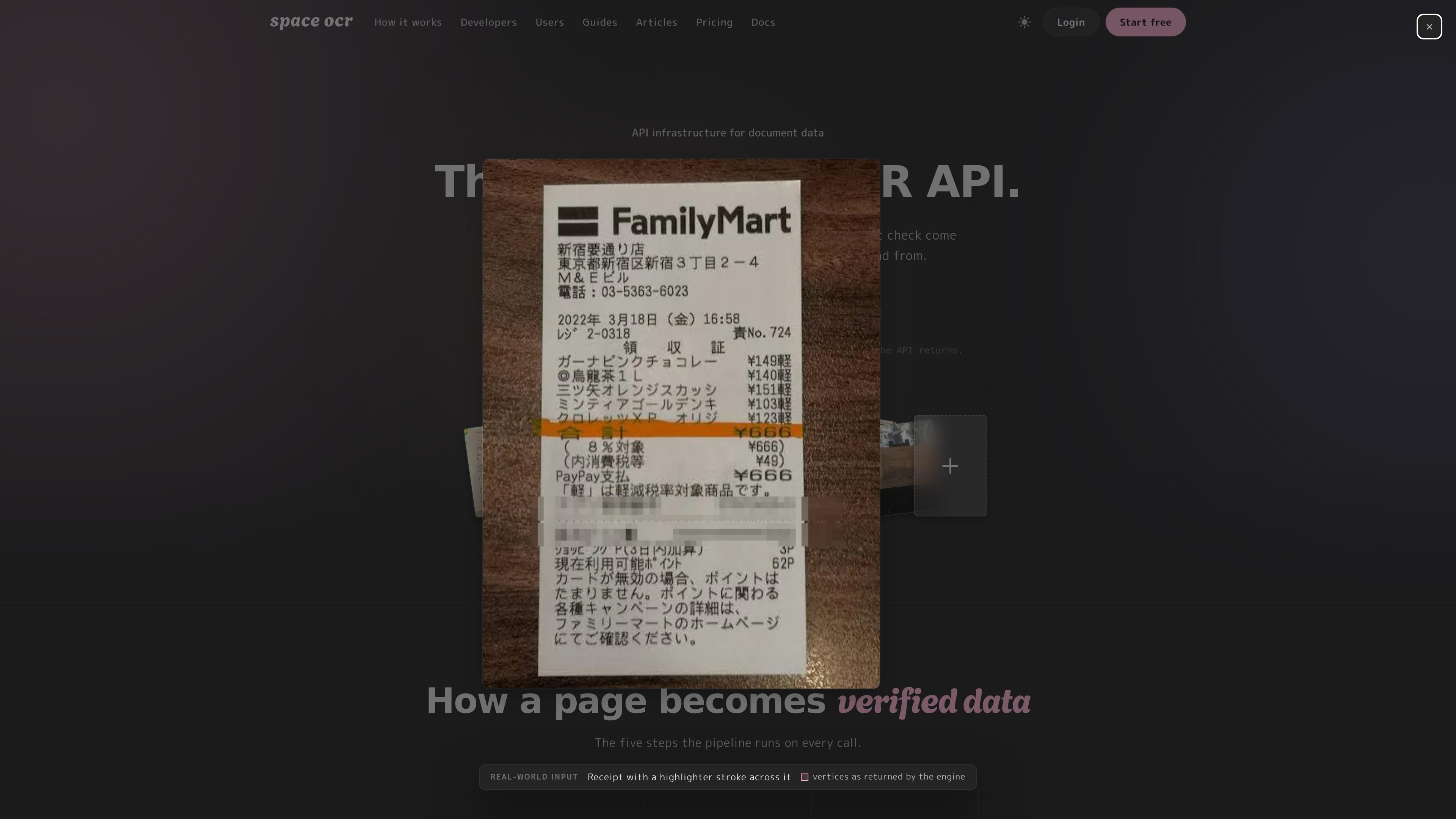
space ocr is a document OCR product built to turn paper documents into searchable, structured data. It can read receipts, invoices, scans, PDFs, handwritten notes, faxed pages, and free-form layouts, then return results as fields, Markdown, or plain text with per-value or per-block evidence from the source image.
The product is presented as an app, an API, and a Claude Code plugin/skill. In the browser, users can upload documents into sheets, inspect each extracted cell against the original image, edit values inline, and query the resulting rows like a database with filters, sorting, projections, and pagination. Developers can automate the same workflow through API endpoints, batch jobs, and webhooks.
Define fields once and upload documents into a consistent row-based schema. The product returns structured values that can be queried later as sheet rows or exported to CSV.
Every extracted value carries the vertices it was read from, along with verification flags such as text_verified and needs_review. Users can jump from a cell back to the source pixels on the original image.
Query stacked rows on the server with filters such as where, sort, select, limit, and offset. The page also mentions a boxes flag to omit bounding-box payloads when they are not needed.
Use the browser app, the REST API, or a Claude Code plugin/skill with the same extraction engine. The site also lists an MCP endpoint for agent workflows.
Upload documents in batches, organize results in folders and Spaces, and search across folder names, memo bodies, and extracted cell values. CSV export is available with array-row expansion.
The service supports async jobs, polling, HMAC-signed webhooks, OpenAPI 3.1, idempotency keys, per-key rate limiting, auto-rotation, and multi-script normalization for Japanese, Korean, Chinese, and English.
Upload invoices or receipts, define the fields you want once, and get each document back as a row that can be sorted, filtered, and exported for accounting or review work.
Use the verification flags and source-image links to inspect questionable cells, correct them inline, and keep a record of where each value came from.
Process scans, handwritten notes, faxed pages, or mixed-layout documents into Markdown or plain text when the goal is searchable content rather than just field capture.
Connect the API, batch upload, and webhook flow into an application or agent workflow that needs structured document ingestion without setting up a separate database.
Run document extraction inside Claude Code or an MCP-compatible client when you want an assistant to file, query, and retrieve document data in place.
Space OCR can read receipts, invoices, scans, PDFs, faxed pages, handwritten notes, and other free-form documents. The homepage also shows line-item and table extraction as part of the structured-field workflow.
Regular OCR usually returns text. Space OCR is designed to turn documents into structured data with per-value bounding boxes, so each extracted value can be verified against the original image and queried later as rows in a sheet.
No. The page says coordinates come from the OCR pass, not from the language model. Extracted values are cross-checked, and uncertain results can be flagged with text_verified and needs_review.
When the cross-check does not agree, the value is flagged for review rather than quietly accepted. The page also says uncertain values return needs_review, and the original image stays available for inspection and inline correction.
Yes. The product states that it can handle line items and tables, and that structured fields can be unfolded into rows that stack into a sheet you can query and export.

Invited turns dates found in bills, cheques, invitations, renewals and other documents into reminders. It supports camera images, screenshots, PDFs and shared files on iPhone and Android, with review before saving and no account required.

nolainocr is an AI OCR tool that extracts structured data from PDF invoices, receipts, forms, contracts, and bank statements. It helps teams move document data into Excel, Google Sheets, JSON, or CSV without manual entry.

Letra is a menu bar OCR utility for macOS Sonoma 14 or later that copies text from screen regions, videos, PDFs, screenshots, and screen shares to the clipboard. It also supports on-device recognition, QR and barcode decoding, searchable capture history, and copied image or file input.
司马阅是一款面向企业的AI文档智能体平台,帮助团队把分散在文档中的知识转成可用于问答、检索、写作和审查的结构化能力。它适合对准确性和数据安全要求较高、且有大量文档工作流程的企业。

Capso is a native macOS screenshot and screen recording app for capturing, annotating, recording, and extracting text from screen content. It is free forever, open source, and positioned as an alternative to CleanShot X.

KlutterAI is an AI-powered expense tracker that helps people capture receipts, categorize spending, and monitor budgets from iOS or Android. The product also surfaces recurring charges, spending alerts, and exportable reports.