
Custom battery alerts
Set battery alerts at the percentages you care about instead of being limited to the default macOS 10% and 5% warnings. The site shows support for multiple alerts and custom sounds for battery state changes.

Juicy is a macOS battery utility that adds custom battery alerts, battery health tracking, menu bar status, and app energy insights. It helps Mac users monitor charge levels and battery condition without opening System Settings.
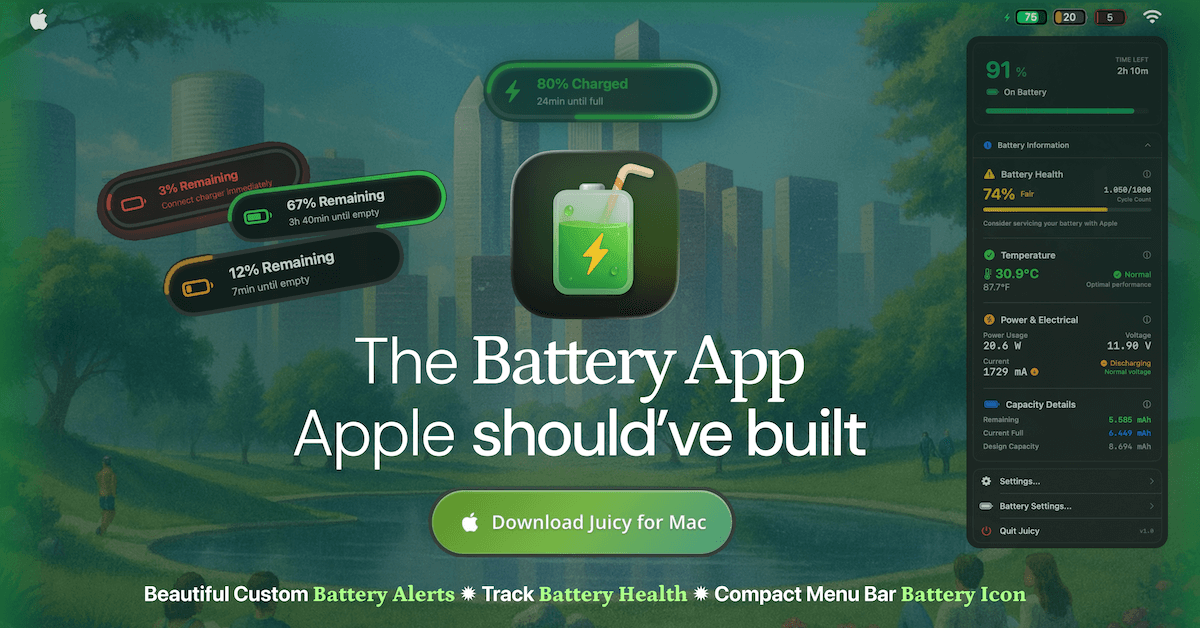
Juicy is a macOS battery utility for people who want more control and more detail than Apple’s built-in battery tools provide. It combines custom battery alerts, battery health monitoring, menu bar status, lifecycle notifications, charge limiting, and app energy insights in one Mac app.
The product’s main job is to make battery status visible without opening System Settings. From the menu bar, Juicy shows battery health data such as cycle count and temperature, lets you set alerts at any percentage, and can track other Apple devices’ batteries when they are connected. It also includes practical protections like auto-dismissing default macOS pop-ups and alerting you when charging should stop to help preserve battery life.
Set battery alerts at the percentages you care about instead of being limited to the default macOS 10% and 5% warnings. The site shows support for multiple alerts and custom sounds for battery state changes.
View live battery health, cycle count, temperature, voltage, amperage, wattage, and raw capacity from the menu bar. Juicy also surfaces Apple service recommendations when the battery crosses the service threshold or shows other faults.
Swap the default wide battery indicator for a narrower iPhone-style icon with the percentage inside. The icon is themeable, color-coded, and has an optional minimal monochrome style.
Use lifecycle alerts to stay informed when the Mac is charging, unplugged, or reaches an 80% charge threshold. The site also mentions auto-dismiss for default macOS battery pop-ups.
Cap charging in the healthy 50% to 80% range, with options described as Sailing Mode, Automatic Discharge, and one-tap top-up to 100% when needed. The MagSafe cable indicator turns green at the limit.
See which apps are drawing power with a live snapshot plus 24-hour, 7-day, and 30-day history. The site shows sparklines and callouts for misbehaving apps.
Set low-battery warnings at the points that matter to your work, such as 20%, 10%, 5%, or even 3%, so you can save files or finish a call before shutdown.
Watch cycle count, temperature, voltage, and capacity from the menu bar to understand battery wear over time and decide when a service appointment may be needed.
Use the 80% charge alert, charge limiting tools, and lifecycle notifications to support better battery habits when you keep your Mac plugged in for long stretches.
Check app-level energy usage history to identify which apps are draining power now or over the last 24 hours, week, or month.
Track the battery status of connected devices such as AirPods, iPhone, iPad, Magic Mouse, Keyboard, and Trackpad from one list in the app.
Juicy is available for Mac and is designed around macOS menu bar use. The source also says iPhone and iPad battery health can be viewed inside Juicy when those devices are plugged in, but the app itself is presented as a Mac app.
The source says Juicy offers a free 3-day trial with full features and no credit card required. Paid access is sold as a one-time license, with a Pro License and a Lifetime License listed on the site.
Juicy can show custom alerts at any battery percentage you choose. Examples on the site include alerts at 3%, 5%, 10%, 20%, 80%, and other levels.
Yes. The site says Juicy can auto-dismiss the default macOS battery pop-ups so they do not interrupt your workflow.
The site indicates Juicy tracks battery health, cycle count, temperature, voltage, amperage, wattage, raw mAh capacity, charging state, and app energy use. It also says all battery metrics are processed locally on your Mac.

MacSpoof change ou randomise l’adresse MAC Wi‑Fi sur macOS pour reconnecter aux réseaux et limiter l’enregistrement de votre identité sur Wi‑Fi public.

NomNak est une app iPhone gratuite pour découvrir des restaurants grâce aux recommandations d’amis, avec spots enregistrés, passeport food et recherche par ville.

TyeGit, client Git natif pour développeurs, offre un contrôle rapide et précis des stages, commits, branches et remotes sur Windows, macOS et Linux.

Loomal is a payments layer for agentic commerce that lets developers add paywalls to APIs, MCP tools, or hosted files. It settles agent payments in USDC on Base and is aimed at services that want per-request payment from AI agents.

idmly converts self-contained HTML designs into editable Adobe InDesign (.idml) files. It is built for designers and teams that need browser-made or AI-generated layouts turned into InDesign without rebuilding them by hand.

Rokoko is a motion capture software and hardware ecosystem for body, finger, and face animation. Rokoko Studio processes capture data, lets creators clean and retarget it, and streams or exports it to 3D tools.