
Simple list-based tracking
Keep titles in three separate lists: Watchlist, Watching, and Watched. The app also surfaces this week’s trending shows and films so you can find something new to add.

ReelStack is an iPhone app for tracking shows and films across streaming services. It organizes titles into Watchlist, Watching, and Watched, with new-season alerts and where-to-watch information.
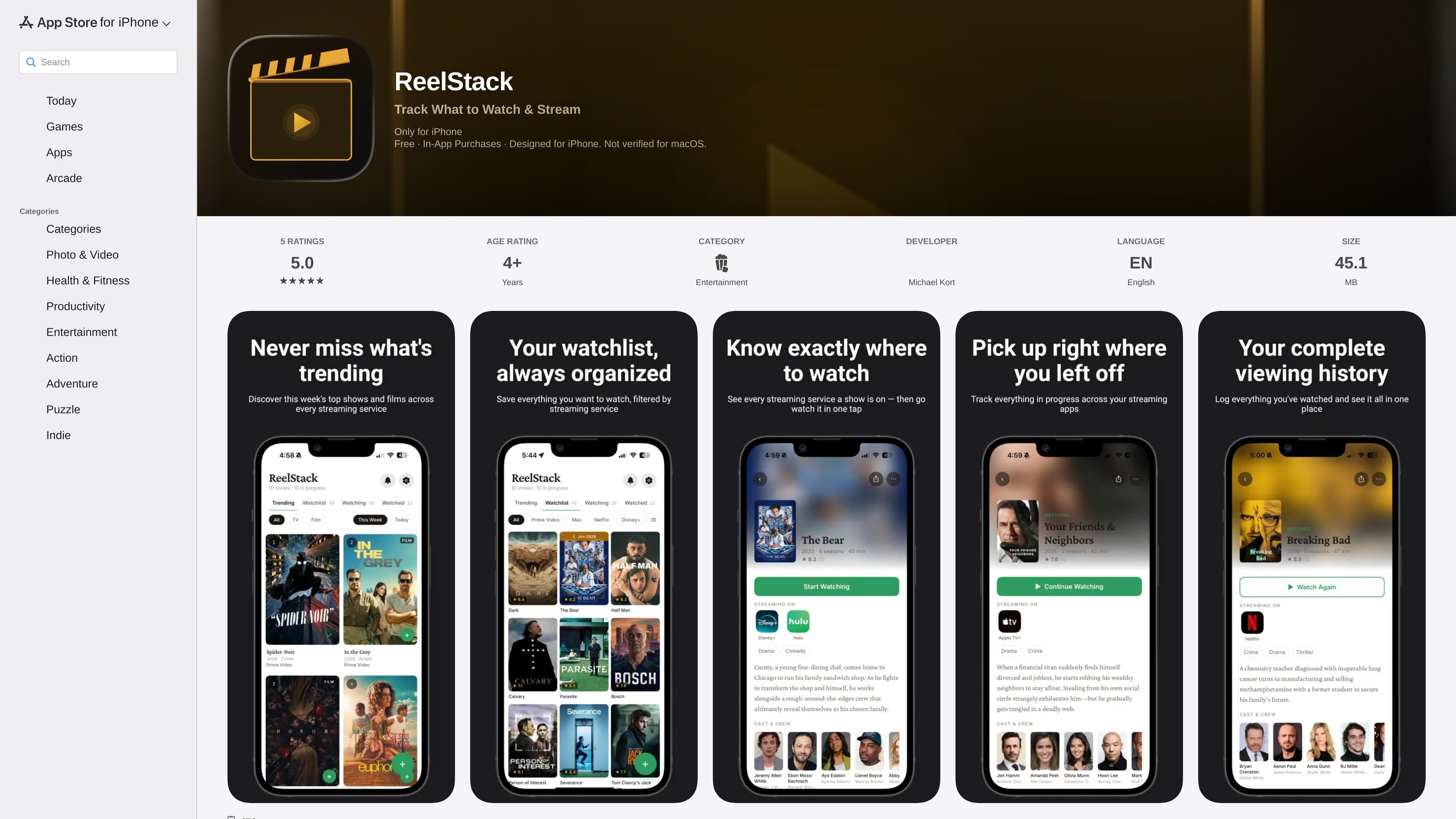
ReelStack is an iPhone app for tracking shows and films across streaming services. It organizes titles into Watchlist, Watching, and Watched, and it is designed to help users keep track of what they want to see, what they are currently watching, and what they have finished.
The app also adds new-season push alerts and a where-to-watch lookup so each title shows its streaming service or rental option. According to the App Store listing, ReelStack uses a simple setup with no login, no account, and no subscription, and it stores data on the device.
Keep titles in three separate lists: Watchlist, Watching, and Watched. The app also surfaces this week’s trending shows and films so you can find something new to add.
Receive a push notification when a tracked show gets a new season. The app says it watches your list for you so you do not have to check manually.
See which streaming service a title is available on, then open that service directly from the app. If a title is not streaming, ReelStack shows where to rent it instead.
Start fast without creating an account. The listing says there is no login, no account, and no subscription, and that your data stays on your device.
Unlock unlimited tracking with a one-time in-app purchase. The App Store listing shows ReelStack Premium at $2.99.
Use the long-press '+ Add' shortcut to send a show straight to Watching or Watched. The version notes also mention more consistent streaming-service info throughout the app.
Use ReelStack to keep a personal list of series and films you want to remember, then move titles between Watchlist, Watching, and Watched as your viewing changes.
If you follow ongoing series, the app can notify you when a new season arrives so you do not need to check release dates manually.
When you are deciding what to play next, ReelStack shows which service carries the title and whether rental is the fallback option.
For users who prefer a lightweight app, the no-login, no-account setup gives you a simple place to track viewing without creating another profile.
The listing says ReelStack is available only for iPhone on the App Store. It also shows compatibility for iPod touch, Mac with Apple M1 chip or later, and Apple Vision, but the main product label is iPhone-focused.
Yes. The App Store listing shows ReelStack Premium as an in-app purchase for $2.99, and the page says it is a one-time unlock with no subscription.
ReelStack is built around individual personal tracking. The listing says there is no login, no account, and no subscription, and that data stays on the device.
ReelStack is centered on tracking shows and films across streaming services. It also includes new season push alerts and links out to the service where a title is available or where it can be rented.
The App Store listing says the app uses TMDB for data and that the developer does not collect data from the app.
MealTime est votre compagnon de recettes personnel, conçu pour fonctionner hors ligne, vous aidant à sauvegarder, organiser, planifier des repas et générer des listes de courses intelligentes, tout en garantissant la confidentialité de vos données.

Goldfish is an AI memory app for macOS that helps you reply, write, summarize, and continue using the context already on your Mac. It stores memory locally and writes in your tone.

Biji est une plateforme polyvalente conçue pour améliorer la productivité grâce à des outils et des fonctionnalités innovants.

MacSpoof change ou randomise l’adresse MAC Wi‑Fi sur macOS pour reconnecter aux réseaux et limiter l’enregistrement de votre identité sur Wi‑Fi public.

Gemma AI is a phone call reminder app that calls you with scheduled reminders instead of push notifications. It helps people who want a more direct way to stay on schedule, with Google Calendar sync and conversational call interactions.

Redline is a budgeting tool for Claude Code that paces sessions to stay within time, token, cost, or plan-percentage limits. It uses Claude Code’s native hooks and statusline to help sessions finish with a usable result instead of stopping abruptly.